Registration profiles (coming soon)
Important
The new registration profiles view is coming soon in version Nov2. Until your Amphora uses it, the old profiles view opens.
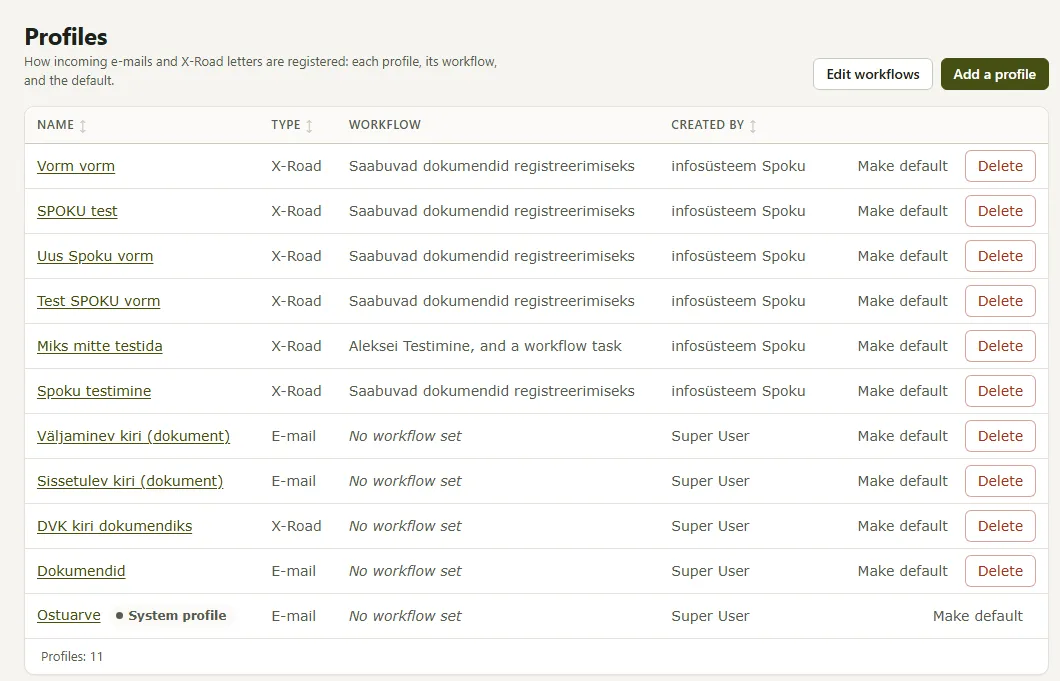
A registration profile sets how incoming e-mails and X-Road letters are registered. The new view (Admin → Profiles) shows all profiles, their workflow and the default profile. The Old view button at the top right of the view opens the earlier view; in the old view, New view returns.
Contents
1. The profile list
The columns are Name, Type (E-mail or X-Road), Workflow and Created by. The Workflow column shows the profile's automatic workflow or responsible person; if the responsible person also gets a workflow task, “and a workflow task” follows the name. Without a workflow, it says “No workflow set”. A profile may have the tags Default, System profile, passive, or the number of conditional rules.
Clicking a profile's name opens it in the profile editor. Add a profile creates a new profile. Below the list is the number of profiles (Profiles:).
2. Editing workflows
Edit workflows turns the list into an editing view where you can change the workflow of several profiles at once.
- On a profile's row, choose an automatic workflow (the first choice) or a responsible person (the second choice). Choosing one clears the other.
- If the responsible person must also get a task, tick Task.
- The checkbox Offer users from all units as responsible shows users of all units in the responsible person choice, not only those of your unit.
- Changed rows are marked, and the number of changed rows is shown (Changed rows:). Press Save.
If a row was not saved, it is marked, and Go to the first marked row takes you there. Cancel asks whether to discard the changes; the changed workflows are then not saved. The list cannot be sorted while editing.
3. Default profile and deleting
Make default on a profile's row makes that profile the default profile.
Delete deletes the profile and its rules for good; letters already registered with the profile are not changed. The default profile cannot be deleted: first make another profile the default. A system profile cannot be deleted.
4. Rights
Users with the right to the module can see the profiles. To change them, the user group policies “Registreerimise profiilid” and “E-kirjade registreerimise profiilide haldamine” and superuser rights are needed. Without them, the view says that the profiles can only be viewed.
Last modified: 20 November 2026, 11:40:25