Amphora 13.9 Version Guide
- Version 13.9.0
- E-service (SOAP service) enhancements
- "Additional files public" setting in directory settings
- When making user passive, notification checkboxes are now removed
- Added permission check to destruction history view
- Document form options optimized
- New HTML template template elements
- Sent e-mail registration from Outlook and E-mails module enhanced
- Party display in public view fixed
- New "My forwarded unfinished tasks" and "My forwarded completed tasks" reports
- System person modification restrictions added
- Spoku and E-service enhancement – adding response document relationship
- Spoku and E-service enhancement - access restriction addition conditions in registration profile
- Purchase invoice directory addition permission check was faulty
- Sales invoice fixes and changes
- Optimizations
- Other changes
- Version 13.9.1
Version 13.9.0
E-service (SOAP service) enhancements
Through E-service, it's now possible to modify already existing documents in addition to document registration. It's possible to add processes to existing documents. Additionally, it's possible to query information about already registered documents – process and delegation data and signer data.
The need for this service has primarily arisen for transferring various applications and requests (for example, from organization website, another information system, etc.) to Amphora, where these documents are then processed.
A comprehensive E-service guide is being prepared. The guide will be available in the nethelp environment under Specific guides.
** This development was supported by Amphora clients Rae Municipality Government and Järve Biopurification ** ** Thank you! **
"Additional files public" setting in directory settings
Until now, it was only possible to make main files public by default at directory level. Now default additional file publication has been added. In directory settings, there's an "Additional files public" checkbox that allows making additional files public by default in the directory.
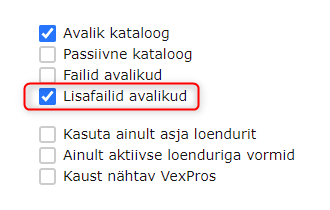 When adding or editing a document, the "Public" checkbox is automatically added. If needed, the user can manually remove this checkbox.
 If a document doesn't have public additional files and the directory is changed on this document and the changed directory has additional files public by default, then Amphora automatically makes additional files public (adds Public checkbox)
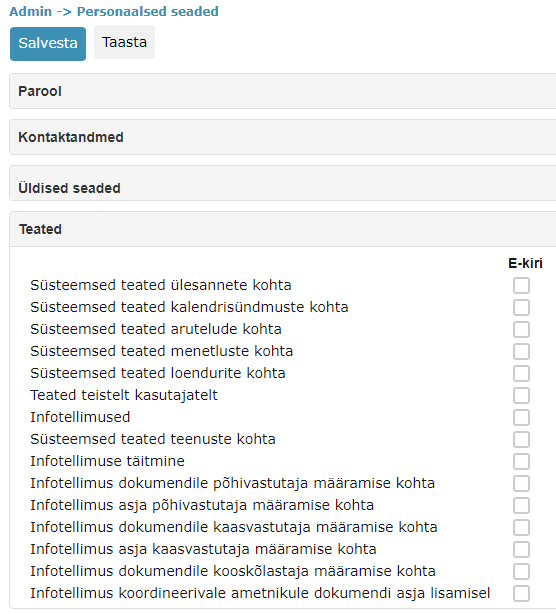
When making user passive, notification checkboxes are now removed
Usually a user is made passive when an employee has left work and from now on Amphora shouldn't send any notifications to this user. Recently, situations have occurred where Amphora has sent incorrect notifications to passive user's e-mail.
Starting from version 13.9.0, when making a user passive, Amphora removes all notification checkboxes (user Personal settings -> Notifications panel). If the user is changed back to active, the user needs to manually enable notification checkboxes.
Additionally, we removed all notification checkboxes from already existing passive users.
Notification checkboxes:
Added permission check to destruction history view
In Archive module -> Destruction view, there's a Destruction history button that allows viewing archive file destruction history (which archive files have been destroyed, by whom they were destroyed, when they were destroyed, etc.). In previous versions, this view lacked permission check, which meant that the entire destruction history was visible to all users who had the Archive module made visible.
In this version, we added permission check to the destruction history display view. When checking permissions, the destruction act directory is considered and user permissions are checked. If the user has restricted reading, reading, reading + addition, editing, and administration permissions for the directory where the destruction act was saved, then the destruction history event is visible to this user.
Document form options optimized
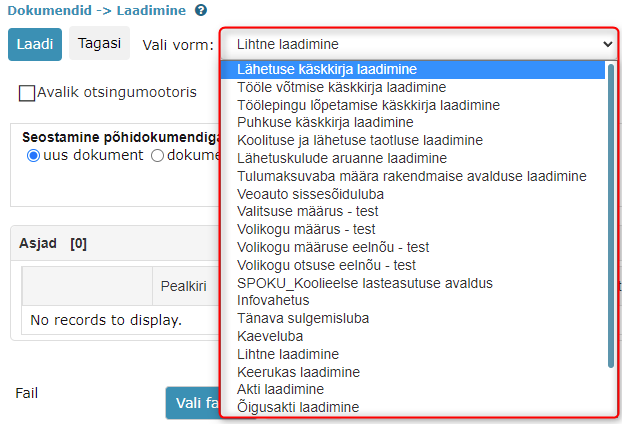
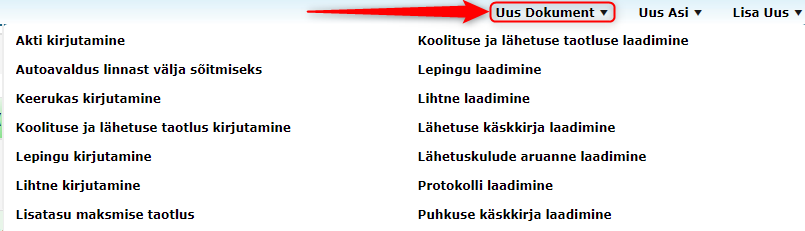
During testing, it became clear that in some environments, document form options make the Amphora environment slow. In connection with this, we enhanced database procedures responsible for displaying form options. The optimization affects both document editing view (1) form option display and quick menu (2) form option display.
1.
 2.
2.
New HTML template template elements
Added three new HTML template template elements:
::MODIFYDATE:: - last version modification date. ::MODIFYDATETIME:: - last version modification date with time. ::CREATEDATETIME:: - first version date with time.
Additionally, the existing template element ::CREATEDATE:: was changed. Previously, Amphora replaced this template element with the document's last version date, but now it's replaced with the document's first version date.
Sent e-mail registration from Outlook and E-mails module enhanced
Sent e-mail registration was enhanced in this version. If an e-mail is sent to multiple recipients, then now Amphora carries all recipient data to the Deliveries panel. In previous versions, Amphora selected the first recipient and added only one delivery.
Party display in public view fixed
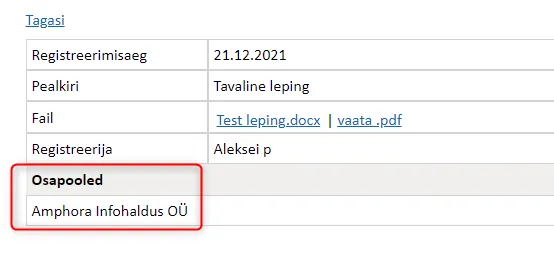
As document party, it's possible to select organizations that are added in Amphora environment Organizations module. Problems were caused by organizations that lacked registry code. In public view, such organizations were displayed in list view in parties column and also in parties panel as private persons ("private person"). In version 13.9.0, this bug has been fixed. From now on, organization name is displayed instead of private person.
New "My forwarded unfinished tasks" and "My forwarded completed tasks" reports
My forwarded unfinished tasks – report outputs tasks forwarded by user that are still unfinished. Tasks are displayed separately, meaning if there are for example four tasks in process composition, then four tasks are displayed separately. In case of sequential execution process, only active tasks are displayed one by one (Waiting status tasks are not displayed because these tasks haven't been created yet). Report columns – Title, Executor, Task type, Module, Sent date and Deadline.
My forwarded completed tasks – report outputs tasks forwarded by user that are already completed. Tasks are displayed separately, meaning if there are for example four tasks in process composition and two of them are completed, then only two completed tasks are displayed. Report columns – Title, Executor, Task type, Module, Sent date and Completed date.
System person modification restrictions added
System persons, like regular persons, are located in the Persons module and these persons can be modified in the same way. Previously, all users (including regular users) who had the Persons module visible could modify system person data. This in turn created problems in some environments.
Starting from version 13.9.0, regular users can no longer modify system persons. A system person is always related to an Amphora user and the user always has a relationship with a unit. When opening a system person, Amphora checks unit permissions and if the unit permission is less than Administration, then the save buttons are not active.
Spoku and E-service enhancement – adding response document relationship
Documents received through Spoku and E-service can now be linked with the original document, meaning Amphora adds response document (follow-up document) relationship. This functionality can be useful in situations where, for example, an application received from Spoku is initially registered and later a report needs to be registered as a follow-up document.
For this, a new field InitiativeLetter was added, with which the original document GUID, Item_ID or External_ID to which the response document should be added can be transmitted to Amphora.
** This development was supported by Amphora client Viimsi Municipality Government ** ** Thank you! **
Spoku and E-service enhancement - access restriction addition conditions in registration profile
An "Actions" panel has been added to registration profile settings where it's possible to add certain conditions based on which Amphora can decide whether to add the default access restriction from directory settings to an incoming document or not.
This functionality makes sense to use primarily for applications and requests whose submitters can be either private persons or legal entities. Meaning for private persons, access restriction needs to be added to the incoming application and for legal entities, not. Since usually both private person and legal entity applications are registered to the same directory, such a possibility didn't exist in Amphora before.
"Actions" panel:
 1. XML data field from which value is searched.
2. Rule type selection dropdown. There are six options in total - Equal, Not equal, Start contains, End contains, Contains and Does not contain. By default, Equal rule type is selected.
3. Field value – exact value that Amphora compares when a new document arrives using the selected rule type.
4. Action selection. There are two options in total - Activate and Deactivate.
1. XML data field from which value is searched.
2. Rule type selection dropdown. There are six options in total - Equal, Not equal, Start contains, End contains, Contains and Does not contain. By default, Equal rule type is selected.
3. Field value – exact value that Amphora compares when a new document arrives using the selected rule type.
4. Action selection. There are two options in total - Activate and Deactivate.
If the condition is true and Activate is selected as action, then Amphora adds restriction to the incoming document. Example: "applicant" is selected as XML field, rule type is Equal and "private person" is written in field value field. If the incoming document has value "private person" in "applicant" field, then the condition is true and Activate action is triggered, which adds access restriction.
If the condition is true and Deactivate is selected as action, then Amphora doesn't add restriction to the incoming document. Example: "applicant" is selected as XML field, rule type is Equal and "organization" is written in field value field. If the incoming document has value "organization" in "applicant" field, then the condition is true and Deactivate action is triggered, which means Amphora doesn't add restriction to this document, even though the directory has default restriction.
If the condition is not true, then Amphora ignores the selected action and adds the default directory restriction.
NB!
Access restriction basis and other info is taken from directory settings. Therefore, it's important that the directory has default access restriction configured.
** This development was supported by Amphora clients Rakvere City Government and Jõgeva Municipality Government ** ** Thank you! **
Purchase invoice directory addition permission check was faulty
The problem occurred with purchase invoices that weren't added by the user themselves and directory was missing. When adding directory to such invoice and then for example adding accounting line, Amphora gave error message – Access denied and it was no longer possible to work with this invoice. Now this bug has been fixed.
Sales invoice fixes and changes
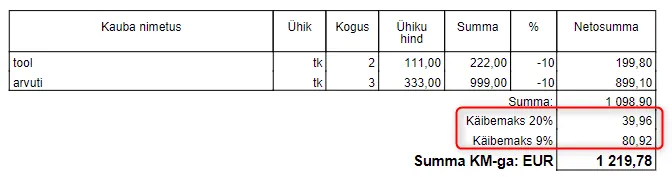
- Sales invoice PDF file now adds each line's VAT % separately if it differs.
Example:
Sales invoice has two lines and lines have different VAT %.
 * Sales invoice line "Discount and surcharge" amount calculation has been fixed. If the sales invoice had multiple invoice lines and at least two lines had "Discount and surcharge" amount entered, then the upper line amount was calculated incorrectly after saving the sales invoice.
Optimizations
- Rarely, users could get Deadlock error messages when using Amphora. These error messages were due to Amphora not being able to add some activity logs to the database. In connection with this, we enhanced log addition database procedures.
- Deadlock error messages could occur when opening documents with very many deliveries (150+). Necessary database changes have been made in this version.
- With regular monitoring, we found that relationship queries could make the Amphora environment slow. For example, some document relationship queries (when opening documents) took about ~5sec. After database changes, slow queries became much faster (5 sec -> ~0.6 sec).
Other changes
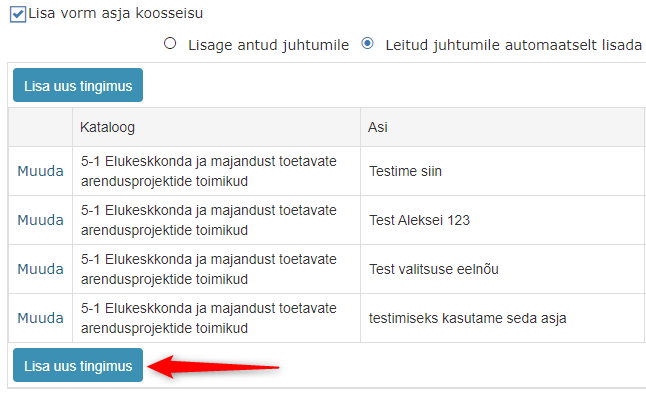
- In registration profile settings, the case composition condition addition table has been enhanced. Add new condition button is now also added to the end of the table. If many conditions are added in the registration profile, it's easier and faster to use the bottom button to add a new condition.
 * Updated Telerik components 2021.2.616 -> 2021.3.1111
Version 13.9.1
File storage change in Amphora servers
There have been situations in Amphora environments where the server hard drive became full and thanks to this, work in Amphora environment was disrupted (it wasn't possible to register new documents, modify existing documents, etc.). To ensure that such situations don't recur in the future, additional configuration possibility for Amphora temporary files folder and deleted files folders was added. This allows more flexible space management on different disk arrays of servers.
This is a technical change. It doesn't show to Amphora users in any way and doesn't affect functionality.
Last modified: 09 October 2026, 10:25:03