Amphora 14.8 Version Guide
- Version 14.8.0
- Signature container data in Routing panel
- Archive module changes
- Institution settings logging added
- Navigation fix in reading (viewing) view
- Counters copying as new functionality enhanced
- Personal settings saving enhanced
- Mobile-ID signing enhanced
- Main file conversion fix
- Deconstructed signature container display enhanced
- Documents module search enhancement – new search form field "Original creation (create_time_orig)" added
- Access restriction disappears on response document – fix
- Front page opening optimized (Routing panel tasks)
- New document internal environment URL
- Minor fixes
Version 14.8.0
Signature container data in Routing panel
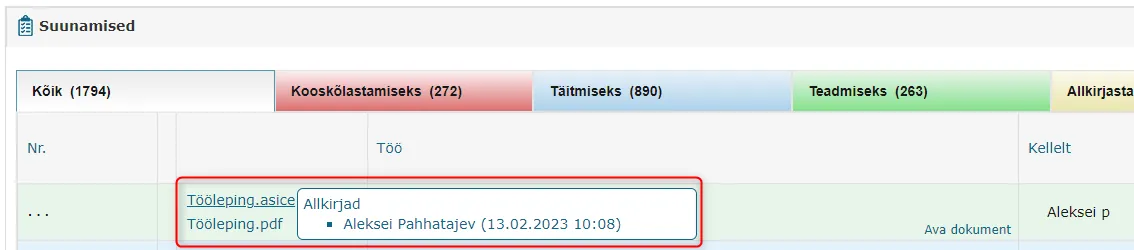
On the front page Routing panel there is a files column. The files column previously displayed the main file together with all additional files. However, if the document had a signature container in deconstructed form, then this container was not visible in the Routing panel.
Starting from version 14.8, the deconstructed signature container is now also displayed in the files column along with data. The signature container is always in the first place in the files list. The signature container can be downloaded by clicking on the container name. Additionally, hovering the mouse cursor over the container name, Amphora displays the following data – who has signed and when they signed. Now users who need to deal with a specific document have a much better overview and they don't need to open the document separately to see who has signed and to be able to download the signature container.
NB!
If the document has multiple signature containers in deconstructed form, then Amphora displays all signature containers.
 ** The implementation of this development was supported by Amphora client Järve Biopuhastus. **
** Thank you! **
** The implementation of this development was supported by Amphora client Järve Biopuhastus. **
** Thank you! **
Archive module changes
- In the archive file view, Amphora now displays the document's last version data. Previously, Amphora displayed the first version data, which was not correct because the first version might still lack a number and the registered date and title could differ from the last version.
- A new Validity deadline column has been added to the objects table in the archive file view. Users get a much better overview of objects that have been added to the archive file composition. The object validity deadline depends on this object's dates and the date priorities are as follows – Not_valid_after (Valid until) > Document_date (Document date) > RegisterTime (Registration time) > Create_time (Document creation date). If one of these dates is missing (for example Not_valid_after), then Amphora takes into account the next date (Document_date).

Institution settings logging added
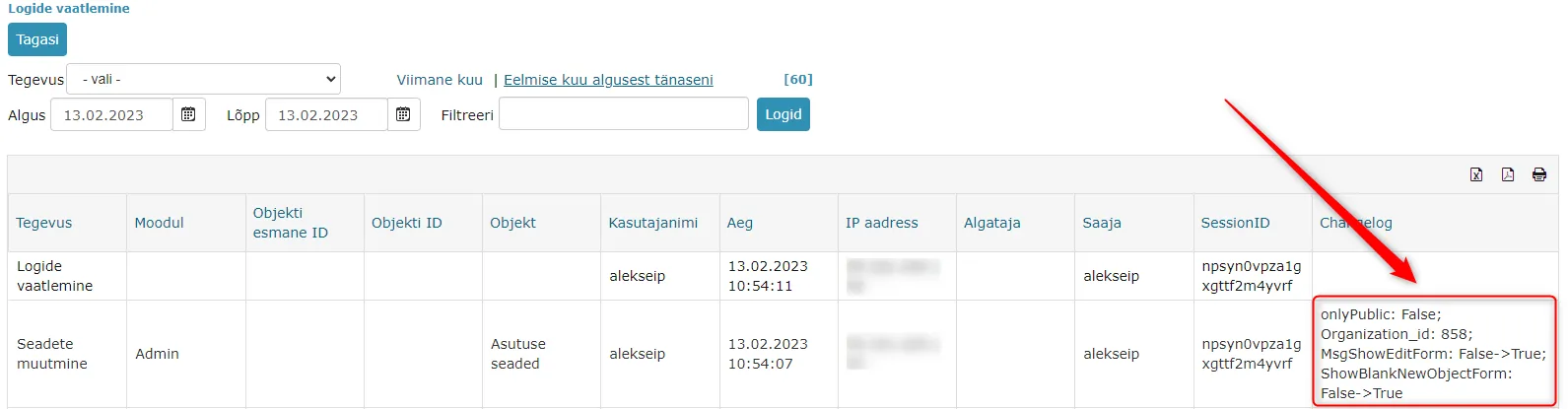
When changing Admin – Institution settings, Amphora did not add logs in previous versions. This in turn made detecting changes very complicated. Starting from version 14.8, log support has now been added.
Logs are also visible through the user interface (Admin – Institution settings - Logs).
Navigation fix in reading (viewing) view
Opening objects in reading view and then moving back to the original object using the Back/Cancel button did not always work correctly. For example, when opening a case object at a case and then pressing the Back/Cancel button, Amphora did not reopen the original case but opened the module list view. In version 14.8, this navigation problem has been fixed.
Counters copying as new functionality enhanced
In Amphora, it is possible to copy existing counters as new for a new records management period. This functionality saves head users' time because you can add all new records management period counters at once and this doesn't need to be done manually. Previously, Amphora allowed copying as new only those counters whose Valid until date year was either the current year or the previous year. So, for example, if some catalog was missing a counter from the previous period (valid until 2022) and there was a desire to copy the counter from the period before last (valid until 2021) as new, then Amphora did not allow this. This check has now been removed and earlier counters can also be automatically copied as new.
You can read more about copying counters as new HERE
Personal settings saving enhanced
Saving the user's own personal settings needed enhancement/fixing. Namely, if the user group to which the user belonged did not have the Notifications administration policy enabled and the user saved their personal settings (Admin – Personal settings) over, Amphora removed all notification checkboxes. In this version, we added an additional check so that in such situations Amphora would not remove personal notification checkboxes.
Mobile-ID signing enhanced
In previous versions, Mobile-ID signing did not work for users who had entered their mobile number with spaces in personal settings. Example - +372 5555 5555. When signing, Amphora displayed Invalid phone No. error message.
In this version, we enhanced mobile number checking. Now Amphora can ignore spaces when signing with Mobile-ID.
Main file conversion fix
Amphora automatically converts the main file to PDF when saving if the main file format allows it. In previous versions, there was a conversion problem with files where the format was suitable but the file extension was written in capital letters. Example – Employment_contract.DOCX. Amphora could not convert such a file to PDF.
In this version, we added a fix. Now the file extension can be written in both capital and lowercase letters.
Deconstructed signature container display enhanced
When deconstructing a signature container, Amphora displays all signers. The following data is displayed – first name, last name and personal identification code. However, for some signatures, Amphora still displayed only the first and last name and in a strange form (first name in capital letters).
 The problematic signatures were those where the signer's certificate issuer was EID-SK 2016 (signatures given with Mobile-ID or Smart-ID).
In version 14.8, the display of EID-SK 2016 signatures has been enhanced and now all data is displayed in the correct form.
Documents module search enhancement – new search form field "Original creation (create_time_orig)" added
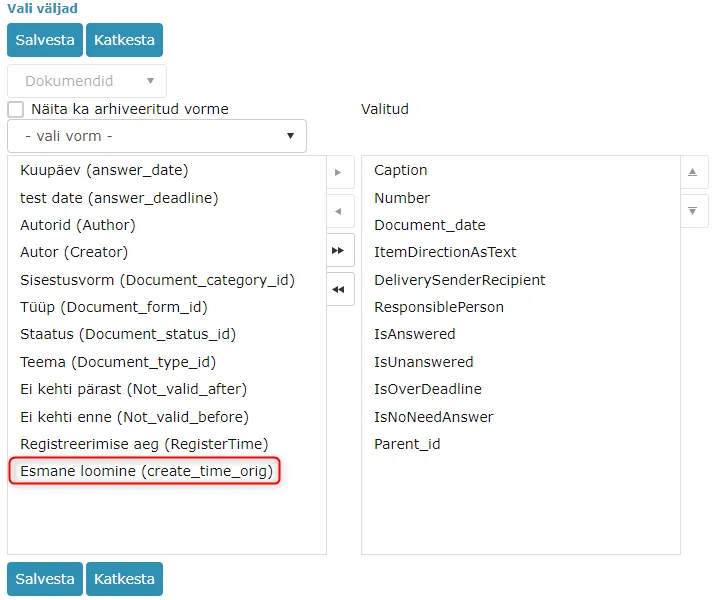
In Documents – Search, it is possible to perform Documents module searches with different search profiles. Search profiles can be added/changed. In previous versions, the document original creation date field was missing from the search form, which made searching for documents from a specific period problematic. Now this field has been added – create_time_orig (Original creation).
Field selection in search profile:
 create_time_orig field on search form:

Access restriction disappears on response document – fix
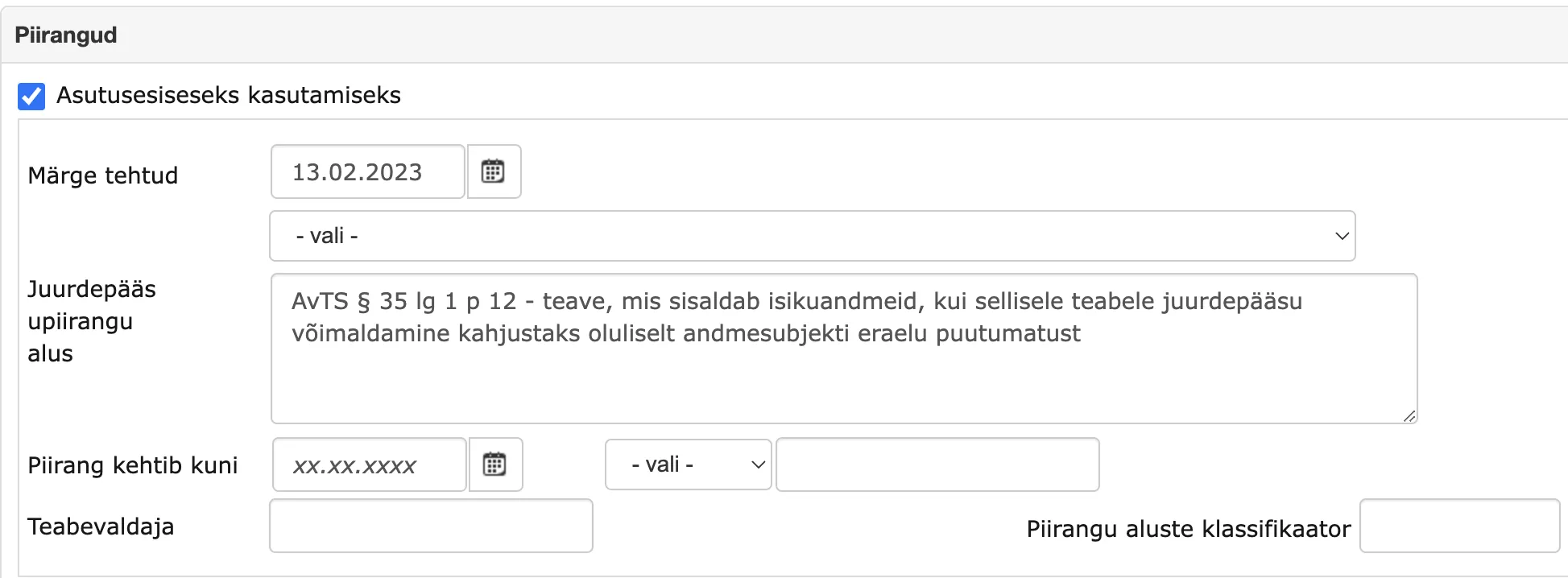
When creating a response document, Amphora carries over the original document's access restriction to the response document. Problems with restriction transfer occurred in situations where the original document was missing the Valid until date. Access restriction assignment to response document works as follows – Amphora adds the same access restriction basis to the response document and adds Note made and Valid until dates according to the response document creation date. But Amphora could not solve the situation where the Valid until date was missing on the original date and thanks to this, all access restriction data disappeared when saving the response document. In version 14.8, the problem of access restriction data disappearing on response document has been solved and in this situation Amphora no longer adds the Valid until date to the response document.
Response document Restriction panel before version 14.8:
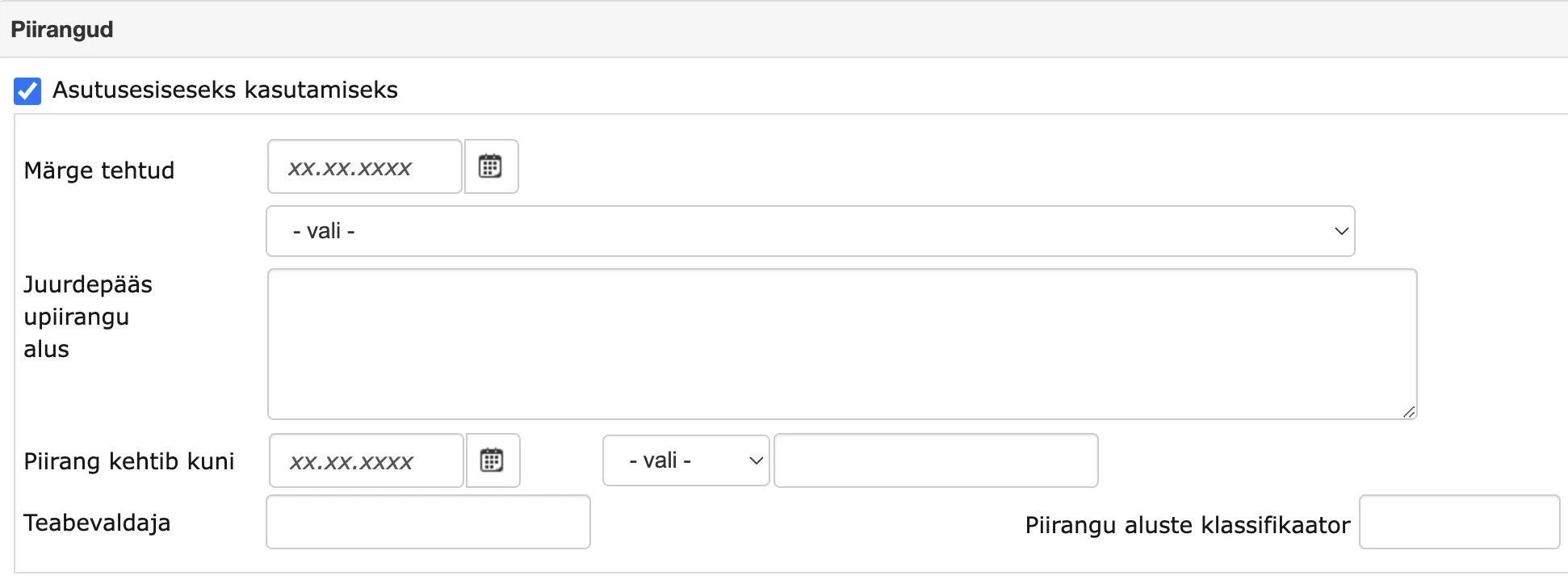 Response document Restriction panel starting from version 14.8:
Front page opening optimized (Routing panel tasks)
Some users who had many tasks in the Routing panel on the front page might have noticed that opening the front page is occasionally slow. The front page opening speed depends on how many tasks the user has. In this version, we redesigned task display in the Routing panel a bit and in the future, front page opening should be faster also for those users who have many completed/incomplete tasks in the Routing panel.
New document internal environment URL
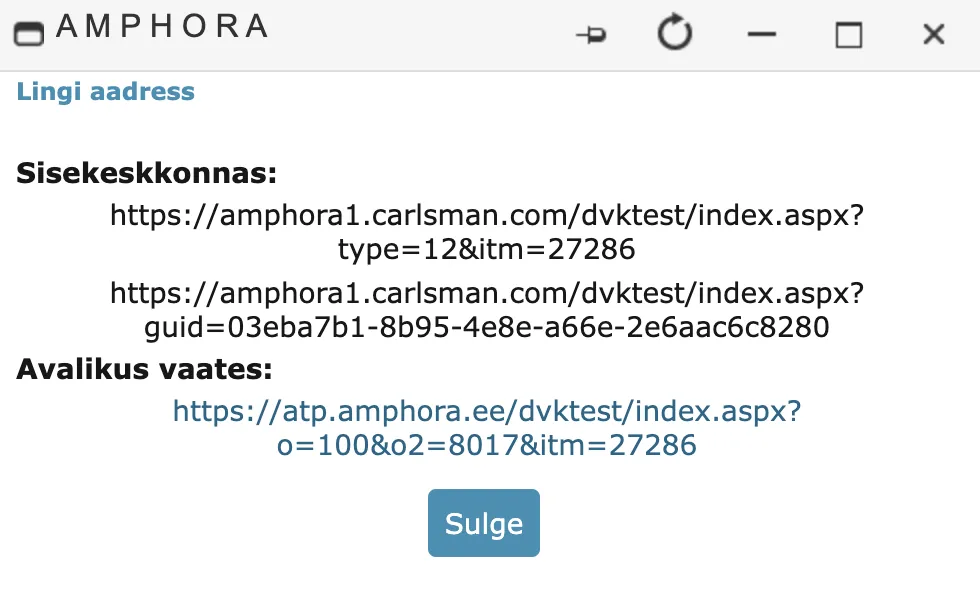
In Amphora, each document has its own unique URL (link) with which a specific document can be opened. This URL looks like this - environmentaddress/index.aspx?type=12&itm=27286, where type is the object type (12 is a Documents module object) and itm is the document version unique ID.
In this version, we added another document URL. The new document link looks like this - environmentaddress/index.aspx?guid=03eba7b1-8b95-4e8e-a66e-2e6aac6c8280, where guid is the document unique (not document version) ID. Each document version has the same guid, it does not change. This is a very important difference from the previous document URL because, for example, when deleting a version (Revert to previous version) the guid still remains the same unlike the document version ID (itm) and with the new document URL, the document can still be opened.
Minor fixes
- The Pending email notifications report previously displayed notifications for deleted objects. In this version, we added a check so that this report displays only active objects' email notifications.
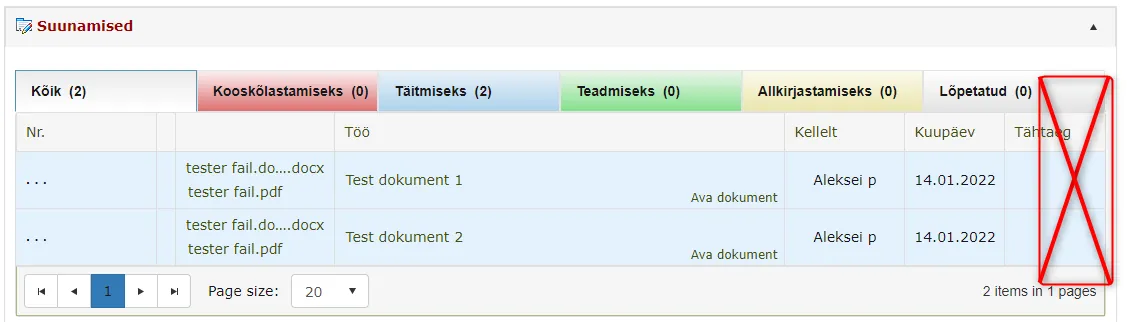
- On the front page Routing panel, some users experienced a problem – action buttons were not visible in situations where the Show action buttons in routing list policy was enabled. In version 14.8, action button display has been fixed and when the Show action buttons in routing list user group policy is enabled, action buttons are always visible.
Problem example:
 3. On the front page Out of office panel, Amphora no longer displays passive users.
Last modified: 09 October 2026, 10:25:03