Amphora 13.6 Version Guide
- Version 13.6.0
- Google account authentication enhanced
- Duplicate personal code persons problem solved
- Changing tab names in public view
- Login error message display restored
- Username change in Amphora environment
- New selected directories are now orange when adding permissions
- Delivery confirmation for e-mail sending fixed
- Calendar module fixes
- Adding numbers to case objects changed
- Adding new document to case composition enhanced
- Sent e-mails no longer show attachment registration options
- Document additional file addition errors are logged
- Archive file deletion in Trash module fixed
- Admin -> Directories button changes
- DHX document registration no longer loses reference link and access restriction info
- Changing file location within document doesn't lose signature container
- Added party personal code/reg. code check when copying document as new and additional registration
- Deleting case from document detail view fixed when metadata versioning is disabled
- Delivery file mode fixes
- Registration of e-mails sent from elsewhere
- Sender change for outgoing deliveries with added field direction
- No new registration time added when updating documents through Spoku service
- Homepage optimization
- Minor fixes
- Other changes
- Version 13.6.1
- Removing calendar selection in user homepage settings if Calendar module is not visible
- Sent e-mail logs changed
- Enhanced signature container unpacking
- Fixed document registration with registration profile to directories with info presentation configured
- Fixed received purchase invoice accounting VAT balance calculation
- Version 13.6.2
Important
The purpose of this guide is to describe Amphora's changed functionality that comes with the new 13.6 version of Amphora Professional. The version guide is continuously updated.
** * The change is relevant for environments that no longer use the correspondence module.**
Version 13.6.0
Google account authentication enhanced
In version 13.5, we added the possibility of Google account authentication. This authentication option is only available for Premium and Elite level environments. More about this can be read HERE.
In version 13.6, we enhanced Google account authentication. Now it's possible to open an object with a direct link after Google account authentication, Amphora opens the correct object. In the previous version, Amphora couldn't open the correct object.
Duplicate personal code persons problem solved
For a long time, there has been a problem where multiple persons are added with the same personal code in one Amphora environment and the person with this personal code doesn't see all tasks in the Self-service Portal.
We made an enhancement and now all tasks related to other persons with the same personal code are displayed in the Self-service Portal. From now on, there shouldn't be situations where a person logs into the Self-service Portal and some tasks are not visible to them.
For example, there are three persons with the same personal code in the Amphora environment and the person with this personal code logs into the Self-service Portal. Amphora displays all unfinished and finished tasks of all three persons to this person.
Changing tab names in public view
In public view, the default tab names are - All, Legal Acts, Contracts, Correspondence, and Bills and Agendas.
 Starting from this version, it's possible to change tab names. This requires changing keyword translations under Admin -> Translations.
PublicTabAll - All tab PublicTabAct - Legal Acts tab PublicTabCtr - Contracts tab PublicTabMsg - Correspondence tab PublicTabCas - Bills and Agendas tab
To change a keyword translation, you need to click on the "pencil" icon on the same line as the keyword and change the ET translation. After changing translations, you need to press the Save button.
Changes will be applied by Amphora within 12 hours.
** This development was supported by Amphora client Rae Municipality Government ** ** Thank you! **
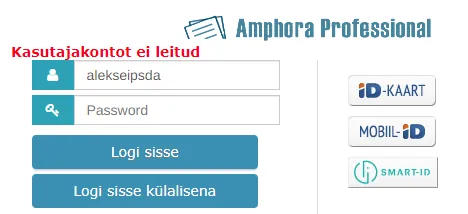
Login error message display restored
With version 13.5 installation, username and password login error messages disappeared. When a user tried to log in with wrong username or password, Amphora didn't display an error message and after the fifth login attempt, locked the user.
In this version, wrong username and/or password error messages are visible again.
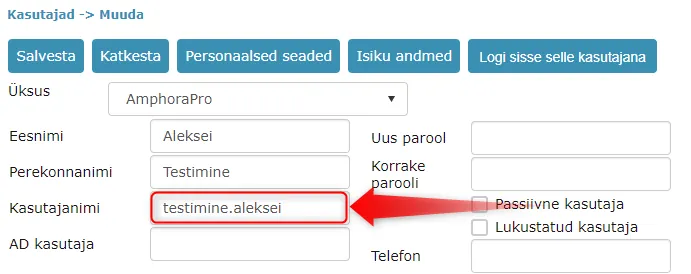
Username change directly in Amphora environment
At some point, it wasn't possible to change user usernames through the user interface. Administrators had to contact Amphora customer support with a request to change a specific user's username.
We added back the username change functionality. Username changes can be made by Amphora environment administrators who have user modification rights (must have "User data modification" policy enabled).
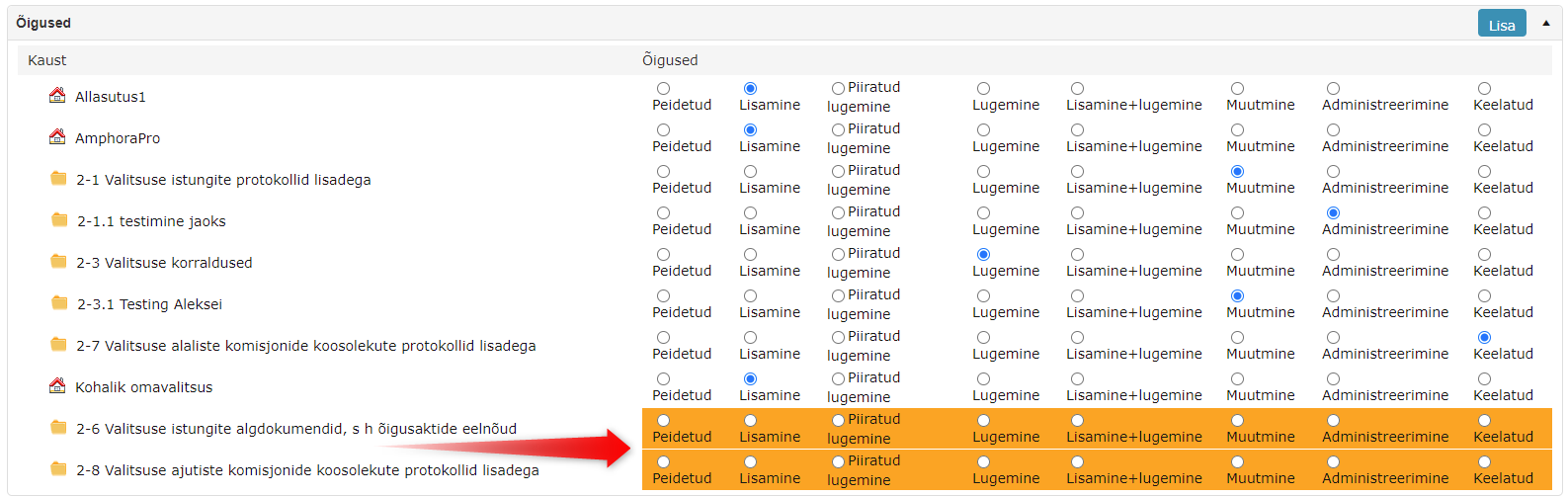
New selected directories are now orange when adding permissions
Adding permissions to a user group or user personally has been enhanced. New selected directories and units are orange before the first save.
The functionality doesn't change, permission addition works exactly the same as in the previous version. This change was made so that it would be possible to distinguish selected directories and units from those that were already added before.
For example, a superuser wants to add new permissions to a user group that already has permissions set for many directories. The superuser selects directories they want to set permissions for and in the permission addition panel, it's immediately visible which directories were just selected and it's very easy to distinguish which directories need permissions set.
Delivery confirmation for e-mail sending fixed
When sending e-mail with @ icon and from E-mails module, there's a Delivery confirmation checkbox. This checkbox functionality hadn't worked for a long time, but in this version the functionality has been fixed.
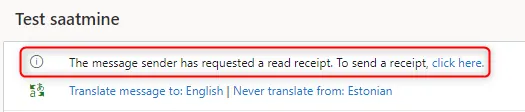
Activating the Delivery confirmation checkbox adds one line to the e-mail composition, which displays a notification to the recipient when opening the e-mail, which when activated can send a delivery confirmation notification to the e-mail sender.
NB!
May not work with all mail servers.
E-mail recipient view:
Calendar module fixes
Issues related to calendar event display in the Calendar module have been fixed:
- General display of recurring events. In the previous version, Amphora displayed recurring events up to one year in calendar view. For example, if there was an annual recurrence and the number of recurrences was 10, then Amphora only displayed the first two events in calendar view.
- Display of daily recurring events in different calendar views. Amphora displayed more event recurrences than there actually were.
Adding numbers to case objects changed
Case objects get a number through the case provided that the case itself has a number and the directory where the case is located has the "Use only case counter" checkbox enabled.
Previously, when adding a number to a case object, Amphora considered existing case object numbers and their directories. If one of the case objects got a number according to this case but was located in another directory, then Amphora didn't consider this case object when adding a number to a new case object.
In version 13.6, the case object directory is no longer considered. If a case object has received a number through the case but is located in another directory, then Amphora considers this case object when calculating the new sequence number.
Adding new document to case composition enhanced
If a case itself belongs to another case composition and a new document (case object) is added to this case composition, then Amphora should add the document only to the case where this document is actually added. Previously, in such a situation, Amphora added the document to both case compositions and thanks to this, the document got the wrong number during registration.
In version 13.6, this bug has been fixed and now a new document (case object) is added to the correct case composition.
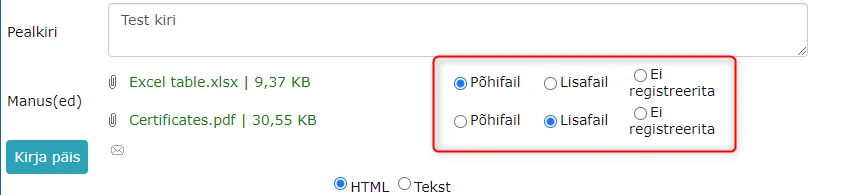
Sent e-mails no longer show attachment registration options
In the E-mails module, sent e-mails displayed attachment registration options in previous versions. These options had no functionality since they are already sent e-mails. In this version, we removed these options.
Document additional file addition errors are logged
If it happens that Amphora cannot correctly save an additional file when saving a document, a log entry is now added about this. Information in logs helps Amphora customer support solve problems related to document additional files more operatively.
Archive file deletion in Trash module fixed
When deleting objects in the Trash module, Amphora checks user permissions. For archive files, user permission check was missing and thanks to this, it wasn't possible to delete archive files in the Trash module. When adding a checkbox in front of an archive file and pressing the Delete button, Amphora kept the archive file.
In version 13.6, this bug has been fixed and now Amphora users who have the necessary permissions can delete archive files.
Admin -> Directories button changes
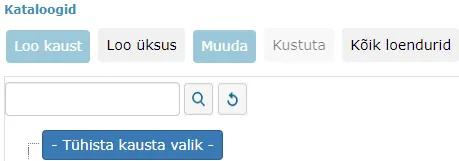
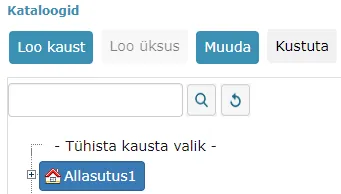
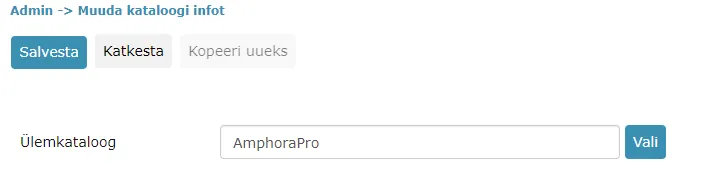
In Admin -> Directories view, some buttons are now inactive in certain situations. These changes have been made primarily to reduce errors when creating new units and directories.
- When Cancel folder selection is selected, then Create folder, Edit and Delete buttons are not active.
 2. When Unit or Directory is selected, then Create unit button is not active.
 3. In Unit and Directory setup view, Copy as new button has been made inactive since currently this button has no functionality developed.
DHX document registration no longer loses reference link and access restriction info
In previous versions, reference link and access restriction info could be lost when registering a DHX document. Specifically, this happened in situations where an incoming DHX document was tried to be linked with an initiative document during registration (Linking with main document in "New response letter" panel).
In version 13.6, this bug has been fixed. Data no longer disappears when registering DHX documents.
Changing file location within document doesn't lose signature container
When changing file location within a document (Main file -> Additional file and vice versa), the signature container should definitely not disappear. Additionally, if a document has only additional files (main file is missing) and these additional files are signed, then Amphora shouldn't remove the signature container when re-saving the document.
File location change and signature container removal problems that existed in previous versions have been fixed in version 13.6.
Amphora removes the signature container only if the main file above the file is a signature container in composition and this main file is removed or modified.
Added party personal code/reg. code check when copying document as new and additional registration
In version 13.4.1, we added configurable functionality that makes it possible to make party personal code/reg. code mandatory. More details about this can be read HERE.
This change is relevant in those Amphora environments where "Party registry code/personal code is mandatory" is enabled under general settings.
Originally, personal code/reg. code check was added only to the party selection view. There was no separate check when saving the document. For example, previously added documents that already had parties added and these parties didn't have personal code/reg. code could be copied as new/additionally registered without Amphora checking the party personal code/reg. code presence.
Personal code/reg. code check when saving documents has been added in version 13.6.
NB!
This check is not applied when re-saving existing documents.
Deleting case from document detail view fixed when metadata versioning is disabled
Fixed a bug where Amphora didn't delete the case relationship from the document detail view. After saving, the case appeared back in the Cases panel. The bug only occurred in environments where metadata versioning was disabled.
Delivery file mode fixes
Outgoing delivery file mode is now always remembered by Amphora. Outgoing delivery file mode can be selected in delivery detailed settings (more about file modes can be read HERE). In previous versions, when changing delivery, Amphora could in certain situations change the selected file mode back to the default file mode - "Send all future added files and signature container".
Added additional file mode check when sending e-mail out. If a file mode is selected and the document lacks files, then Amphora asks for additional confirmation whether the user agrees to send an e-mail without files. Previously, Amphora always displayed a red notification that files are missing and such an e-mail couldn't be sent out.
Amphora now always adds file mode to response document delivery. If files are not added and the user wants to send out an e-mail without files, then such a possibility exists. At the same time, this change ensures that Amphora always sends e-mail with files if files are present with the document.
Registration of e-mails sent from elsewhere
Sometimes an e-mail is sent out externally to Amphora (for example, directly from Outlook) and later this e-mail needs to be registered in Amphora as a document. Previously, it was necessary to register the e-mail as an incoming document and then manually delete the added delivery and add a new outgoing delivery.
In version 13.6, we added the possibility to register externally sent e-mails as sent documents. For this, you need to create a new registration profile (Admin -> Profiles).
Direction selection has been added to registration profile settings. There are two options: incoming and outgoing.
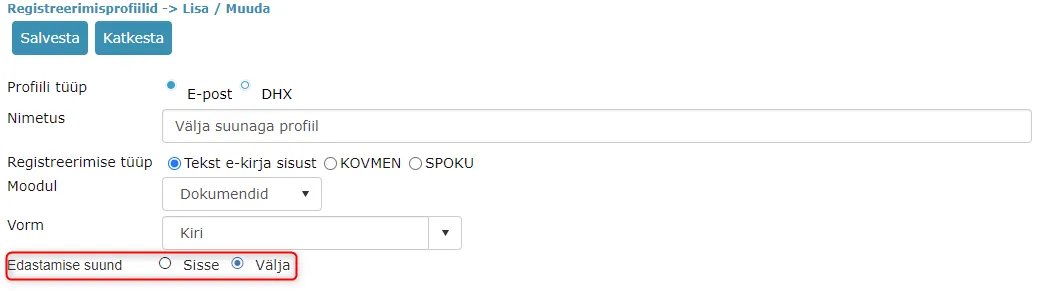 Delivery direction selection is displayed if "E-mail" is selected as the profile type.
With incoming selection, an "Incoming" direction delivery is added to the registered e-mail. With outgoing selection, an "Outgoing" direction delivery is added where the delivery status is "Sent".
Sender change for outgoing deliveries with added field direction
On outgoing deliveries with sent status, it was previously possible to change recipient data. In version 13.6, we also added sender change support.
To change the sender, you need to open the delivery change view by pressing the "Edit" button. In the opened view, there's now a "Select user" link which when clicked displays a dropdown on screen where Amphora environment users can be selected.
NB!
The "Select user" link is only visible on Sent status outgoing deliveries.
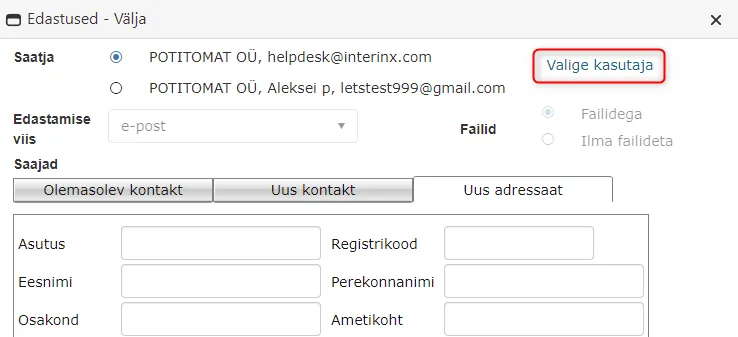
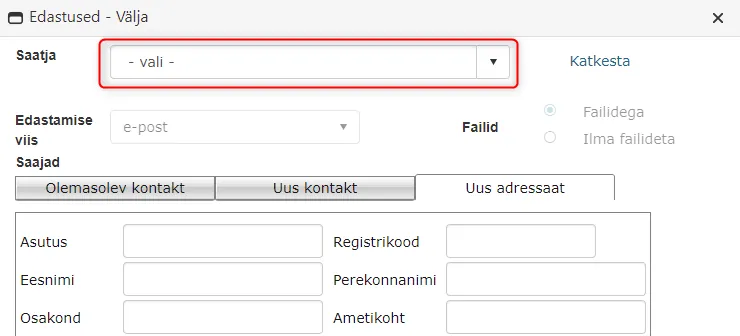 Currently, the user selection also displays users who don't have an e-mail address.
Version 13.6 also includes registration of e-mails sent from elsewhere (more details can be read HERE) and when registering such e-mails, it's often necessary to change sender data. This functionality has been added primarily to solve such situations.
No new registration time added when updating documents through Spoku service
It's possible to modify existing Spoku documents through the Spoku service. In previous versions, documents modified through the Spoku service overwrote the registration time with a new value, which wasn't correct. In version 13.6, this bug has been fixed.
Homepage optimization
On the homepage, the Assignments panel now displays up to 1000 tasks at once for one user, thanks to which homepage opening and use becomes faster.
Minor fixes
- In the E-mails module, Amphora displayed a full-screen error if no e-mail was selected when selecting a registration profile. In the new version, a clear error message is displayed.
 2. When archiving a document, Amphora keeps only the last two document versions and removes the rest. Previously, a document with more than two versions could end up in an archived file and Amphora didn't display such a document among archived documents. In version 13.6, the display bug has been fixed and all archived documents are visible in the archive file.
Other changes
- Updated Telerik components 2021.1.119 -> 2021.1.224.
Version 13.6.1
Removing calendar selection in user homepage settings if Calendar module is not visible
On the Amphora environment homepage, users can configure which homepage panels are visible to them. This can be done in the Homepage settings panel.
In version 13.6.1, we added an additional check so that the user doesn't have a calendar panel option in the Homepage settings panel if the user doesn't have the Calendar module visible.
Sent e-mail logs changed
E-mails sent from Amphora environment create sending logs and one log event is Open. This log event means that the recipient has also opened this e-mail. Unfortunately, such a log event doesn't come with every e-mail sending. It depends on the recipient's e-mail settings.
In previous versions, Amphora displayed all Open events. If the e-mail recipient opened the e-mail five times, then Amphora displayed five Open events.
In this version, we made an enhancement so that Amphora only displays the very first Open event.
Enhanced signature container unpacking
If there were files inside the signature container where file names had forbidden symbols (< > : " / \ | ? *), then in previous versions Amphora couldn't correctly unpack such a signature container.
In version 13.6.1, we enhanced signature container unpacking and now forbidden symbols are removed from files inside the signature container during unpacking. Thanks to this, Amphora can now correctly unpack such signature containers and all files inside the signature container are visible in the document view.
Fixed document registration with registration profile to directories with info presentation configured
This fix is relevant for environments that had version 13.6.0 installed.
In info presentation settings, it's possible to specify forms that are allowed to register documents to selected directories. If a directory was added to the info presentation composition and forms were selected in this info presentation, then when registering an e-mail (from Outlook or E-mails module) or DHX document with a registration profile to this directory, Amphora selected not the form in the registration profile but the form specified in the info presentation. This bug has been fixed and now when registering with a registration profile, the form specified in the registration profile settings is always selected.
Fixed received purchase invoice accounting VAT balance calculation
Amphora couldn't correctly calculate the accounting VAT balance for some received purchase invoices. The problem occurred with received purchase invoices where the invoice line ItemTotal element was 0.
We made an enhancement on Amphora's side so that if a received purchase invoice has an invoice line ItemTotal of 0, then Amphora calculates this field itself. From now on, Amphora calculates the accounting VAT balance correctly.
Version 13.6.2
Fixed document addition when "Document info hiding (Parties)" policy was enabled
Starting from version 13.6.0, it wasn't possible to add documents if the user belonged to a user group where the "Document info hiding (Parties)" policy was enabled. Amphora displayed the following error message - Object reference not set to an instance of an object
In version 13.6.2, this bug has been fixed.
Last modified: 17 October 2026, 11:05:57