Amphora 14.2 Version Guide
- Version 14.2.0
- Archive developments
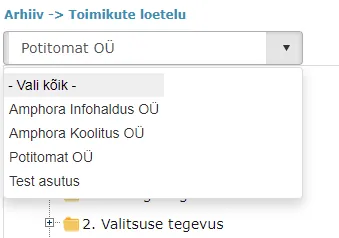
a. Institution selection dropdown added to Archive module
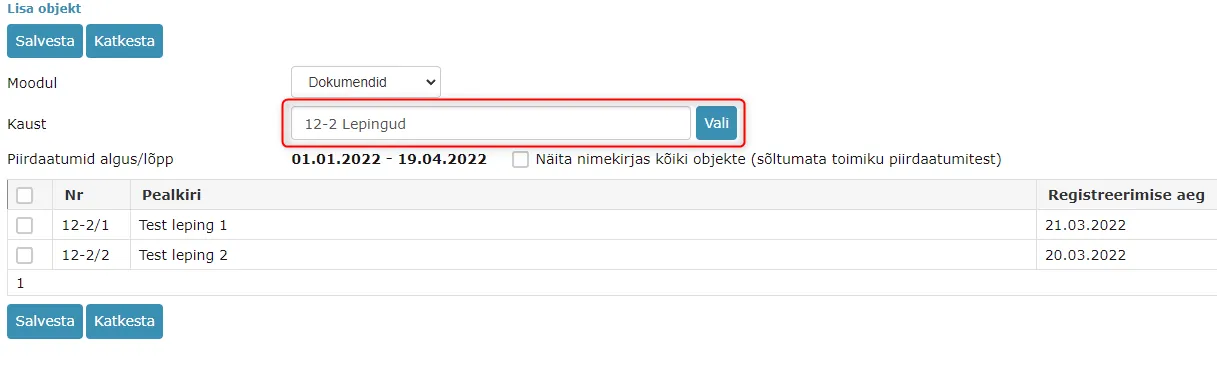
b. Catalog selection dropdown added to archive file object addition view
c. New columns in archive file objects panel – Series and Series closed
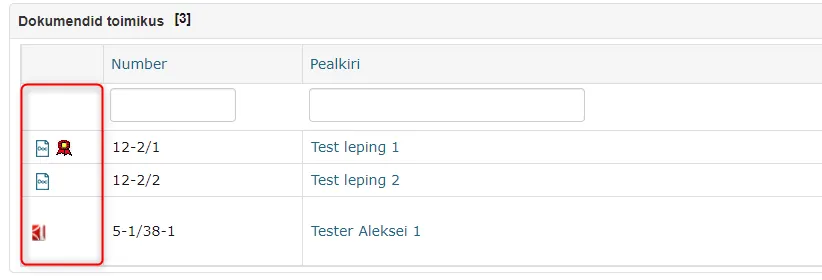
d. File icons of added objects added to archive file reading and editing view
e. "Valid until" control added to archive file objects addition view - Catalog change logs added
- Added ability to resend email through Deliveries panel in case of failed attempt
- Spoku form field order broke the form - fixed
- Document history panel enhancements
- Deliveries panel info in document print view/XML export
- Object text editor content is now visible in case reading view
- Fixed adding excessive relationships when creating response document
- Sequential execution process stays pending - fixed
- Sales invoice sending enhanced
- Amphora now always adds automatic process when copying document as new
- Out of office and task substitute synchronization fixed
- Other
- Archive developments
Version 14.2.0
Archive developments
Below are described all the fixes and changes related to the Archive module that were made in version 14.2.0.
Institution selection dropdown added to Archive module
In the Archive module, all units for which the user has rights (Admin rights) are visible to the user. In this version, we added an institution dropdown selection, with which the user can filter out a specific institution and continue working with it.
NB! The selection contains institutions related to units, not units.
Catalog selection dropdown added to archive file object addition view
The catalog selection dropdown allows adding objects from different catalogs to one archive file composition. In previous versions, it was possible to add objects to the archive file composition only from the catalog where the archive file was currently being saved.
New columns in archive file objects panel – Series and Series closed
Series – series (catalog) of the archive file object. Series closed – date when the archive file object series (catalog) was made passive. Additionally, the catalog passive date was also added to the Admin -> Catalogs view. If the catalog is active, the column remains empty.

File icons of added objects added to archive file reading and editing view
In the archive file objects panel, the object main file icons are made visible, including signature container icons. Some files can be opened by Amphora in preview (PDF, HTML), just like in the Documents module list view. Other files can be downloaded by clicking on the file icon.
"Valid until" control added to archive file objects addition view
This control applies to those documents (primarily contracts) where the form has a "Valid until" (Amp. field name not_valid_after) field. The purpose of this change is that only those documents that are no longer valid should come into selection.
How Amphora determines that a document is not valid: Initially, Amphora checks whether the document has a "Valid until" date. If the "Valid until" date exists and this date is within the archive file period (range between archive file opened and closed dates), then this document is visible in the selection. If the document has "Valid until" and "Entry into force" date missing, but the registration date is within the archive file period, then this document is similarly visible in the selection. However, if the "Entry into force" date exists and the "Valid until" date is missing, then such a document is not visible in the selection because this document is still valid.
Catalog change logs added
When changing catalog and unit (Admin -> Catalogs), Amphora now adds logs. These logs are visible in Admin -> General settings -> Logs (to view other users' logs, the user group policy "View other users' logs" must be enabled). A small enhancement that makes it easier for Amphora client support to solve problems related to catalogs and units.
Added ability to resend email through Deliveries panel in case of failed attempt
If after sending an email the delivery status is Sending failed, a Send again button appears under the status. In some situations, resending may help and with a new attempt, the email is successfully delivered.
 If the recipient's email address is, for example, incorrectly written, then the recipient's email address should be changed using the Edit button and the email should be sent out again using the Send button. In previous versions, there was no such possibility and the user had to delete the faulty delivery and add a new one.
When resending, email logs are also updated.
Spoku form field order broke the form - fixed
Some clients encountered a problem where when opening a document with a Spoku form, the data was not visible and the form looked broken. Such a problem could occur when changing the Spoku form and the cause was the incorrect order of form fields. In version 14.2.0, we added a control so that the form field order no longer breaks the form.
Document history panel enhancements
- In the document reading view, the Additional info column is now visible.
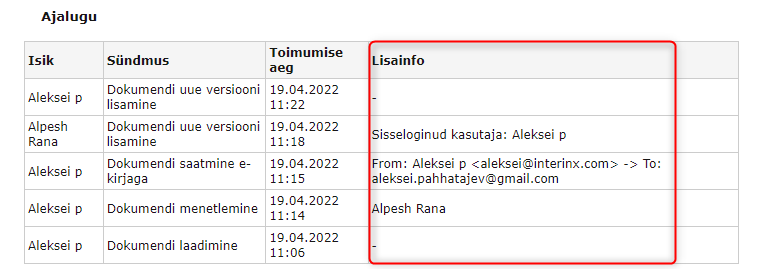 2. If an administrator logs in with another user and changes a document, information is added to the history panel in the format – Logged in user: First name Last name.

Deliveries panel info in document print view/XML export
Starting from version 14.2.0, Deliveries panel info is displayed in the document print view. This means that when printing out a document, the Deliveries panel info is visible. Additionally, when exporting documents, the Deliveries panel info is present in XML files.
Object text editor content is now visible in case reading view
Among case objects there may be documents with upload or writing forms that have text editor content. In previous versions, document text editor contents were not visible in the case reading view.
If an upload form document has both a main file and text editor content, then clicking on the file icon, Amphora downloads the main file and the text editor content did not become visible. If a writing form document lacks text editor content and an upload form document lacks both main file and text editor content, then in the opened window Amphora displays the corresponding notification.
In version 14.2.0, the case reading view has been enhanced and document text editor contents are visible (you need to click on the file icon).
Fixed adding excessive relationships when creating response document
In previous versions, there was a problem with excessive relationships when adding a response document through the "Linking with main document" panel. When changing the initiative document, the relationships of the previous document remained in the Relationships panel and these relationships had to be manually deleted later.
Starting from version 14.2.0, when selecting a new initiative document, Amphora removes the relationships of the previously selected document.
Sequential execution process stays pending - fixed
Some clients encountered a problem where the sequential execution process gets stuck at some stage, where one user has a task with Completed status and the next user has Pending status and the process does not move forward. Such a situation occurred when the user in queue added a comment to the next user in queue and then completed their task.
In this version, this bug has been fixed.
Sales invoice sending enhanced
When sending out a sales invoice, a check for the sender institution's bank account existence has been added along with a notification. If the sender institution lacks bank account data, then problems arise when sending out the sales invoice and it is not delivered.
Amphora now always adds automatic process when copying document as new
If the catalog where the copied as new document was saved had automatic process configured, then in previous versions Amphora did not add the automatic process. There was a process addition entry in the logs, but Amphora did not actually add the process itself. In this version, we fixed this bug and now Amphora correctly adds automatic process also to documents copied as new.
Out of office and task substitute synchronization fixed
After the out of office period ends, Amphora now removes all task and substitute relationships. In previous versions, Amphora did not remove these relationships permanently. Through the user interface, the substitute was not visible, but at the database level the relationship still existed and, for example, task reminders were sent to the substitute (who was actually no longer a substitute).
Other
- Telerik components update 2022.1.119 -> 2022.1.302. More details about updates can be read HERE
Last modified: 17 October 2026, 11:05:57