Tasks
The Ülesanded (Tasks) module is for an organisation's internal work tasks: a task has a title, a deadline, performers and a status. Process and delegation tasks on documents are described in Documents and in the homepage's Suunamised panel.
Contents
- Opening the module
- Adding a task
- Task list
- Searching for tasks
- Task card
- Accepting and declining
- Copying and deleting
- Task statuses
Opening the module
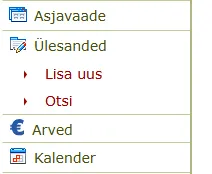
The left menu has the module Ülesanded with two items: Lisa uus (Add new) and Otsi (Search). A user without the right to use the module has no Ülesanded item in the menu.
Adding a task
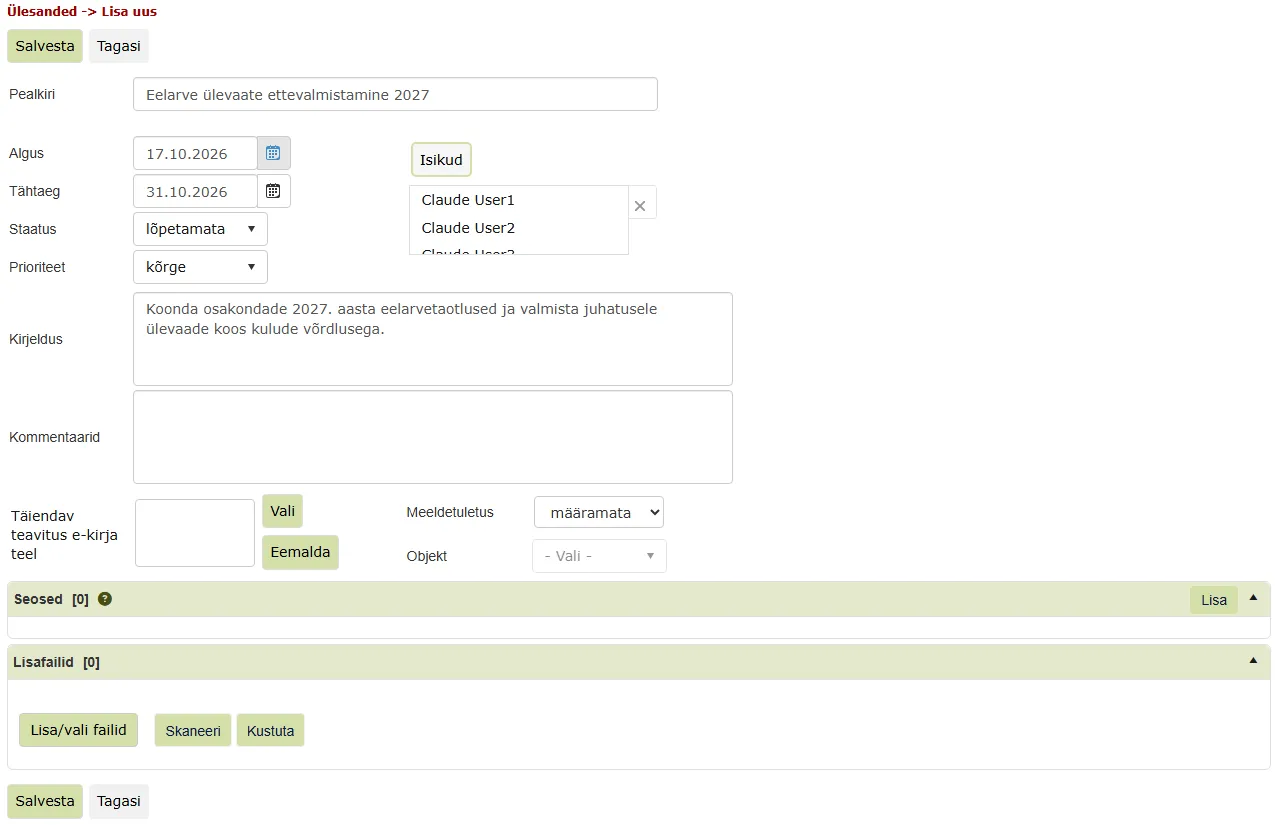
To add a task, choose Ülesanded → Lisa uus. The form Ülesanded -> Lisa uus opens, with the buttons Salvesta (Save) and Tagasi (Back) at the top and bottom.
The form has these fields:
- Pealkiri (Title, required);
- Algus (Start) and Tähtaeg (Deadline), as dd.mm.yyyy or with the calendar button;
- Staatus (Status): kinnitamata (unconfirmed), kinnitatud (confirmed), lõpetamata (not finished, the default), lõpetatud (finished) or peatatud (on hold);
- Prioriteet (Priority): kõrge (high), normaalne (normal, the default) or madal (low);
- Kirjeldus (Description) and Kommentaarid (Comments);
- Täiendav teavitus e-kirja teel (Additional notification by e-mail), with the buttons Vali (Choose) and Eemalda (Remove);
- Meeldetuletus (Reminder): for example 1 day, 1 week or 1 month before, Ülesande alguspäeval (on the start day) or Ülesande tähtajal (on the deadline); not set by default;
- Objekt (Object).
Choose the performers with the Isikud (Persons) button. In the Isikud window, pick people in the left list and move them to the right with the arrow (or by double-clicking); the checkbox Näita kõikide üksuste kasutajaid/kasutajagruppe (Show users and groups of all units) also lists other units' users. Press the window's Salvesta. The list starts with the task's creator.
Below the form are the panels Seosed (Relations, button Lisa) and Lisafailid (Attachments, buttons Lisa/vali failid and Kustuta).
Finally press Salvesta. The task is saved and the view Ülesanded -> Nimekiri (List) opens. If the title is empty, the message "Ülesandel puudub pealkiri!" (The task has no title!) is shown and the task is not saved.
Task list
The view Ülesanded -> Nimekiri shows the user's unfinished tasks, newest first. The columns are Pealkiri, Staatus, Tähtaeg, Üle tähtaja (Overdue), Prioriteet, Objekt and Looja (Creator). Clicking the Pealkiri header sorts the list by title.
Above the columns are filters: Staatus, Prioriteet and Objekt with a drop-down, Pealkiri and Looja with a text box, and Tähtaeg with a date. By default a page shows 20 tasks; you can choose 20 to 500 per page.
Above the list are the buttons Uus (New), Tehtud (Done), Aktsepteeri (Accept) and Kustuta (Delete), the saved-query choice and a search box.
Searching for tasks
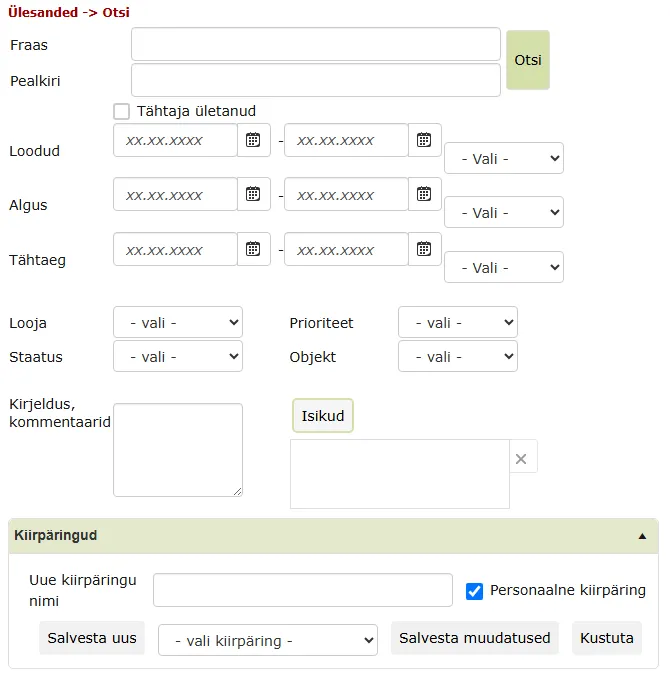
To open the search form, choose Ülesanded → Otsi. The form has the fields Fraas (Phrase, with the Otsi button), Pealkiri, the checkbox Tähtaja ületanud (Overdue), Loodud (Created), Algus and Tähtaeg (from-to dates with a quick range, for example "eelmised 10 päeva", the last 10 days), Looja, Prioriteet, Staatus, Objekt, Kirjeldus, kommentaarid and Isikud.
The Kiirpäringud (Saved queries) panel has the field Uue kiirpäringu nimi (New query name), the checkbox Personaalne kiirpäring (Personal query, ticked by default), the button Salvesta uus (Save new), the list - vali kiirpäring - (choose a query) and the buttons Salvesta muudatused (Save changes) and Kustuta.
The search result opens in the view Ülesanded -> Nimekiri.
Task card
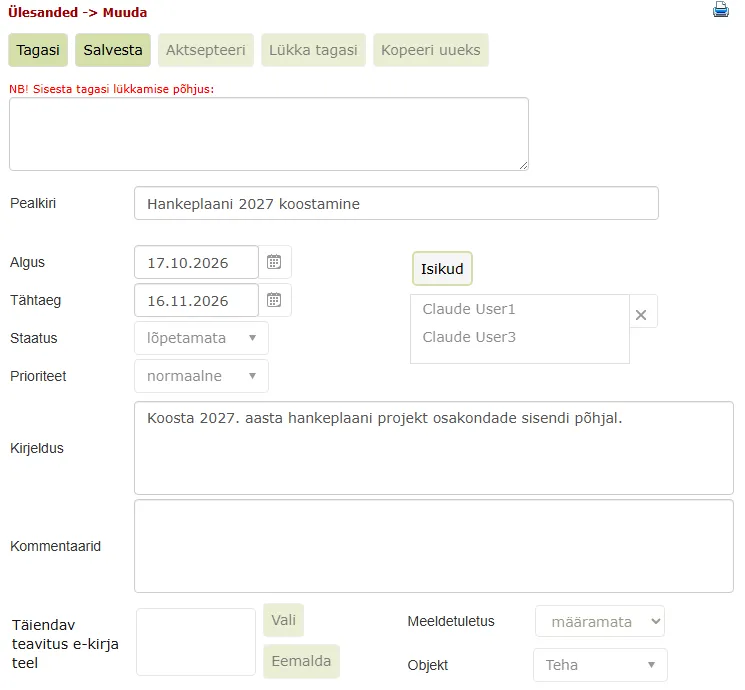
A task opens in the view Ülesanded -> Muuda (Edit). At the bottom of the card, the Ajalugu (History) panel shows the task's last event, its time and who did it.
The buttons depend on who is viewing the task:
- creator: Tagasi, Salvesta, Aktsepteeri, Kopeeri uueks (Copy as new) and Kustuta;
- performer: Tagasi, Aktsepteeri, Lükka tagasi (Decline) and Kopeeri uueks. A performer can add and delete attachments but cannot change the task's status, priority, persons, reminder or relations.
A user who is not part of the task does not see it in their list.
Accepting and declining
To take on the task, press Aktsepteeri. No confirmation is asked; the card stays open and an event is added to the history.
To decline the task, press Lükka tagasi. A text box "NB! Sisesta tagasi lükkamise põhjus:" (Enter the reason for declining) appears on the card. Please write the reason and press Salvesta. A decline without a reason is not saved. After saving, the list opens, the task leaves the performer's list and the reason is added to the task's comments.
Copying and deleting
To copy a task, press Kopeeri uueks and confirm "Kas soovid valitud ülesannet kopeerida?" (Copy the selected task?). The copy's card opens.
To delete a task, press Kustuta and confirm "Kas soovid valitud ülesannet kustutada?" (Delete the selected task?). The task goes to the trash can and the list opens.
Tagasi returns to the list without saving changes.
Task statuses
A task's Staatus can be kinnitamata (unconfirmed), kinnitatud (confirmed), lõpetamata (not finished), lõpetatud (finished) or peatatud (on hold). A new task is lõpetamata. The list shows unfinished tasks.
Last modified: 17 October 2026, 11:05:57