Amphora 15.3 Version Guide
- Version 15.3.0
- Enhanced rejection of coordination tasks
- Responsible person panel can now be configured as mandatory
- Sequential execution procedure creation enhanced - repeated person addition allowed
- Fixed deletion time display in Trash module
- Additional files no longer disappear when saving document
- Full path of catalog in document and case editing view
- Fixed changing main file PDF version name when changing main file name
- Enhanced signing and existence of signing tasks in document editing and list view
- Fixed case composition count in case (Draft bills awaiting agenda quick query)
- Enhanced sending documents via DHX
- Document next creation changed
- Fixed archive file restoration where object belonged to multiple archive files
- Forms can now be made active/passive through user interface
- Fixed changing form public view type
- Two new columns in Admin - Users view
- Fixed document saving
- Content is now always non-public when adding transmission
- Enhanced adding default responsible person to Document and Case forms
- Enhanced adding objects to archive files
- Other changes and fixes
Version 15.3.0
Enhanced rejection of coordination tasks
When a coordination task (procedure or delegation) is sent to a user and the user selects "no" or "dissenting opinion" as their position, Amphora creates a task for the procedure creator. Previously, such a task type was For information, but starting from version 15.3, a For completion task is created.
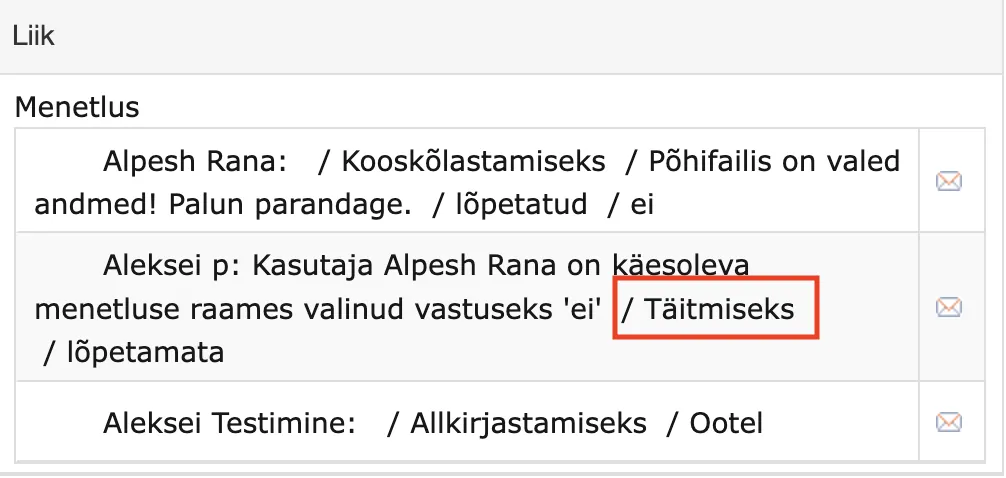
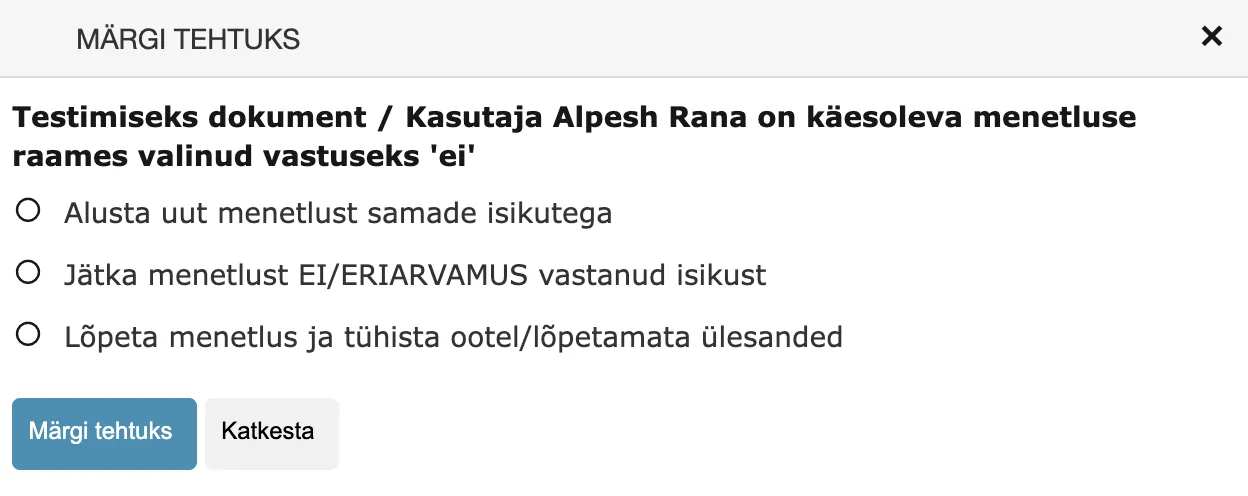
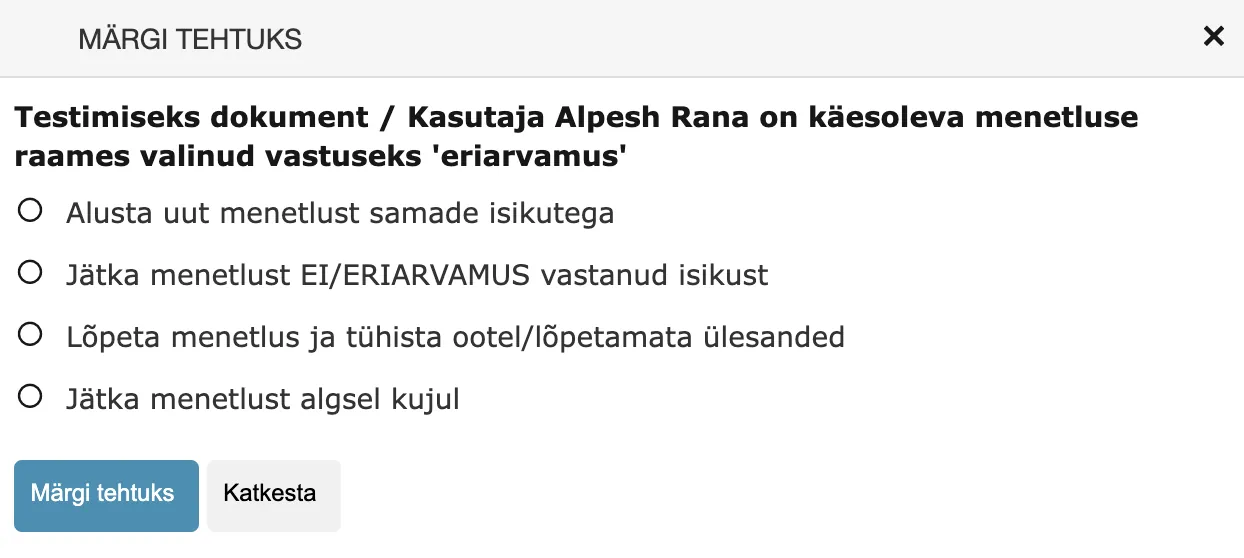
Starting from this version, the completion task sent to the procedure creator has multiple options. Sequential execution procedures have a total of three options, while parallel execution procedures and delegations have four options.
Sequential execution procedure options:
Parallel execution procedure and Delegation options:
So now the procedure creator can choose what exactly to do with this procedure or delegation. Previously, the procedure creator had only one option in this situation – complete their own task and the procedure or delegation would continue.
Start new procedure with same persons – Amphora completes the current procedure or delegation and removes all tasks that are not in "Completed" status. Creates a completely new procedure or delegation with the same persons.
Continue procedure from person who answered NO/DISSENTING OPINION – Amphora adds back to the procedure or delegation composition the person who rejected the coordination task (so that after corrections they can coordinate again) and other persons in the procedure remain.
Complete procedure and cancel pending/unfinished tasks – Amphora completes the procedure. This means deleting all tasks with "Unfinished" or "Pending" status and adding the procedure/delegation end date.
Continue procedure in original form - This option is available only for parallel execution procedures and delegations. Essentially, this is the old solution where the procedure/delegation continues and nothing changes (no one is removed/added, other tasks are not marked as done). We added this option in version 15.3.1 because some clients complained that in some situations it is necessary to continue the procedure/delegation unchanged.
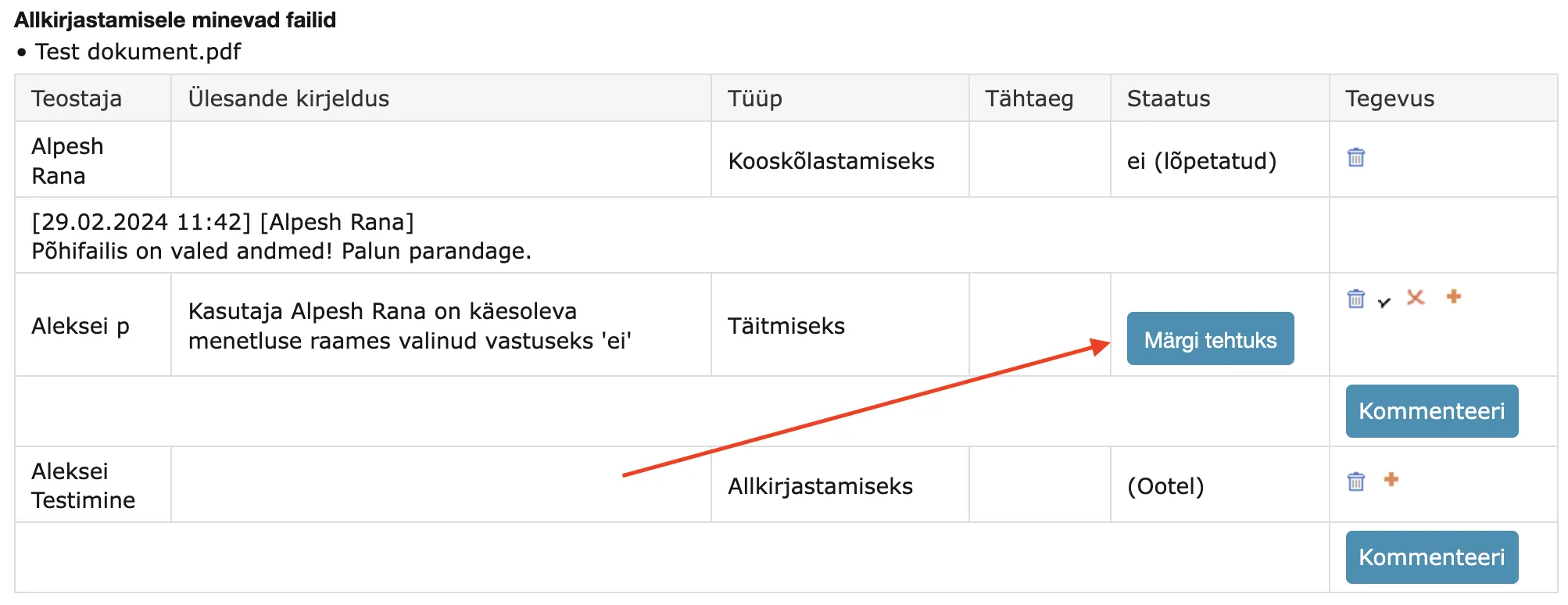
In addition, we also enhanced completing completion tasks in the procedure/delegation detail view. Now there is a separate Mark as done button (previously there was simply the possibility to add a "Done" checkbox).
 !!! warning "NB!"
This functionality works in Documents, Case view, and Invoices modules.
!!! warning "NB!"
This functionality works in Documents, Case view, and Invoices modules.
** This development was supported by Amphora client Saue Municipality Government. ** ** Thank you! **
Responsible person panel can now be configured as mandatory
In Documents and Case view module forms, it is possible to enable the Responsible person panel. This can be done under Admin – Form setup form panels.
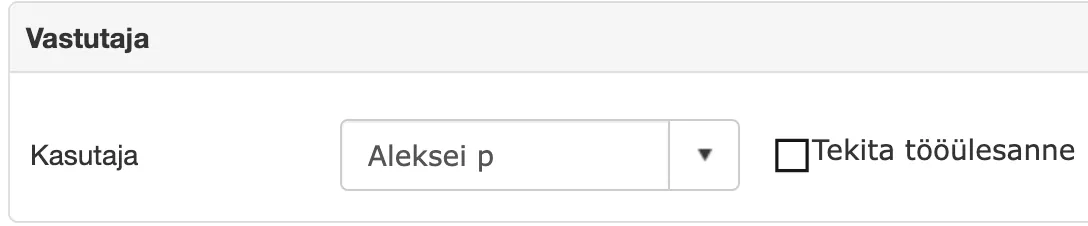
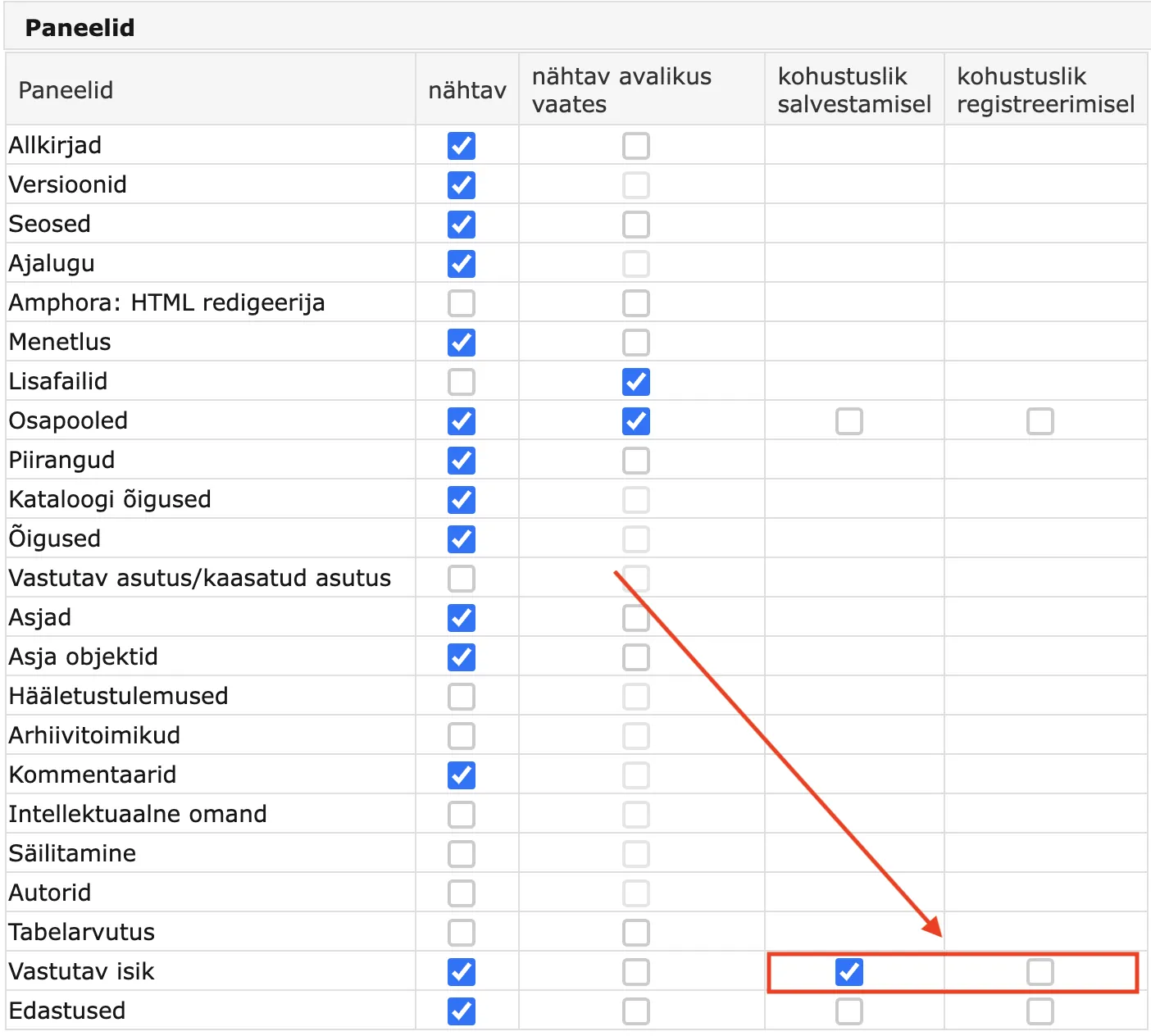
Starting from version 15.3, it is possible to make the Responsible person panel mandatory when saving or registering a document or case. Mandatory Responsible person panel means that when saving or registering a document/case, a responsible person must be selected. If no responsible person is selected, Amphora displays the following message when saving or registering the document/case - Adding responsible person is mandatory.
This can be configured for each form separately. In form settings (Admin – Form setup), under panels, next to Responsible person, you need to enable the mandatory when saving option. If drafts are allowed in the catalog counter settings, then it is worth enabling the mandatory when registering option. You can also enable both options at the same time.
 ** This development was supported by Amphora client Saue Municipality Government. **
** Thank you! **
** This development was supported by Amphora client Saue Municipality Government. **
** Thank you! **
Sequential execution procedure creation enhanced - repeated person addition allowed
When creating a sequential execution procedure, it is now possible to select the same user multiple times within the procedure. This functionality allows easily composing procedures where one user must complete multiple tasks.
When selecting a user, the selected user remains in the left box and it is possible to select this same user again. In previous versions, after selecting a user, this user disappeared from the left box and it was not possible to select them again.
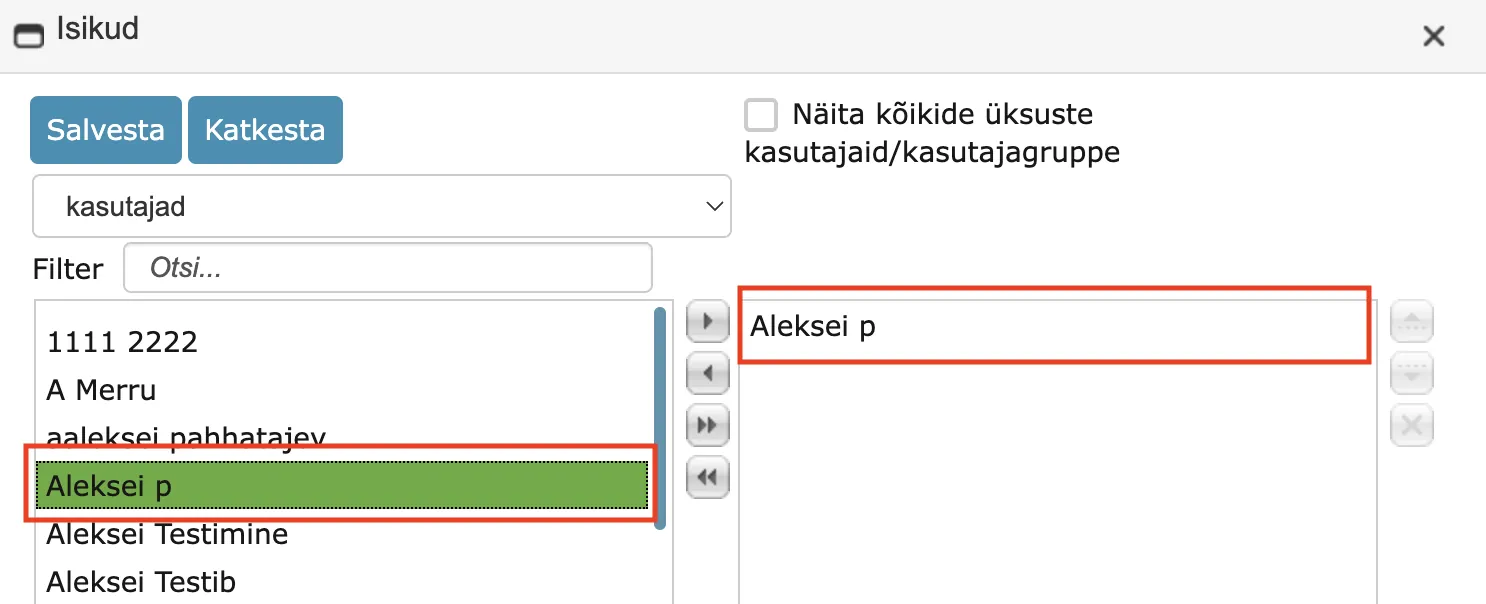 Similarly, it is possible to select persons multiple times (for sending to Self-service Portal).
This functionality only works with sequential execution procedures. Before selecting users, the "Sequential execution" procedure mode must be enabled. For parallel execution procedures and delegations, the new functionality does not work.
Some examples of how users/persons can now be added: UserA UserB UserB
UserB UserA UserB
UserB UserB UserA
NB!
The same user/person can be selected multiple times consecutively.
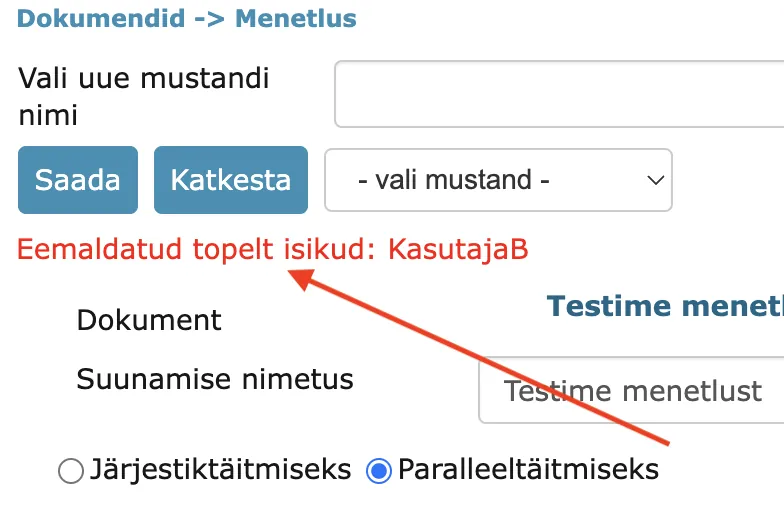
If sequential execution was selected when adding the procedure and repeated users were selected, then after adding users and changing the procedure mode (Sequential execution -> Parallel execution), Amphora automatically removes all duplicate persons.
NB!
This functionality works in Documents, Case view, and Invoices modules.
** This development was supported by Amphora client Saue Municipality Government. ** ** Thank you! **
Fixed deletion time display in Trash module
In the Trash module, deleted objects have a date – the object deletion date. In previous versions, Amphora displayed the object deletion date like this – 12.02.24 14:32 (year in abbreviated form). In the new version, it is displayed like this – 12.02.2024 14:32.
Additional files no longer disappear when saving document
In previous versions, it could happen that a user added additional files to a document, but ultimately these additional files were not visible with the document. Such a situation could occur when, for example, two users open a document at the same time, the first user adds additional files and saves, the second user also makes some changes and saves the document after the first user. Since the user who saved last did not yet see the additional files, Amphora did not consider the additional files added by the first user when saving. The same situation could also occur with documents received from Spoku. The added additional files were visible in the penultimate version, but these additional files were not in the last version.
In version 15.3, we added the necessary controls so that in such a situation, additional files would also be visible in the last version of the document.
Full path of catalog in document and case editing view
In document and case editing view, there is a catalog field that displays the selected catalog. However, many administrators complained that it is difficult to understand which institution's document it is, since many subsidiaries have similar document trees. In version 15.3, we made the catalog full path visible. To see the catalog full path, you need to hover the mouse cursor over the catalog name field.

Fixed changing main file PDF version name when changing main file name
In previous versions, when changing the main file name, Amphora did not change the converted PDF file name. The old file name remained, which could cause problems, for example, when signing the PDF file – the PDF file with the wrong name ended up in the signature container.
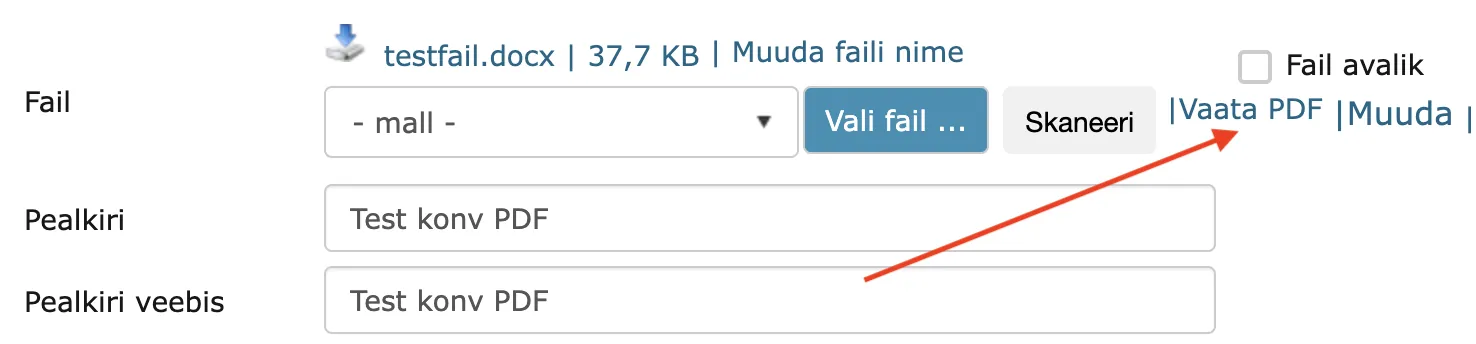 In version 15.3, this problem has been fixed.
Enhanced signing and existence of signing tasks in document editing and list view
Often a situation could occur where a signing task was sent to a user and the user signed this document outside the task, i.e., in the document editing or list view. Previously, in such a situation, Amphora did not complete the task and the procedure/delegation remained in unfinished status.
In version 15.3, this problem has been solved. If a user has one signing task and they add a signature in the document editing or list view, then Amphora automatically completes their signing task as well. In the document signing window, the user immediately has those files selected that were selected when creating the procedure.
Fixed case composition count in case (Draft bills awaiting agenda quick query)
With the "Draft bills awaiting agenda" quick query, it is possible to quickly find draft bills that do not belong to any other case composition (Session agenda composition). Case objects have a system attribute that counts how many case compositions this case belongs to. "Draft bills awaiting agenda" outputs only those cases that are registered with "Draft bill" forms and case composition count is 0.
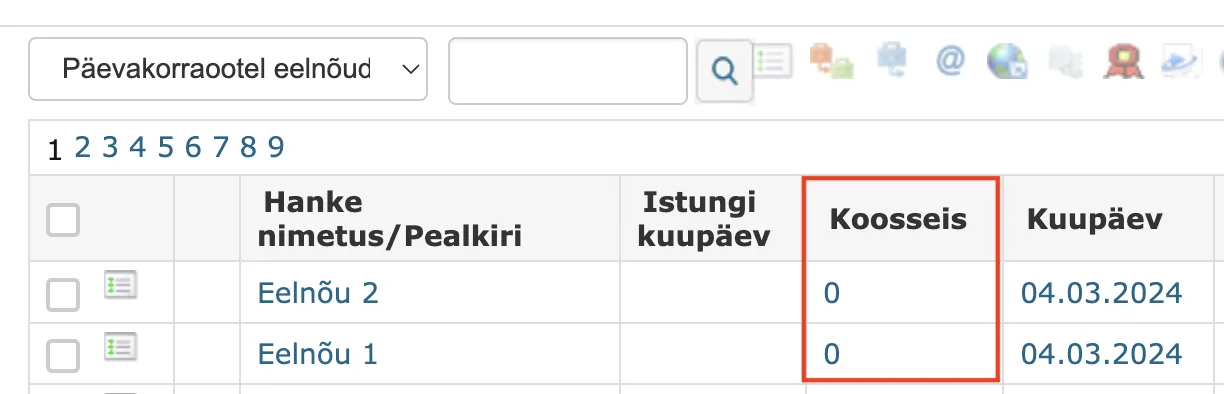
In previous versions, case composition count was calculated somewhat incorrectly. The problem occurred in a situation where a draft bill was removed from another case composition. Case composition count was not updated (value remained 1) and subsequently this draft bill was not findable with the "Draft bills awaiting agenda" quick query.
Enhanced sending documents via DHX
When sending DHX documents, filling recipient data has been enhanced - contact data added in the transmission panel is also taken into account. Recipient data (address, contact data) is now added to the DHX capsule. In addition, the recipient's personal code is now also displayed in the DHX module sent document capsule reading view (previously this was not displayed).
Document next creation changed
When creating a document next, the outgoing transmission content mode is now changed to "Text editor" and the "All files" option is activated. This change excludes the situation where wrong options are selected in the next document transmission. For example, if "Comment to recipient" was selected instead of "Text editor" in the original document transmission, then this selection was also carried over to the next document transmission and the user might not have noticed this and the sent email content had the wrong text. The same situation was also with files (attachments).
Fixed archive file restoration where object belonged to multiple archive files
In previous versions, it was possible to add one object to multiple archive files. Thanks to this, a situation could arise where an object was, for example, in two archive files and both archive files were archived. However, when one of these archive files was restored, the object was also restored from the archive, although the other archive file was archived. Such a situation was obviously not correct, since one archive file was still archived, so the object should have been in archived status as well.
In version 15.3, this problem has been fixed. If an object belongs to multiple archive files and at least one archive file is archived, then the object is also in archived status.
Forms can now be made active/passive through user interface
In Admin – Form configuration a form can now be made passive, and a passive form active again. A passive form is no longer offered when creating objects; existing objects with that form stay visible and editable.
Fixed changing form public view type
Changing a form's public view type did not move the objects already saved with that form; they stayed under the old type in the public view. From 15.3 all objects of the form move to the new type at once. This applies to Documents and Case view forms.
Two new columns in Admin - Users view
The Users view in the Admin module has two new columns: personal ID code and mobile number. User data can now be checked without opening the user.
Fixed document saving
Rarely, a document could disappear from the list view and search after saving, usually when several users changed and saved it at the same time. Version 15.3 adds a check that prevents this.
Content is now always non-public when adding transmission
A new delivery no longer gets the content-public tick automatically when the document's text editor content is public, because the delivery content may differ from it. The user can tick it when needed.
Enhanced adding default responsible person to Document and Case forms
Version 15.2.0 added a default responsible person with a task on Document and Case forms (see 15.2). In this version, we enhanced this functionality a bit. Now it is possible to add the Create work task checkbox in form settings without adding a responsible person. If such a setting is made, then the responsible person is not selected by default, but when the user manually selects a responsible person, the Create work task checkbox is automatically added.
Enhanced adding objects to archive files
In version 14.8, we updated the date priority based on which objects are displayed and selected in archive files.
The date priority is as follows: Not_valid_after (Valid until) > Document_date (Document date) > RegisterTime (Registration time) > Create_time (Document creation date).
It turned out that the Not_valid_after (Valid until) date should not be considered for every form. Amphora should consider the Valid until date only for contract forms (Contract loading and Contract writing). We made an enhancement so that Amphora considers the Valid until date ONLY for contract forms. If such a field exists, for example, on some Spoku form or Legal act form, then it is not considered in the archive file object selection view.
Other changes and fixes
- Fixed displaying the "Delete" link in the Cases panel in case detail view - when one deletion was made, the links disappeared from other rows.
Before the change:
 After the change:
 2. When sending DHX, spaces are removed from the beginning and end of the postal code to comply with the required standard.
 - Fixed user group input when running reports. In report settings, it is possible to make the user group selection visible, which was important for some reports. In previous versions, this option did not work – the selected user group did not reach the report.
- Fixed DHX document registration – when registering a DHX document received as a new version of the document, the registered document is now removed from the DHX module. Previously, the registered DHX document remained in the DHX module as if it had not been registered.
- Invoice procedure fix - rejected task was created partially and was not visible correctly in the procedure view. The procedure creator was sent a task, but this task was not visible in the procedure view.
- Global search enhanced – support for non-indexed objects has been added. In previous versions, only indexed objects were displayed in search results (object indexing could take up to 60 minutes). Therefore, when searching for an object, especially after saving, it could seem that such an object does not exist in the Amphora environment or that this object is faulty. For such objects, every word occurrence is now searched in either the object name or reference.
- Increased the volume transmitted in the background when saving document text editor content - previously 2MB volume content transmission to server was supported, now this restriction has been removed and the max restriction is 2GB (error occurred, for example, when adding a transmission to a document, when text editor content transmission to server occurred first to preserve changes)
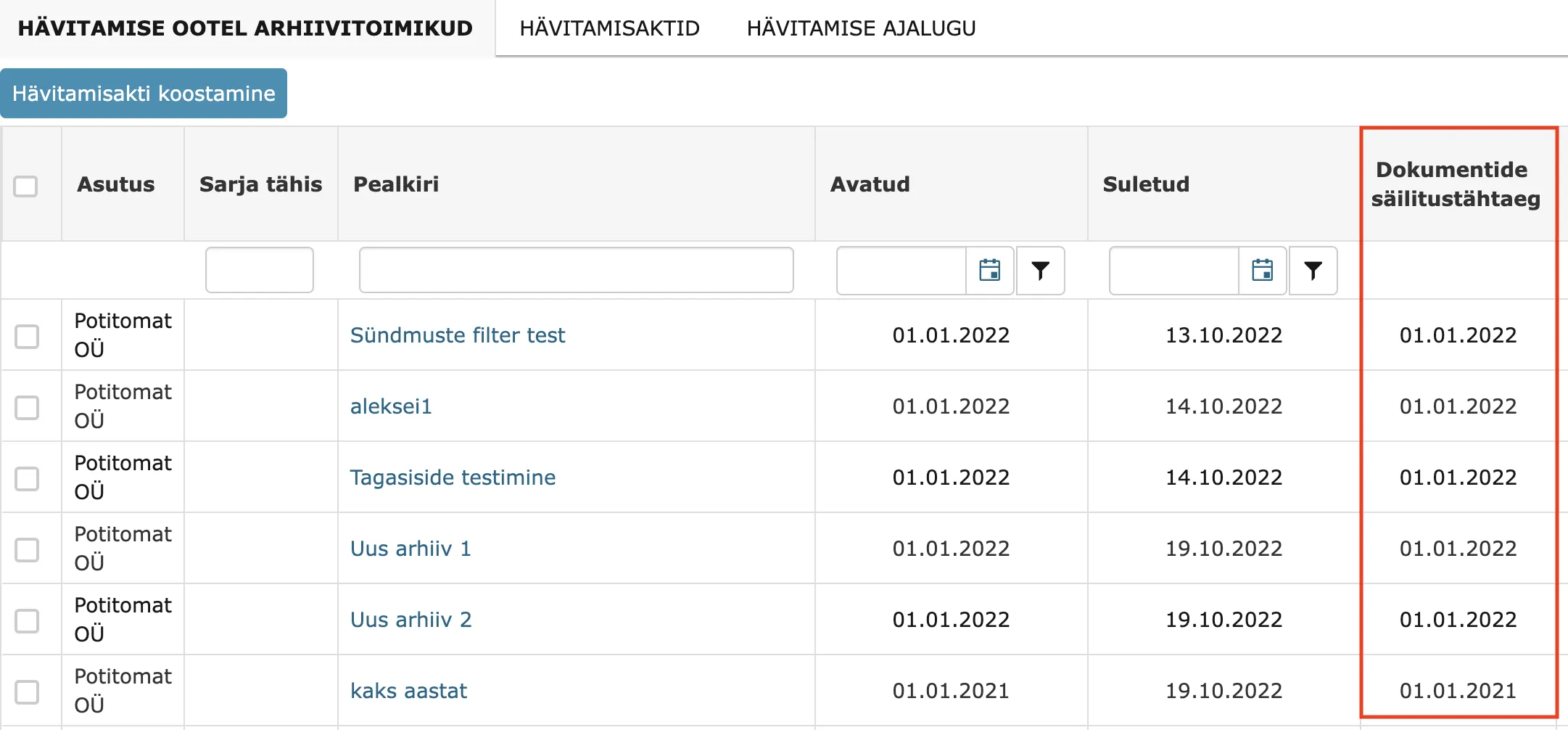
- Fixed displaying Document retention deadline in the archive files awaiting destruction view (Archive module - Destruction). In previous versions, this column was always empty.
 9. The header design in the Amphora environment has changed slightly.
In previous versions:
9. The header design in the Amphora environment has changed slightly.
In previous versions:
 In new version:
 10. TECHNICAL CHANGE! Enhancement of Eservice queries - enhanced metadata and file access rights control. If the user lacks direct rights, but the document itself and/or file is public, then data is output.
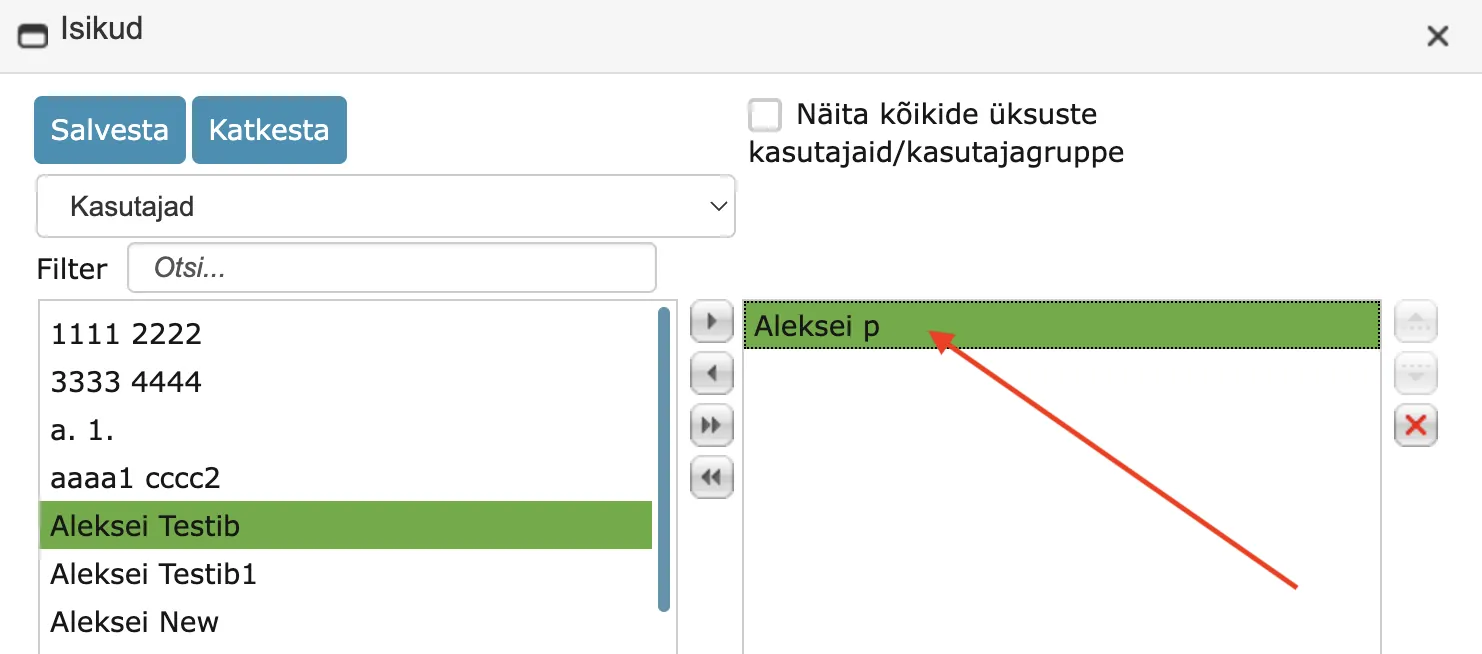
 - Enhanced procedure/delegation person selection. Now it is possible to remove selected persons (right box) with double-click.
- Fixed case archiving - not all cases reached the search. Previously, it was not possible to select cases (these cases did not appear in the search) where at least one case object was in another archive file composition. Thanks to this, many cases were not visible in the archive file search. In version 15.3, this problem has been fixed – now such cases are visible.
Last modified: 09 October 2026, 04:37:04