Amphora 15.2 Version Guide
- Version 15.2.0
- Main file field can now be removed from Document Upload forms
- Transmissions panel can now be made mandatory
- Adding default responsible person to Document and Case forms
- Support for adding permissions to Case view module objects added
- New notification type "Failed transmissions"
- BDOC signing support has been removed
- Removing spaces around person's first name, last name and personal code in Persons module
- Business Registry search improvements/changes
- Fixed adding recipient email address in incoming transmissions
- Fixed recipient/sender display in Public view for letters with old Correspondence module forms
- Minor changes
Version 15.2.0
Main file field can now be removed from Document Upload forms
Until now in Amphora, it was not possible to remove the main file field from Document Upload forms. After form creation, the main file field could be removed, but when saving the form, Amphora added this field back.
In version 15.2, we made a change so that it is possible to remove the main file field from already created Document Upload forms. This cannot be done before the form's first save, because Amphora adds the main file field only after the first save.
We also added the necessary control - if at least one document has already been uploaded with the form where the main file exists, then the main file field cannot be removed. Otherwise, this would cause data loss.
 ** This development was supported by Amphora client Viljandi Municipality Government. **
** Thank you! **
** This development was supported by Amphora client Viljandi Municipality Government. **
** Thank you! **
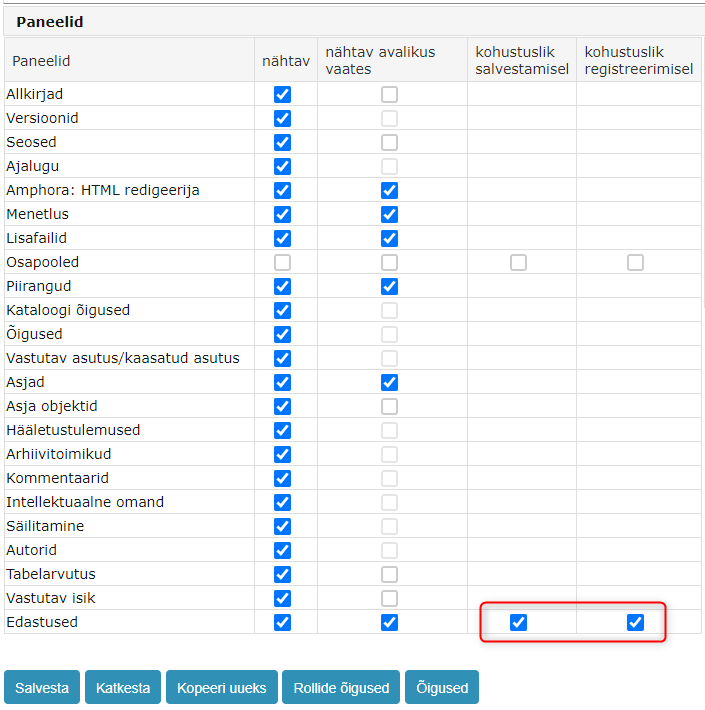
Transmissions panel can now be made mandatory
Mandatory Transmissions panel means that to save the document, the document must have at least one transmission. Here it does not matter whether the transmission is Incoming or Outgoing.
If the document is missing a transmission, Amphora displays the following error message when saving - Adding transmission is mandatory.
This can be configured for each form separately. In form settings (Admin – Form setup), under panels, next to Transmissions, you need to enable the mandatory when saving option. If drafts are allowed in the catalog counter settings, then it is worth enabling the mandatory when registering option. You can also enable both options at the same time.
 ** This development was supported by Amphora client Viljandi Municipality Government. **
** Thank you! **
** This development was supported by Amphora client Viljandi Municipality Government. **
** Thank you! **
Adding default responsible person to Document and Case forms
In form settings (Admin – Form setup), it is now possible to assign a default responsible person to each Document and Case form. In addition, it is possible to mark next to the responsible person that Amphora should create a procedure task for the responsible person (Completion task).
NB!
The Responsible person panel must be activated on the form. This can be done similarly in form settings (Panels).
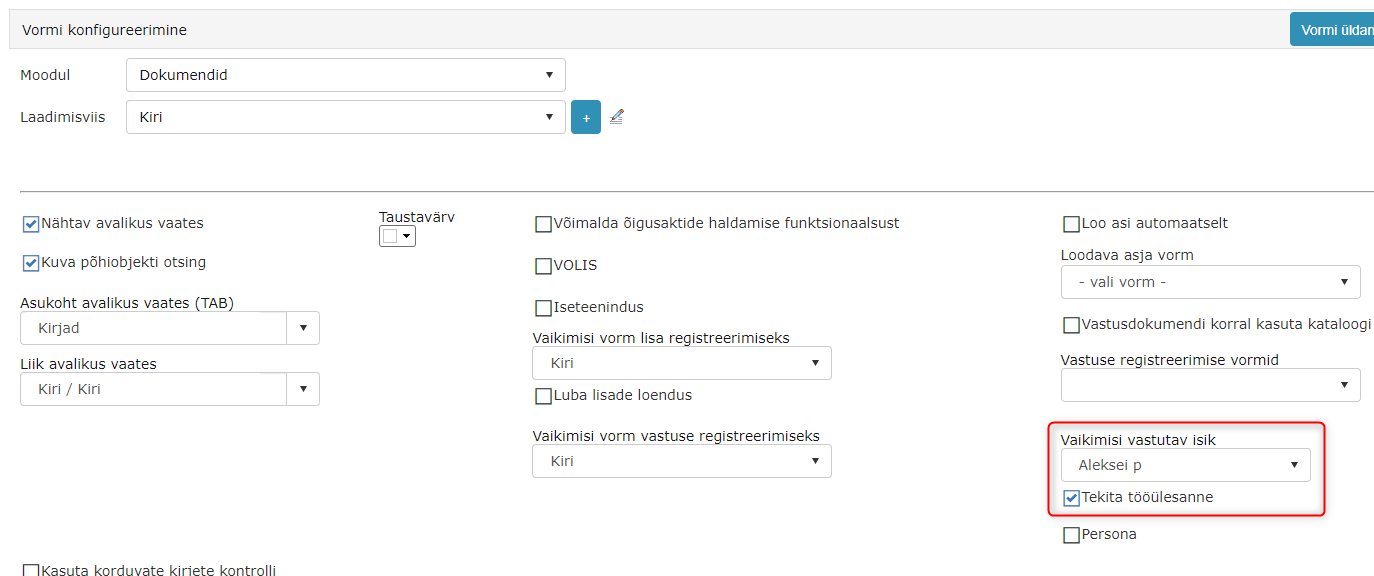 If a responsible person is selected on the form and the Responsible person panel is activated, then when creating a new document with this form, Amphora always adds the responsible person (If the Create work task checkbox is added, then it adds this checkbox as well). However, it is always possible to change the responsible person or remove them altogether.
** This development was supported by Amphora client Harku Municipality Government. ** ** Thank you! **
Support for adding permissions to Case view module objects added
In the Documents module, it has long been possible to add separate permissions to a specific document. For this, it was necessary to enable the Rights panel in form settings (Admin – Form setup). In the Rights panel, you could select users/user groups and add the desired permission to them.
Starting from version 15.2, the same support has been added to Case view module objects. In Admin – Form setup – Case view module form settings, you need to enable the Rights panel.
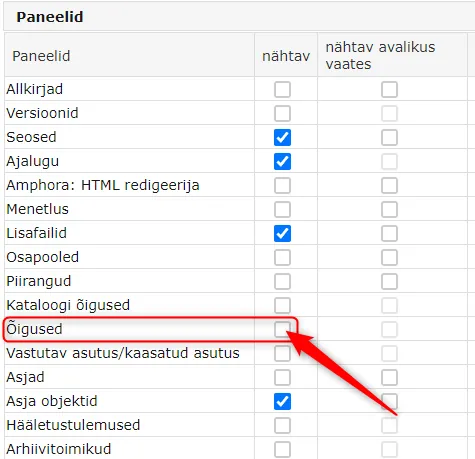 In the view of an object created with the same form, a Rights panel appears, where using the Add (1) button it is possible to select specific users or user groups and then add (2) the desired permission to them. After adding permissions, the Case view module object must be saved.
 !!! warning "NB!"
The permission added through the Rights panel is stronger than the user's personal or user group permission. So this functionality makes sense to use in a situation where a user has, for example, been given a forbidden permission to a catalog, but they need to be able to modify/see one object.
!!! warning "NB!"
The permission added through the Rights panel is stronger than the user's personal or user group permission. So this functionality makes sense to use in a situation where a user has, for example, been given a forbidden permission to a catalog, but they need to be able to modify/see one object.
** This development was supported by Amphora client Saue Municipality Government. ** ** Thank you! **
New notification type "Failed transmissions"
In user personal settings, there is a Notifications panel where you can select which notifications Amphora sends. In this version, one new notification type was added to this list – Failed transmissions.
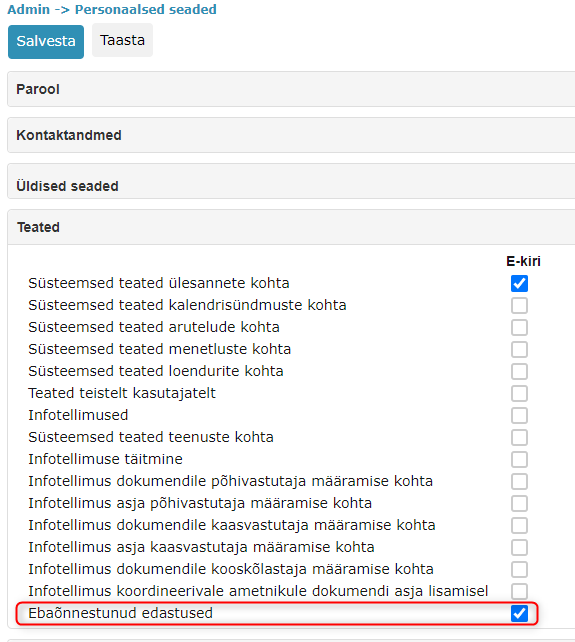 If this notification type is enabled, then Amphora sends a notification about failed email sending to the user's personal email address. So when a user sends an email from the Amphora environment (via @ icon or transmission panel) and for some reason the email sending fails (Status – Sending failed), then a notification about this is sent to this user's email address. For one transmission, Amphora sends only one notification.
Information about this notification also remains in the Transmissions panel.
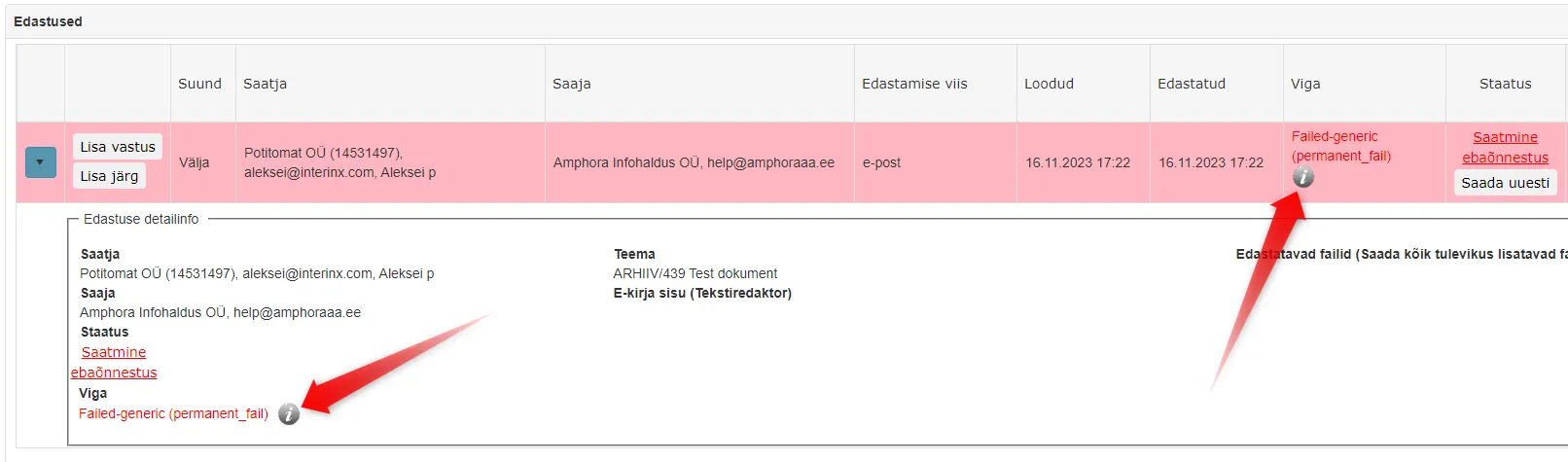 Clicking on the icon opens the sent notification's email logs.
The default notification content is:
An error occurred while sending the transmission
Subject: TEST/23 Test document
Recipient: aleksei443@interinx.com
Sending time: 14.11.2023 11:58
Error: Failed-bounce (permanent_fail)

View <- direct link to document
The notification content can be changed under Admin – Translations. Keyword - NOTIFICATION_Delivery_Failed_Body.
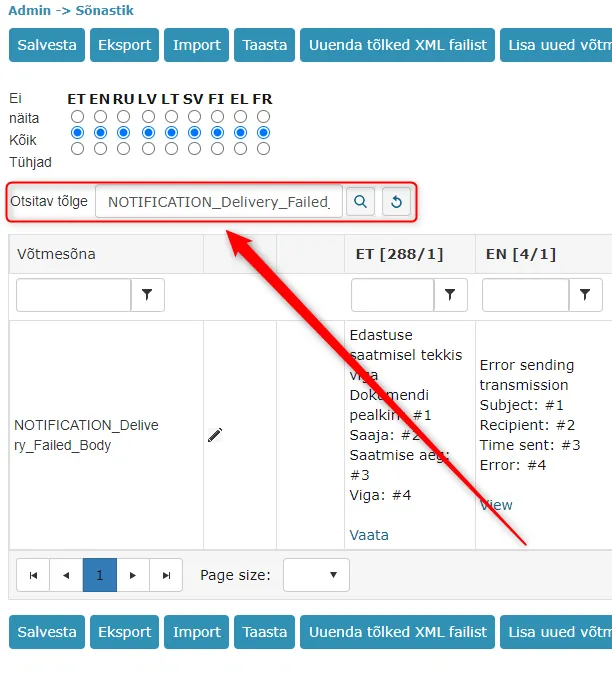 We recommend enabling this notification type for users who constantly send emails from the Amphora environment. This way, the user can immediately know when sending fails and can quickly react to it.
** This development was supported by Amphora client Rae Municipality Government. ** ** Thank you! **
BDOC signing support has been removed
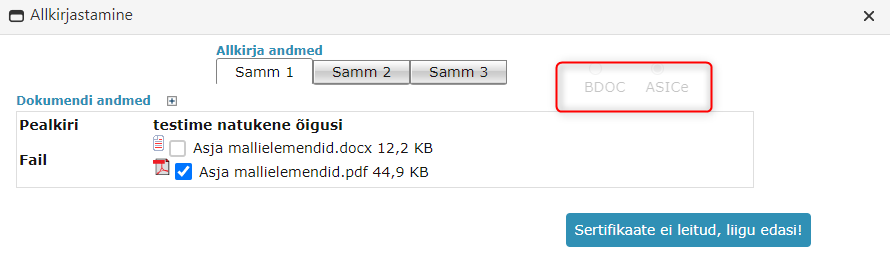
Starting from 01.11.2023, it is no longer possible to create digital signatures in BDOC-TM (.bdoc) format. However, it is still possible to add signatures to existing .bdoc signature containers. You can read more about this HERE
In connection with this, we made the format selection inactive. In the future, when creating a signature container, an .asice signature container will be created.
Removing spaces around person's first name, last name and personal code in Persons module
When copying data or manually writing data, a space could accidentally appear before or after the first name, last name, and personal code. This in turn could cause problems, for example, with Self-service Portal login or person selection when creating procedures. In this version, we added a control when saving a person – if Amphora detects a space around the first name, last name, or personal code, it automatically removes it.
Business Registry search improvements/changes
In the Institutions module, starting from version 15.1, it is possible to use Business Registry search when adding an institution (previously was Credit Info search). In the last month, we found some problems and these problems have been fixed in this version.
- Inactive communication means (data) are no longer added. For example, an institution may have multiple email addresses and one of them is no longer active – such an email address is no longer added.
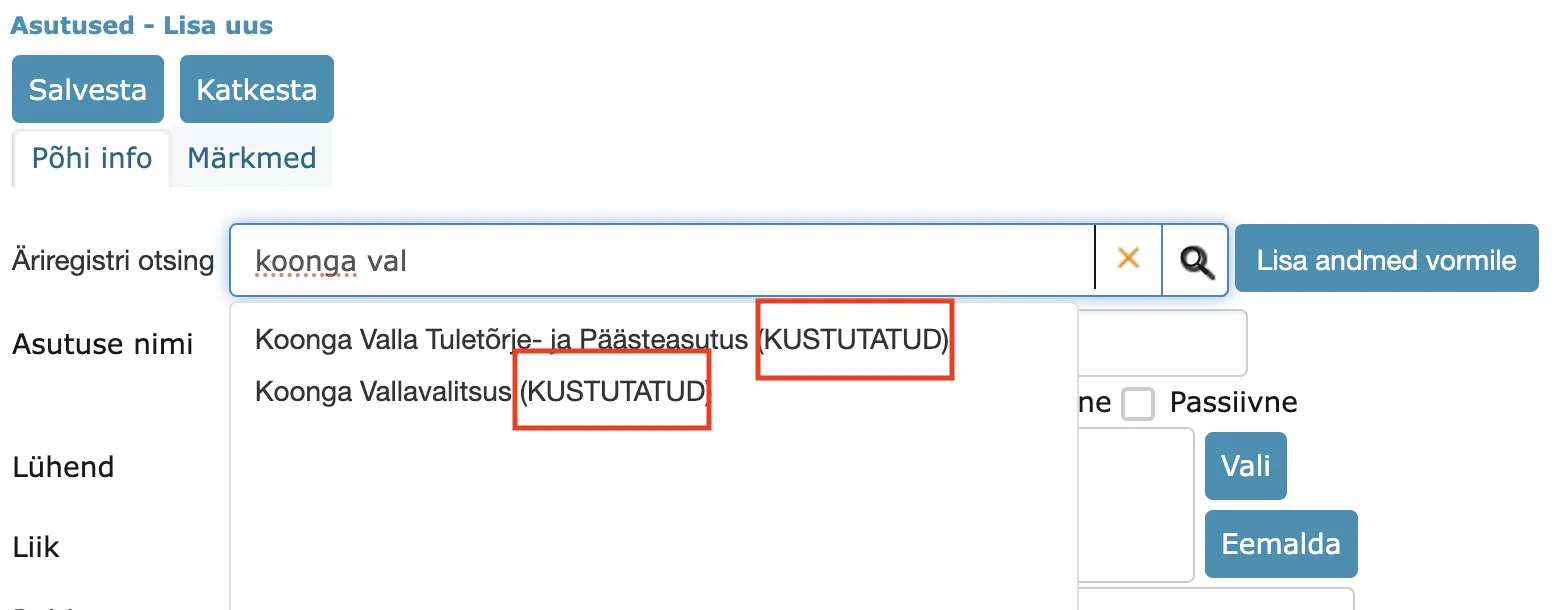
- For a deleted institution, (DELETED) text is now displayed in the search.
- In the previous version, when adding a new institution, Amphora displayed "Access denied for KiCompany!" error message if the institution was missing a VAT code. In this version, Amphora no longer displays this error message.
Fixed adding recipient email address in incoming transmissions
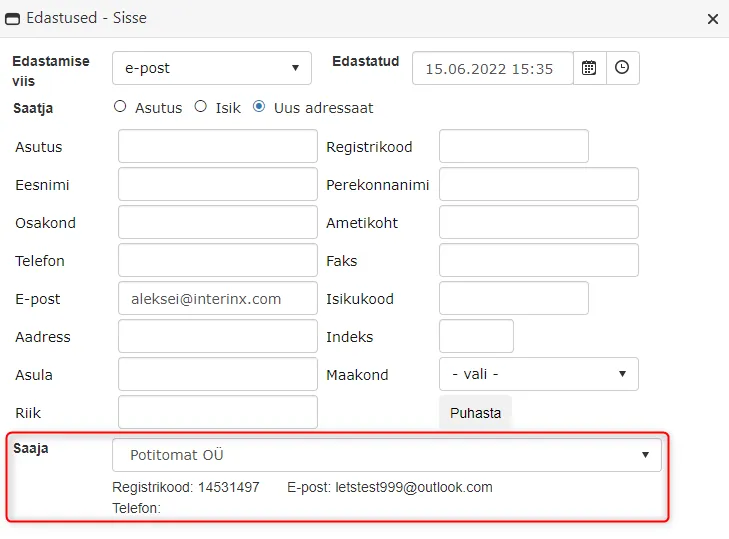
When registering an email from the Emails module or from Outlook, a situation may sometimes arise where the recipient data contains only the recipient's name and the email address is missing. Previously, there was an Amphora bug that did not allow adding an email address to the recipient in such a situation. The recipient institution selection did not add the email address. In version 15.2, this bug has been fixed.
Fixed recipient/sender display in Public view for letters with old Correspondence module forms
The problem could occur with old Correspondence module DHX forms - Document sent via DHX and Document received via DHX. For some letters, Amphora displayed the name of the institution using Amphora in the Recipient/Sender column in the Correspondence tab in the public view. We made enhancements and now the external institution's name is displayed in the public view (to whom it was sent or who sent it).
Minor changes
- Authentication logs enhanced. Amphora now logs the user's login method (ID-card, Smart-ID, Mobile-ID). Currently, this is a database change; it is not possible to see this information in the user interface.
- In unit settings, Amphora no longer displays email domain information if the institution is marked as inactive.
- Fixed history event dates when adding documents via Spoku and E-service - previously the procedure date could be earlier and document addition after that.
- Direct sales invoice addition in Amphora environment enhanced. Starting from 2024, the default VAT rate on the sales invoice form is 22% (currently still 20%).

- Fixed display in the Out of office panel – the time part is no longer considered. All events starting from the next day are displayed.
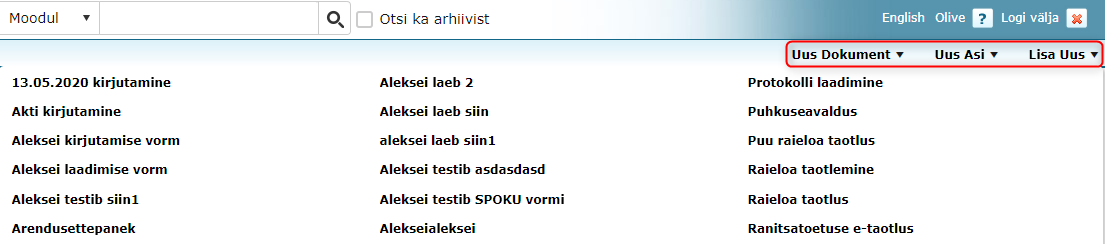
- Fixed quick menu form selection styles. If there are more than 15 document forms, they are displayed in two columns, and starting from 45 forms, they are displayed in three columns. Browser zoom no longer breaks the display (previously links ran partially as transparent text over the rest of the page).
- Enhanced Spoku form modification. A bug could occur in a situation where new fields were added to the beginning of an existing form.
- Telerik components update - 2022.3.1109 -> 2023.3.1010
Last modified: 09 October 2026, 10:25:03