Amphora 14.4 Version Guide
- Version 14.4.0
- Multiple signature containers on one document – fixed
- Email registration from Emails module enhanced
- Removing access restriction "Information holder" value on response document
- Delivery icon update in Documents module list view enhanced
- Changing recipient institution/person of delivery with "Email" delivery method with Sent status prohibited
- Multiple additional files deletion functionality added
- Other changes
Version 14.4.0
Multiple signature containers on one document – fixed
If a document already has a signature container in deconstructed form and the user sends a signing task through process or delegation, then when creating the process/delegation it is possible to choose whether a new signature is added to the existing container composition or a new signature container is created. Creating a new signature container had a problem in previous versions where Amphora did not create a new signature container but added a new signature to the existing signature container composition. This happened in situations where the user signed the document on the front page Routing panel using "picture buttons" (2). Signing through the "Sign" (1) button worked correctly, Amphora created a new signature container.
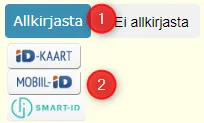 In version 14.4.0, this bug has been fixed. Signing through "picture buttons" now creates a new signature container in such situations.
Email registration from Emails module enhanced
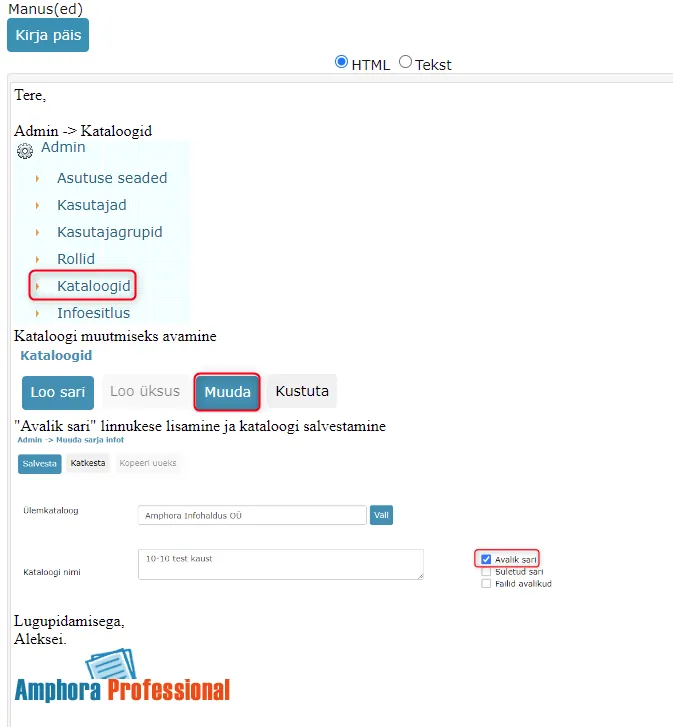
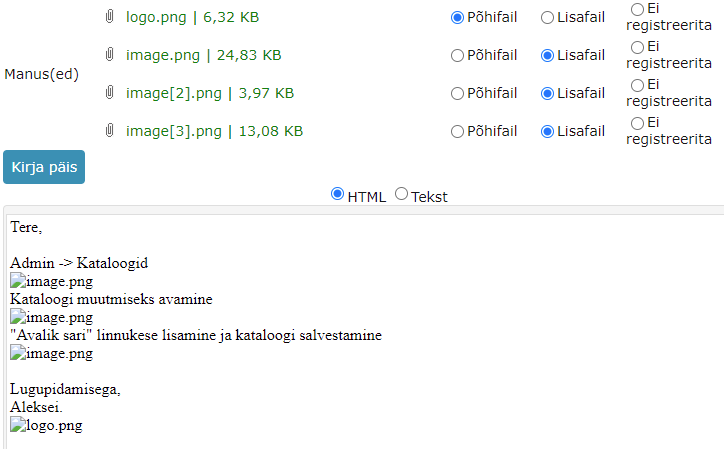
Images in received email content are now converted to base64 format and these images are visible in the text editor. This applies to both IMAP and POP3 protocols. Previously, images in email content were saved as files, which meant these images were not visible in the text editor content. For example, if an email contained many images, then when registering the email, the document had many additional files. Additionally, problems could arise with downloading these files for email accounts configured with POP3 protocol.
Starting from version 14.4.0:
 Previously:
Removing access restriction "Information holder" value on response document
If the original document has access restriction data and a response document is composed, then Amphora copies the original document's access restriction data to the response document. Previously, Amphora copied all data, including "Information holder". Starting from this version, the "Information holder" value is no longer copied to the response document. The reason is that, for example, on a received original document the "Information holder" may be the sender institution of the document and the same institution should no longer be on the response document.
When creating a sequel document, all access restriction data is still copied, including "Information holder".
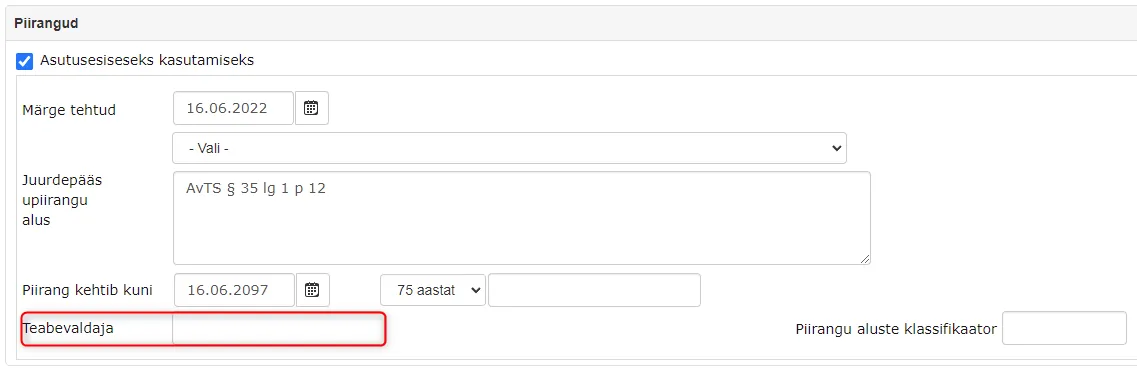 NB! If a response document is added to a catalog that has a default access restriction with "Information holder", then Amphora automatically adds the default "Information holder" value.
Delivery icon update in Documents module list view enhanced
In the Documents module list view, delivery icons are displayed in the files column
 which allow the user to know whether document sending has been successful or not. In previous versions, there were problems with updating these icons. In some situations, Amphora did not update icons after delivery status changes. For example, when sending an email, the delivery might initially have "Sending failed" status with temporary_fail (temporary error) log and with the next sending attempt the delivery status changed to "Sent" status, but in the Documents module list view there was still a red icon.
In this version, we added an automatic check that checks delivery statuses every hour and updates delivery icons according to changes.
Changing recipient institution/person of delivery with "Email" delivery method with Sent status prohibited
If an email has been successfully sent out from Amphora, then the recipient email address of this delivery should no longer be changed. The ability to change the recipient email address in the "New addressee" tab was already blocked previously, but changing Institution/Person was still allowed in the previous version. Changing Institution/Person also changed the recipient email address. In version 14.4.0, such a possibility no longer exists.
Multiple additional files deletion functionality added
Starting from this version, it is possible to delete multiple document additional files at once. Additional files now have checkboxes where you can add checkmarks and thus mark additional files that need to be deleted. It is also possible to add checkmarks to all additional files at once (1). To delete selected additional files, you need to press the "Delete" button (2). It is still possible to delete additional files one by one using the "Delete" link (3).
 This functionality makes life easier in situations where a document has many additional files and you need to delete most/all additional files.
** The implementation of this development was supported by Amphora client Saue Municipality. ** ** Thank you! **
Other changes
Document export (Documents module -> Export) enhanced for the National Archives. In export XML file we added new elements to Additional Files (ItemFile) and Signature Container (SignatureConteiner) composition:
- Crc - now always 32 characters long
- CrcAlgorithm - MD5
Last modified: 09 October 2026, 10:25:03