Forms for HR management (coming soon)
Important
The new self-service portal is coming soon and the HR forms are being prepared. The status of each form is shown below. How to use the portal in general is described in New self-service portal.
Contents
The forms and the portal are in Estonian; the names below are glossed in English.
1. Who these forms are for
The HR forms are for employees who have no Amphora user account, for example staff of schools and kindergartens. The employee submits the application in self-service and Amphora registers it in the right folder at once. The organisation sets up how the application is handled (for example the manager's approval, HR's execution and an order).
HR processes and the legal requirements are described in more detail in Personalitöö Amphoras (in Estonian).
2. Forms
In the new self-service portal an employee can submit the following HR forms.
| Form | What it is for | Status |
|---|---|---|
| Põhipuhkuse avaldus (annual leave application) | Application for annual leave. | ready |
| Õppepuhkuse avaldus (study leave application) | Application for study leave, based on the school's notice; the notice must be attached as a file. | ready |
| Lapsepuhkus (child leave) | Application for child leave. | ready |
| Isapuhkus (paternity leave) | Notice to the employer of paternity leave (applied for through the Social Insurance Board). | ready |
| Vanemapuhkuse avaldus (parental leave, formerly lapsehoolduspuhkus) | Notice to the employer of parental leave. | ready |
| Muu puhkuse avaldus (other leave) | Application for any other leave type. | ready |
| Puhkuse muutmine või katkestamine (changing or interrupting leave) | Changing the dates of agreed leave or interrupting it. | ready |
| Lähetuse taotlus (business trip request) | Request to be sent on a business trip. | ready |
| Lähetuskorraldus (business trip order) | Arranging a business trip. | ready |
| Lähetuse kuluaruanne (trip expense report) | The trip's costs with receipts. | in preparation |
| Koolitustaotlus (training request) | Request to attend training, with cost and deputy. | ready |
| Maksuvaba tulu avaldus (tax-free income application) | Application for the tax-free income allowance in payroll. | ready |
| Kulude hüvitamine (expense reimbursement) | Reimbursement of costs the employee paid, with receipts. | in preparation |
| Töölepingu lõpetamise avaldus (resignation) | The employee's application to end the employment contract. | ready |
| Uue töötaja ankeet (new employee data sheet) | A new employee's contact and bank details. | ready |
| Töötõendi taotlus (work certificate request) | Request for a work certificate or employment data. | ready |
For child leave and paternity leave, the answers are filled into the application's template at submission; the filled document becomes the application's main file. Child leave and paternity leave applications and a business trip order can be sent unsigned.
The forms are ready-made in Amphora. If your organisation wants to use them, please let Amphora know: Amphora adds the chosen forms to the organisation's environment, with their templates and process. The employee then finds the form in self-service under Uus taotlus (New application).
How an application moves
- The employee submits the application. It is registered and gets a number, shown on Minu taotlused.
- An automatic process starts. Depending on the organisation's setup, the manager (for approval) or HR gets a task. The application's status is Menetluses (being handled).
- When the task is approved or finished, the application's status is Otsus tehtud (decided).
- When the manager or HR rejects the application with a comment, its status is Tagastatud teile (returned to you) with the comment, and the employee's home page shows a notice of the return. A returned application cannot be changed; if needed, the employee submits a new one.
The organisation can change the process steps (for example add the manager's approval).
3. What an employee does in self-service
- Submits an application on one of the forms above (see Filling in and submitting an application).
- Follows the application on Minu taotlused (see Application status).
- Submits a returned application again: if the manager or HR rejects the application, the employee sees their comment and can submit a new application.
- Signs an employment contract or an amendment. If the employer has already signed, the employee's signature is added to the same signature container (see Documents sent to me).
- Confirms reading an order or another document, for example the leave schedule. Amphora records when it was confirmed.
- Reads the organisation's documents, for example work rules and instructions (see Documents).
4. What HR does in Amphora
- Opens the organisation's own form to self-service (Amphora adds its ready-made forms with their settings): form settings, default folder and automatic process (see Organisation setup in Amphora).
- Approves an application: in the application's process the manager's task has the type Kooskõlastamiseks (for approval). The Kooskõlasta (Approve) button approves the application; the Lükka tagasi (Reject) action icon rejects it.
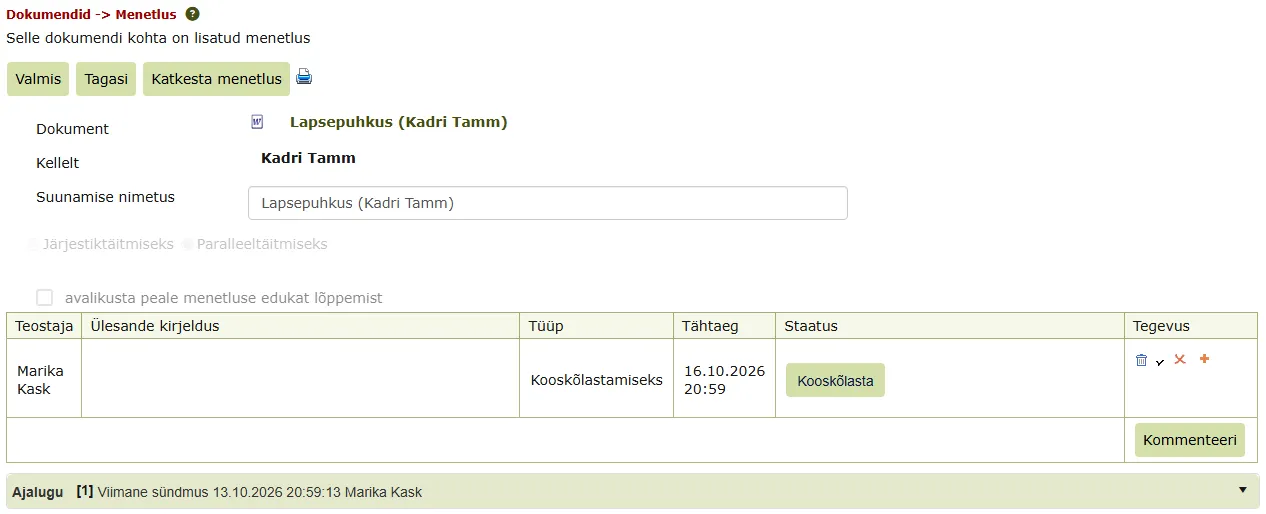
- Returns an application: please reject the task and write in the comment what the employee must correct or add.
- Sends an employment contract to the employee for signing: on the document's Edastused panel, delivery method Iseteenindus (allkirjastamiseks) (For signing in self-service).
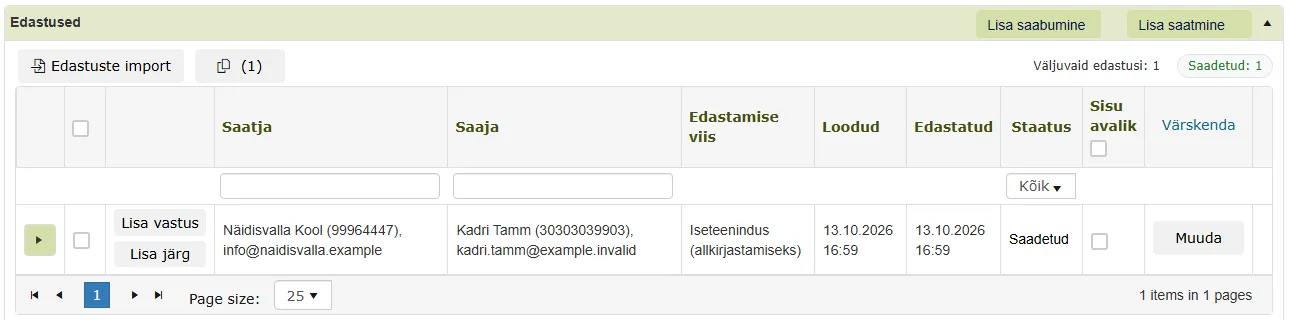
- Makes an order known: delivery method Iseteenindus (teadmiseks) (For information in self-service).
- Opens the organisation's documents to employees: the folder setting Dokumendid nähtavad iseteeninduses (Documents visible in self-service).
Last modified: 15 October 2026, 08:27:25