Amphora 13.1 Version Guide
- Version 13.1.0
- Rights calculation related changes
- Spoku form new version changes
- Default width changed for Spoku new form/form new version fields
- When modifying document from Spoku and sending to Amphora, the Amphora document title is no longer changed
- Spoku form names no longer have "SPOKU_" prefix added
- Box code control added for incoming Spoku forms
- Response document title change
- KOVMEN applications Date and Datetime type fields have been fixed
- Institution email selection has been fixed on response document
- KOVMEN applications now have sender data in correct format
- Automatic process modification view has wider boxes and title fields
- Date selection fields in Trash module have been made wider
- Calendar event display on homepage has been fixed
- Admin -> Tables example file has been fixed
- Forwards panel "Open letter" link
- Amp. field name addition changes
- Form configuration changes
- Tasks module has been optimized
- Field combining has been fixed
- File icon error fixed in new process/delegation creation view
- User/person addition window changes when adding process and delegation
- Layout change in substitute selection view in Persons module
- Sent Email log in delivery panel
- Substitute sees all substitute's tasks created from the substitution start date
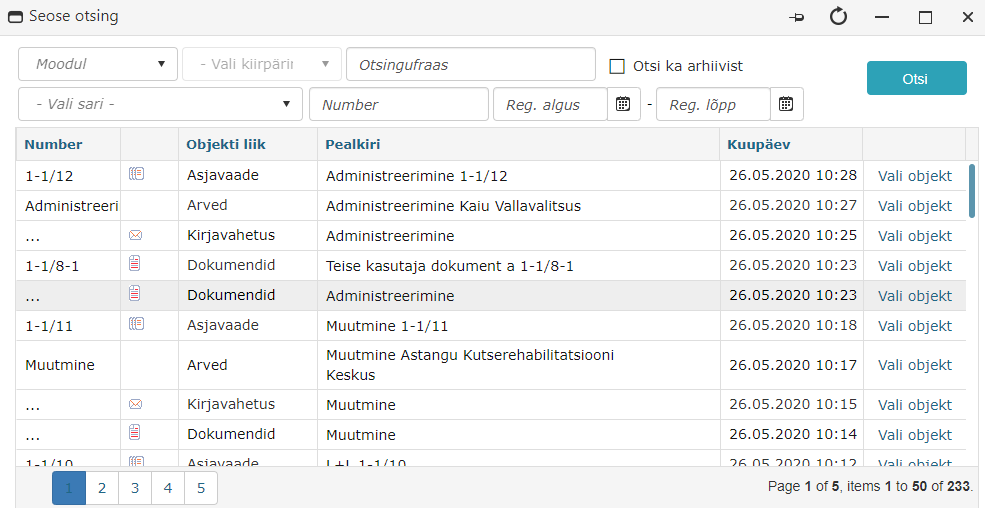
- Relation search window design has been updated
- Global search design has been updated
- Version 13.1.1
- Version 13.1.2
- Version 13.1.3
- Version 13.1.4
- When adding unit, email address and related institution are now mandatory
- Coordination task can no longer be completed without selecting a decision
- TextBox type field default values are now visible in form configuration
- Number type field default value has been fixed
- Directory security classes and security level classifier fixes
- Fixed "Response deadline in days" functionality in SPOKU registration profiles
- Updated process and delegation icons in document and case modules
- After sending document via email icon (@), user is correctly redirected back to sent document view
- Document delivery status info is displayed in document registry view
- Translation changes
- Version 13.1.5
- Version 13.1.6
- Version 13.1.7
Important
The purpose of this guide is to describe the changed functionality of Amphora that comes with the new version 13.1 of Amphora Professional. We continuously update the version guide.
** * Change is relevant for environments where the correspondence module is no longer used.**
Version 13.1.0
Rights calculation related changes
This version added new rights calculation logic. New rights are calculated at the moment when rights are added. This solution makes searches and queries faster in Amphora environment. Previously, rights were calculated separately for each query and search, which is why operations could be slow (e.g., opening the relations window).
For users, nothing changes significantly overall. The biggest change is the addition of the new Hidden right. All other rights behave the same way as before.
Hidden right is like a forbidden right, but it is the weakest right. This means that all other rights override this right, but only at the same level. Currently, Amphora has four rights levels (from strongest to weakest): object owner right (object creator) -> object's own right (right through process, adding right to document via rights panel) -> user personal rights and user group rights (specific directory right) -> user personal rights and user group rights (parent directory right).
Previously, users had problems with forbidden rights. Namely, if in one user group a forbidden right was given to a specific directory and the user belonged to that group, then that directory was always forbidden for the user, even if in some other user group there was, for example, administration right for the same directory. In the same situation, with hidden right, the directory is not forbidden to the user if they get a stronger right from another user group (or personally).
With hidden right, the user does not see directories or objects inside the directory. If hidden right is added to an object (e.g., document), then the object is not visible.
Rights hierarchy (from weakest to strongest):
 Hidden right examples:
- User personally has read right added to directory 1-1. User group that the same user belongs to has hidden right to directory 1-1. After rights calculation, read right results, as this right is stronger.
- User group has modify right to directory 1. and hidden right to subdirectory 1-1. After rights calculation, subdirectory 1-1 gets hidden right, because subdirectory right level is higher than parent directory right level.
- Hidden right is added to document (via rights panel). User has administration right in user group to the directory where this document is located. Hidden right still applies to the document, as the document's own right is at a higher level than the user group right.
Spoku form new version changes*
- In Amphora, forms have rights, meaning you can configure which user group/unit users can see this form in selection. When adding a new version of Spoku form, Amphora now takes the rights from the previous version of the form and adds them to the new version of the form.
In the previous version, there was a bug that when adding a new version of Spoku form, it became visible to all users.
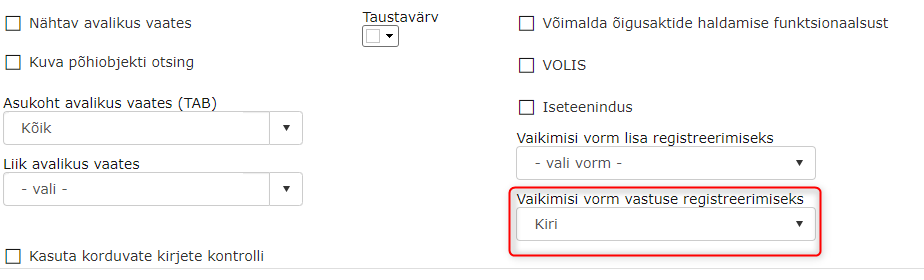
- When adding a Spoku form version, Amphora adds the Letter as the default response registration form if this option is missing from the previous version of the form. If the previous version of the form had this option, then Amphora now adds this option to the new version of the form.
Default width changed for Spoku new form/form new version fields*
In previous versions, when adding a new Spoku form/form new version, Amphora added a default width of 350 px to each field. Since some fields need to be wider, we made a change so that by default, Amphora adds 750 px width to each field for new Spoku form/form version.
Previously:
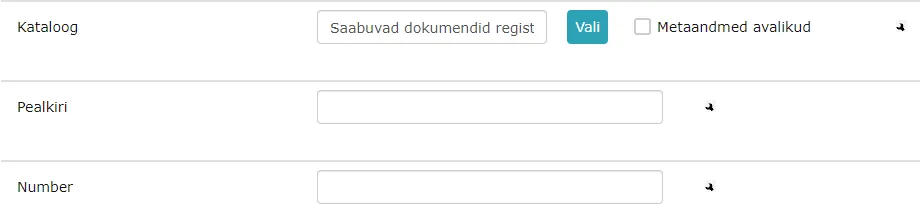 Now:
Now:

When modifying document from Spoku and sending to Amphora, the Amphora document title is no longer changed*
In Spoku, it is possible to modify a document and send updates to Amphora. Previously, as a result of such action, Amphora always changed the title of the Spoku application. However, many users change the title of the document received from Spoku in Amphora and do not want the original title to come back. Due to this, we made a change so that when sending changes from Spoku, Amphora no longer changes the title on the document.
Spoku form names no longer have "SPOKU_" prefix added*
Amphora no longer adds the SPOKU_ prefix to new Spoku forms. So if previously when creating a form, the form name was added as SPOKU_Funeral benefit, now such form name is Funeral benefit. Additionally, SPOKU_ is not added to the registration profile name associated with the Spoku form.
The change applies only when adding new Spoku forms, existing form names are not changed. Existing Spoku forms and registration profiles will continue to work correctly.
Box code control added for incoming Spoku forms*
When a new Spoku application is sent to Amphora (a new form is created in Amphora) or an application comes from Spoku with an existing form in modified form (a new form version is created), Amphora now checks all box codes on the Spoku form. Spoku form box codes are amp. field names in Amphora environment.
In Amphora, there are system amp. field names that should not be used casually (e.g., Number, Caption) and such box codes on Spoku form can cause problems in Amphora. If the added control detects that a system name is used as box code on Spoku form, then a notification is sent to Spoku and such form is not added to Amphora.
Notification content: New form generation failed. localizedlabel value 'Number' is not allowed (form element 'I am the beneficiary of the plot').
Response document title change*
Response document title (xxx: response letter) is not added if the response form has a default title.
Default title can be configured for a form under Admin -> Form configuration. Open the form and add a default value to the Title field.
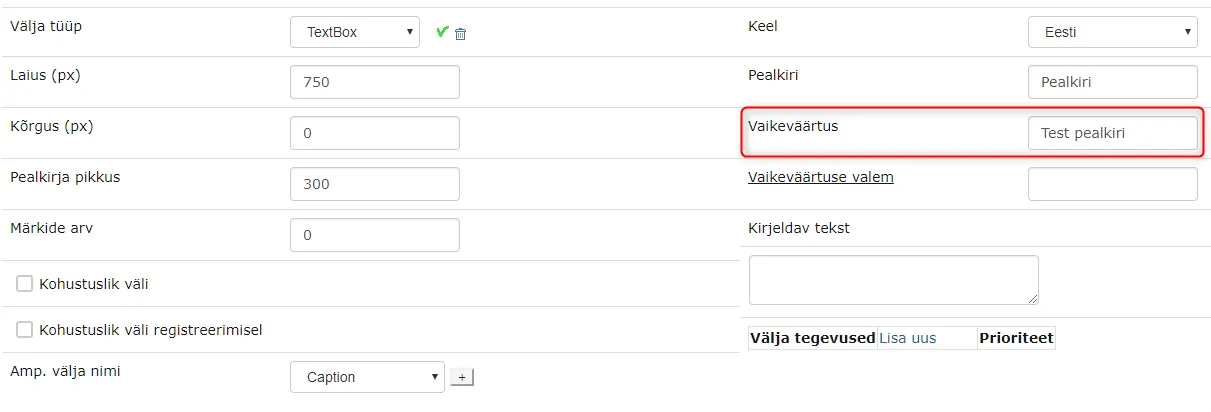 If the response form has a title default value, then when creating a response document, Amphora adds this title to the response document by default.
KOVMEN applications Date and Datetime type fields have been fixed
During automatic registration of KOVMEN applications, Amphora did not carry Date and Datetime type field data to the form. So after automatic registration, all date fields on the form were empty.
In version 13.1, this bug has been fixed and now Amphora carries all dates to the form in correct format.
Institution email selection has been fixed on response document*
The problem with email selection occurred only in situations where email was selected as the delivery method.
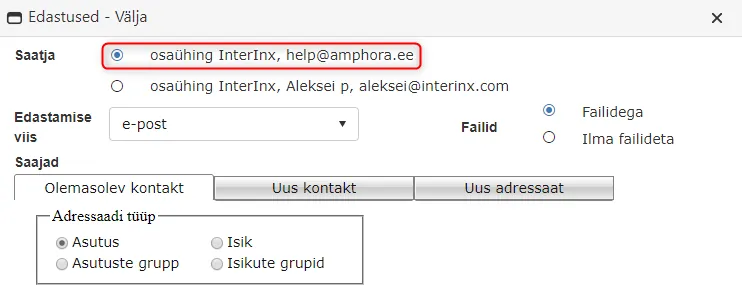
When creating an outgoing response document, Amphora automatically selected the user's personal email address as the sender email address and it was not possible to change it. If the user selected the institution email address, then Amphora did not change it correctly.
In version 13.1, this bug has been fixed and now it is possible to select the institution email address.
KOVMEN applications now have sender data in correct format*
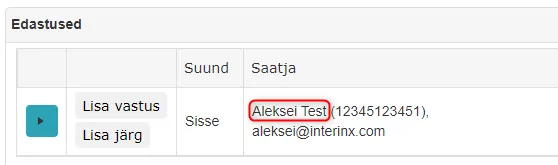
In Amphora, version 13.0 added a setting that allows us to add sender data to the sender column of the delivery panel for incoming KOVMEN applications, and if there is no person with such personal code in Amphora, then Amphora adds that person to the persons module.
From KOVMEN, people's first and last names come in capital letters. From this version, Amphora adds names in a format where only the first letters of the first and last names are capitalized.
Previously:
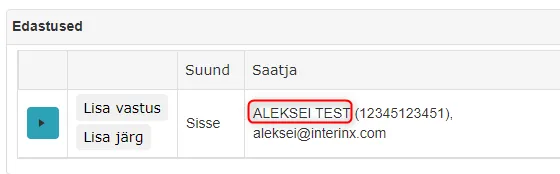 Now:
Now:
Automatic process modification view has wider boxes and title fields
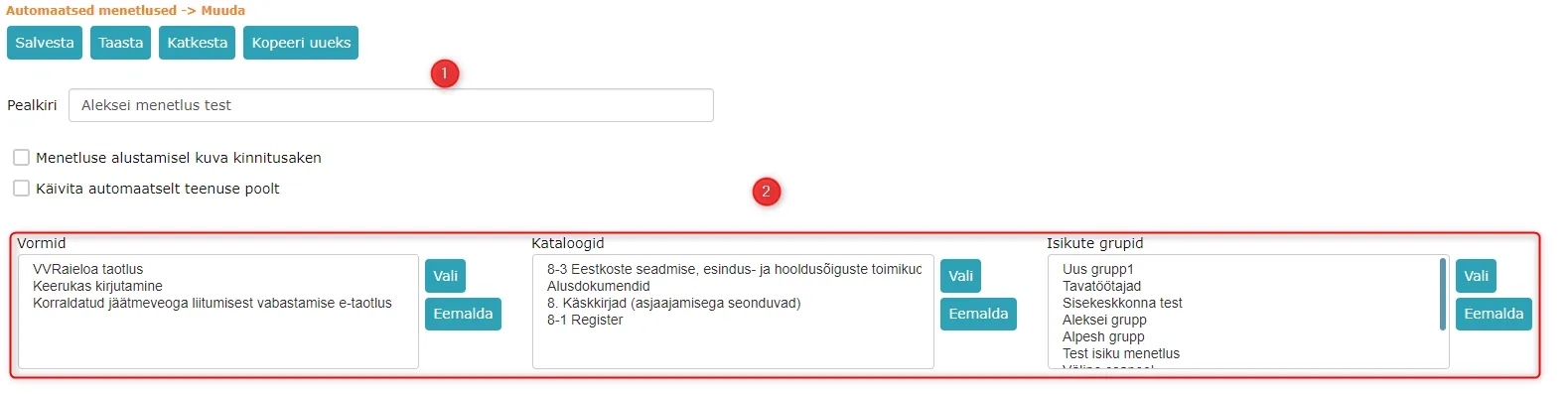 1. Title field has been made wider
2. Forms, directories, and person group boxes have been made wider as well.
1. Title field has been made wider
2. Forms, directories, and person group boxes have been made wider as well.
Additionally, when dragging the mouse cursor over the form/directory/person group name, a tooltip appears showing the full form/directory/person group name.

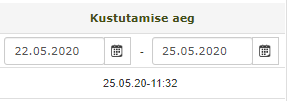
Date selection fields in Trash module have been made wider
The change has been made so that the full date is visible. Since previously the date fields were relatively narrow, the full date did not fit there.
Previously:
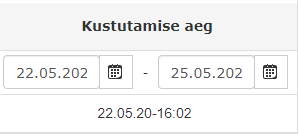 Now:
Now:
Calendar event display on homepage has been fixed
Some institutions (with more than 40 users) could have problems in previous versions with displaying institution calendar events on the homepage, which meant some calendar events were not visible.
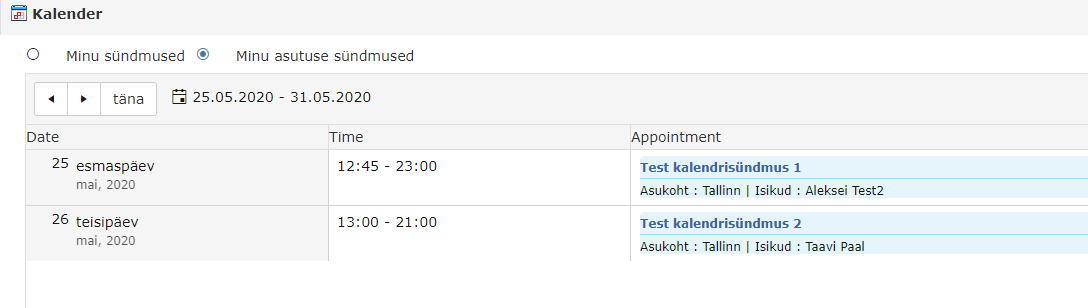 In version 13.1, we made the necessary changes and now Amphora displays all institution calendar events on the homepage.
Admin -> Tables example file has been fixed
In Admin -> Tables view, you can import data into the table. The main data that can be imported into the table are related to invoices (VAT codes, dimension names and values).
In the Tables view, there is an example file that can be used to import data. Previously, this file was faulty and could not be used for import. Now this example file has been fixed.
Forwards panel "Open letter" link
In the forwards panel, each module object has a separate Open xxx link name. In the previous version, correspondence module objects had the link name Open document. In version 13.1, the link name has been corrected and is now Open letter.

Amp. field name addition changes
When adding a new amp. field name to a form field, the correct data type is now selected by default. Amp. field name data type depends on what field type is selected. In the new version, other data types are no longer visible. So the user no longer has to select the correct data type themselves.
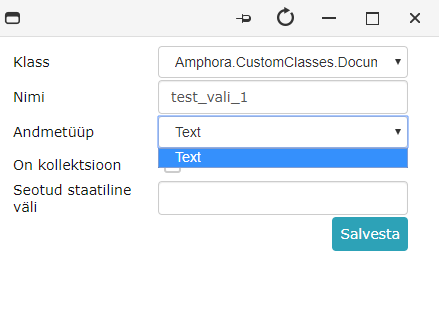 Also, after adding an amp. field name, Amphora automatically selects the just added amp. field name. No longer need to search for the just added amp. field name from the dropdown menu.
Form configuration changes
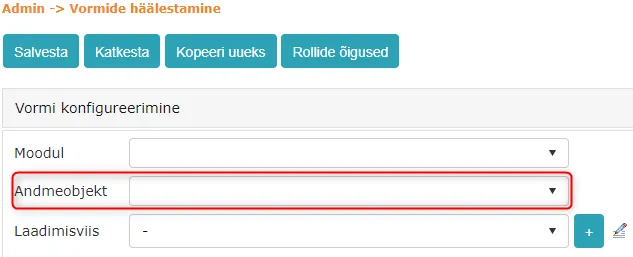
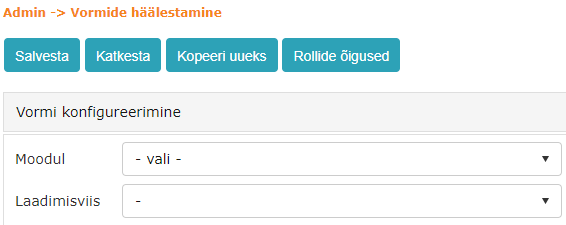
- Module selection now only has Documents and Case view. Other modules have been removed from the selection, as it is not possible to add new forms there.
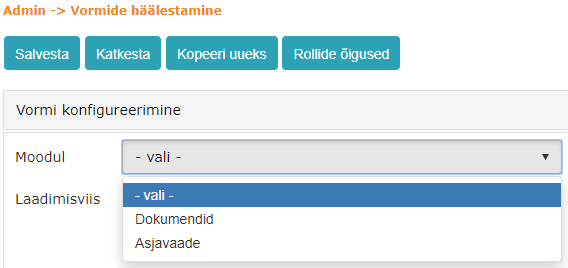 2. Data object dropdown menu has been removed. Amphora now adds the correct data object by default and this option is no longer displayed to the user.
Previously:
 Now:
Now:
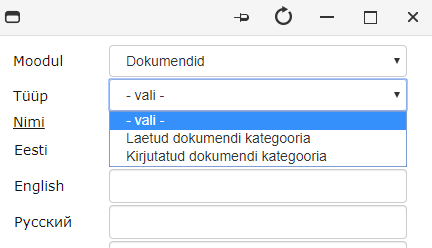
 3. When adding a new loading method to a new form (if the form is not saved), this loading method is immediately selected. The user does not have to search for the just added loading method from the dropdown menu.
Additionally, when adding a loading method, the correct module is now selected by default and only options related to this module are in the type selection.
Tasks module has been optimized
The tasks module was very slow in some environments. We made the necessary changes and now the tasks module should be faster.
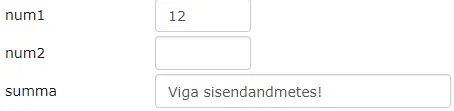
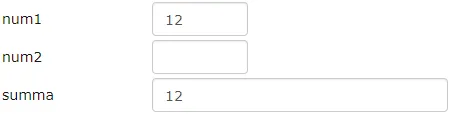
Field combining has been fixed
In version 13.0, we added field combining functionality. There was a bug that was fixed in this version. Namely, if one of the fields used in summation was empty, then an error message appeared in the sum field. Now this error message no longer appears.
Previously:
 Now:
Now:
File icon error fixed in new process/delegation creation view
If the user had an existing process or delegation open before creating a process/delegation, then when creating a new process/delegation, Amphora displayed the main file icon of the previously viewed process/delegation next to the object title.
This was a rare bug and did not cause substantial problems.
User/person addition window changes when adding process and delegation
- Bottom Save and Back buttons have been removed.
- Layout has been fixed in IE.
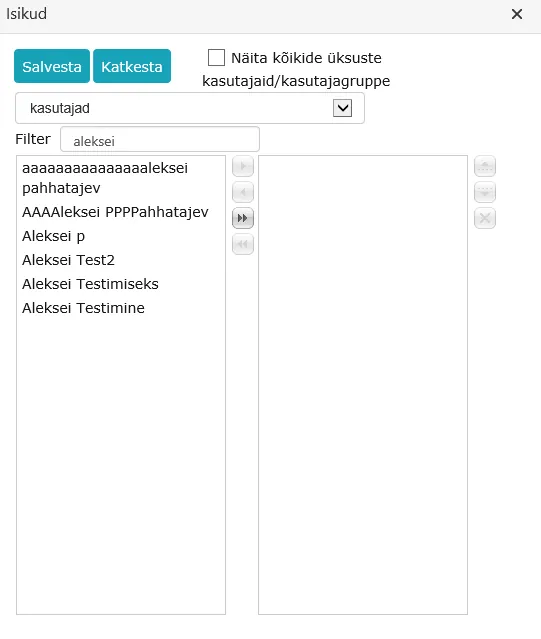
Layout change in substitute selection view in Persons module
In the persons module, it is possible to add a substitute for each person. In previous versions, this was relatively difficult to do because the layout was poor and search box titles were missing.
In version 13.1, the layout has been fixed and titles have been added to search boxes.

Sent Email log in delivery panel*
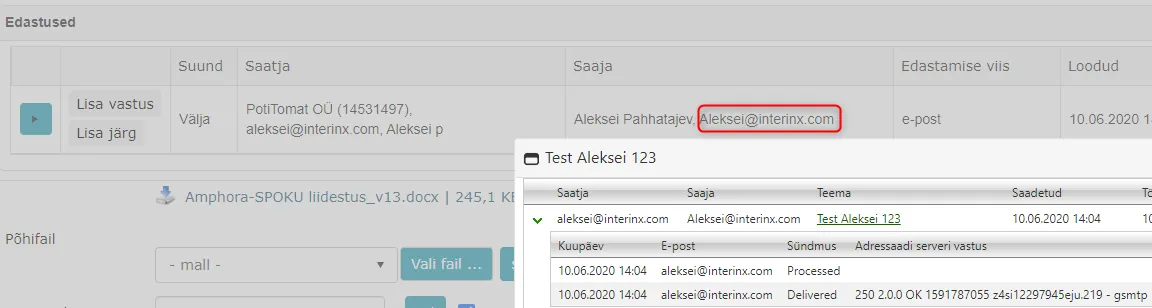
In the delivery panel, it is now possible to view the sent email log directly. When an outgoing delivery with delivery method email is sent out, the delivery status changes from Not sent -> Sent. It is possible to click on the Sent status and then Amphora opens a window with the sent email log.
 Log window:
 You can click on Sent status only when the delivery method is email. When sending with @ icon, a delivery is also added and by clicking on Sent status, the log window can be opened.
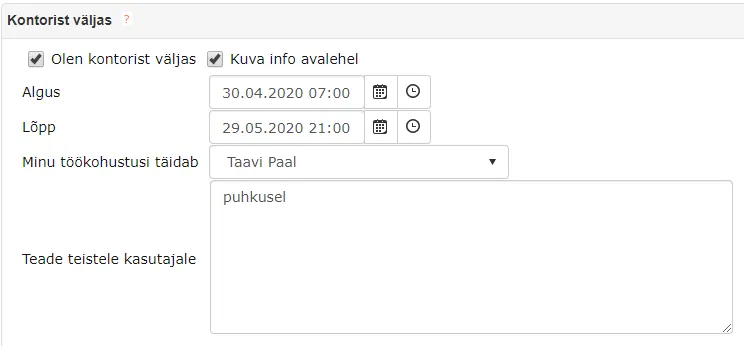
Substitute sees all substitute's tasks created from the substitution start date
From version 13.1, all incomplete tasks of the substitute that were created from the Out of office Start date become visible to the substitute. For example, if we add a substitute to a user and add 30.04.2020 as the Start date, then all incomplete tasks from that date become visible to the substitute in the Forwards panel.
Relation search window design has been updated
The relation search window opens in Amphora when adding relations to an object, adding a case to an object, and adding a case object to a case.
- Select object is now a link, not a button.
- Search results now have pages. Each page displays 50 objects.
Global search design has been updated
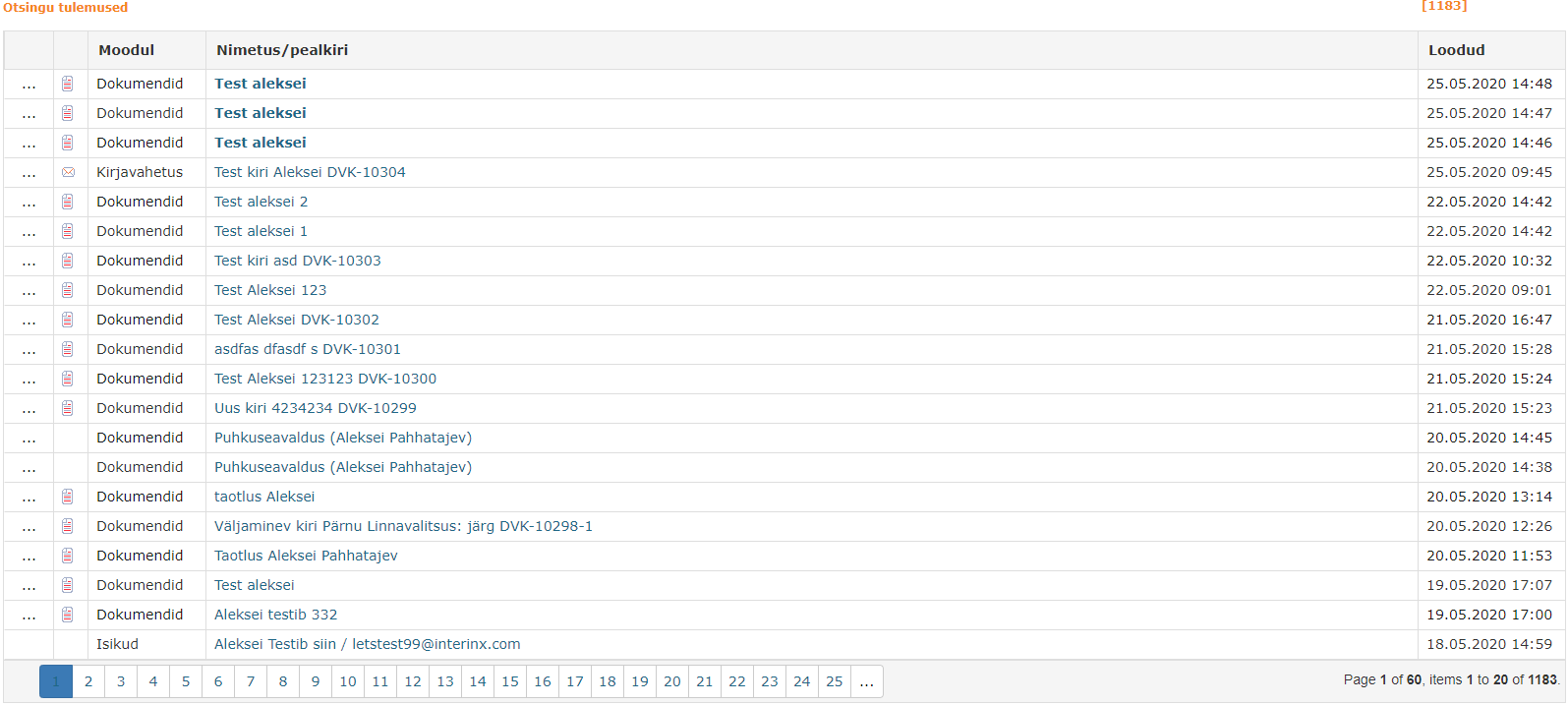 ***
***
Version 13.1.1
Access restriction "Restriction valid until" date fix
When creating a document response document and sequence document and registering a document attachment, Amphora added +1 day to the Restriction valid until date field for the new document. For example, if registering a response document and the initiative document had access restriction with dates, then such a view appeared in the response document restrictions panel:
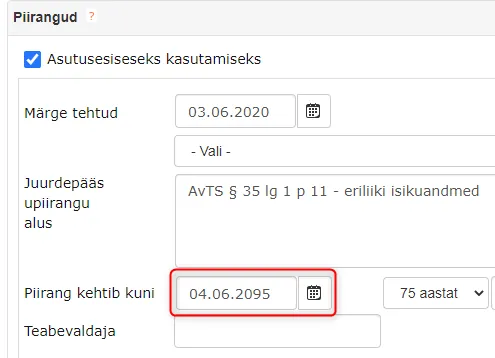 Now this bug has been fixed and Amphora adds the correct Restriction valid until date.
Removing forbidden symbols from additional file names
When changing additional file names, Amphora now removes all forbidden symbols when pressing the Done button.
Forbidden symbols: < > : " / \ | ? *
Forbidden symbols in additional file names caused problems in situations where such document was sent to a user with process/delegation. If the user opened the homepage and the Forwards panel was open, then Amphora displayed the following error message on the entire screen:
 In version 13.1.1, such error message should no longer appear.
Added delivery panel status colors*
In addition to the delivery panel status link added in version 13.1.0, we are adding color to the status in this version. Status color changes only on deliveries where email is selected as delivery method. If the delivery has another delivery method, then the status color is always black.

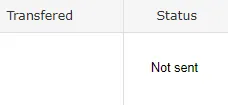 Black color status is when the delivery is not yet sent and the status is Not sent.
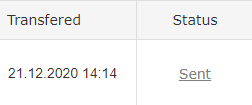 Gray color status is when the delivery has been sent, but email logs have not yet reached Amphora. Usually email logs reach Amphora within 1-2 minutes.
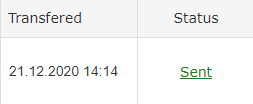 Green color status is when the delivery has been sent and there is an event called Delivered in the email logs. This means the email has been delivered to the recipient's mail server.
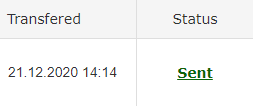 Dark green color status is when the delivery has been sent and there is an event called Open in the email logs. This means the recipient has also opened this email. Unfortunately, such log event does not come with every email sending. This depends on the recipient's email settings.
Open event description. When an email is sent, one invisible image is added to the email. When the email recipient opens the email, this image is loaded by the mail application and an Open event appears in the logs. But the email user may turn off default image loading in settings or it may already be off by default. In such case, Open event is not added to logs, as there is no way to know whether the email was opened or not.
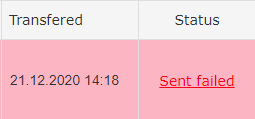 Red color status is when the delivery has been sent, but for some reason email sending failed. Amphora displays the reason for failed sending in the Error column.
Important
Amphora updates status colors once per hour.
Version 13.1.2
New SPOKU form is public by default*
When adding a new SPOKU form, Amphora now adds the Visible in public view checkbox to the form by default. This means that if an application received from Spoku is made public, then in public view this document is displayed correctly. If the Visible in public view checkbox is not enabled on the form, then when opening the document in public view, the following notification is displayed and data is not visible – Form publication is not configured!.
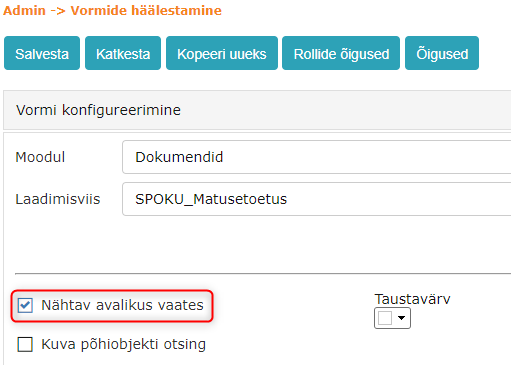 We enabled the Visible in public view checkbox for existing SPOKU forms (and also other forms).
New Letter form template element*
We added a new xRECIPIENTSTREETx template element that can be used in Letter form templates in the document module. With this template element, it is possible to add institution or person address street to the template (in delivery window New addressee view field named Address).
Delivery panel email log display fix*
From version 13.1.1, it is possible to view email logs sent by email by clicking on the Sent link. In this version, we fixed a bug where email logs with uppercase email addresses did not reach the email log window.
Added "Slow queries (statistics)" and "Slow queries by users" reports
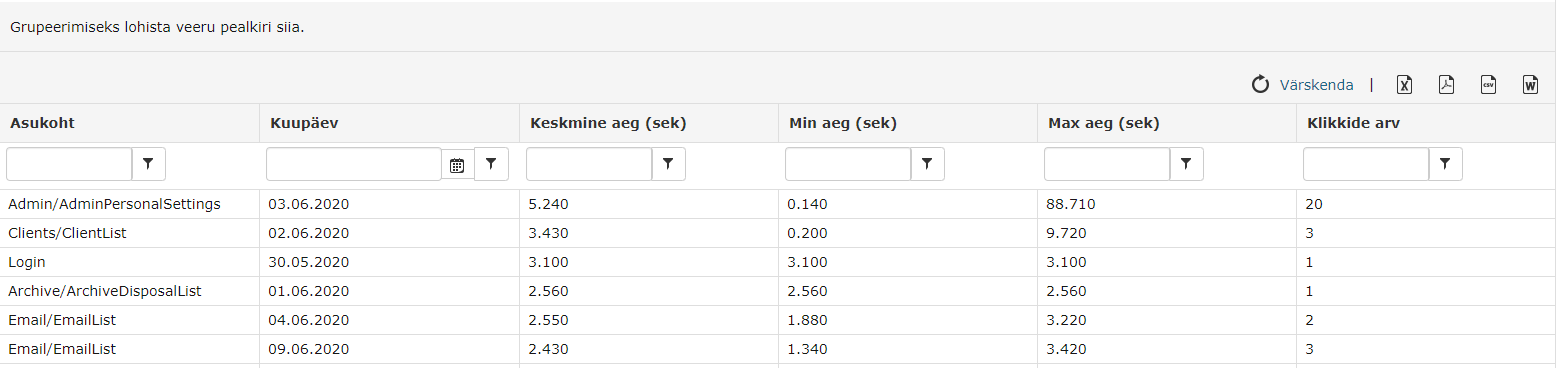
Two new reports have been added: Slow queries (statistics) and Slow queries by users. Reports have been added to administrators, main users, and chancellery user groups in each environment.
Slow queries (statistics) – report outputs queries made in the last 14 days, their number of queries, average time, minimum time, and maximum time. Additionally, the location where this query was made is also displayed.
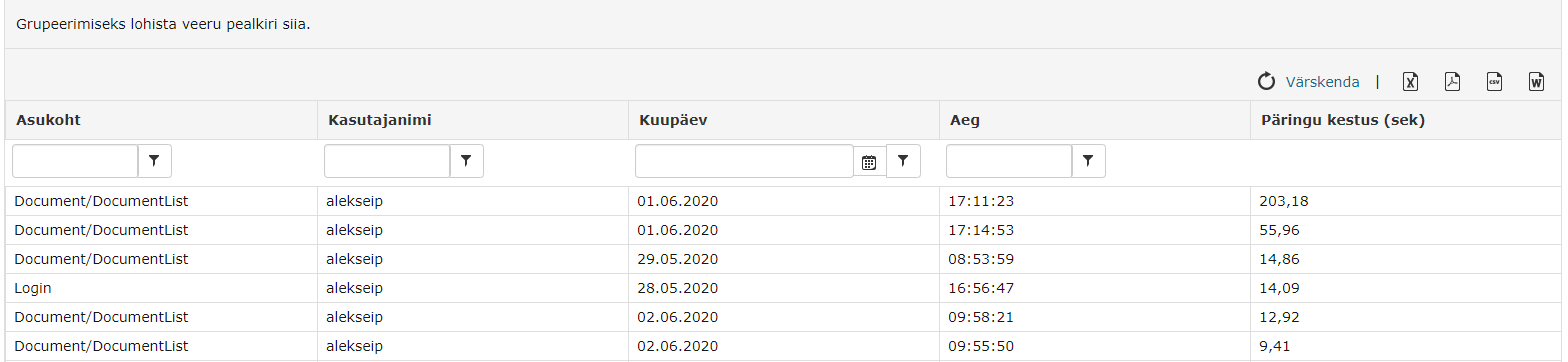
 Slow queries by users – report outputs selected user's queries made in the last 14 days. Report results show query location, username, query date and time, and query duration.
 Both of these reports help to quickly identify and fix slow queries in the future.
Sending legal acts to State Gazette – changes
New legal act preparation and sending guide is located at this link.
Version 13.1.3
HTML file download and DHX form main file download fixed
On documents and letters, it was not possible to download HTML files after version 13.1.0 in edit view by clicking on the file name. An error message appeared that the user does not have sufficient rights.
Additionally, we also fixed main file download on correspondence module DHX forms by clicking on the file name (File name).
Version 13.1.4
When adding unit, email address and related institution are now mandatory
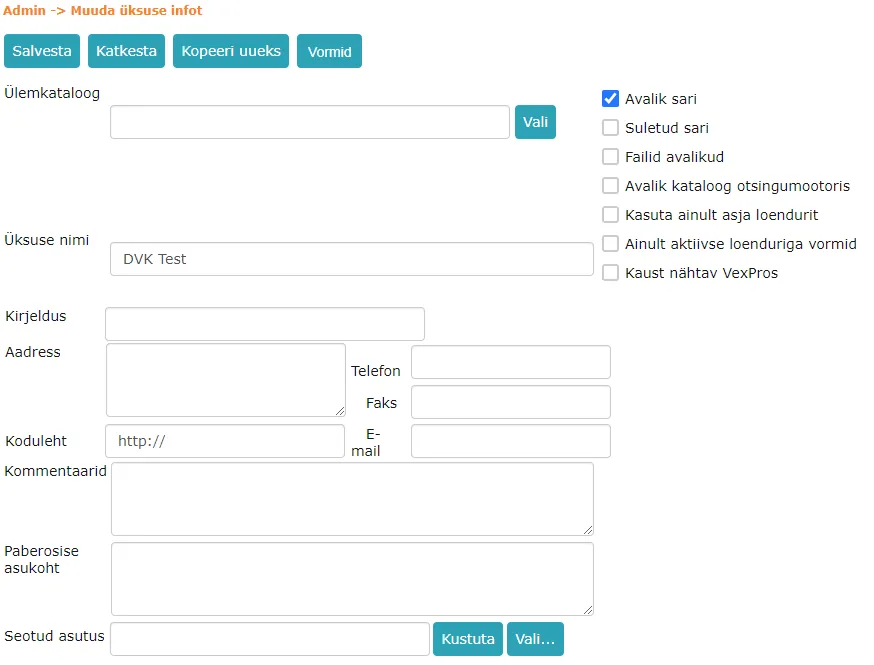
When adding a new unit and modifying an existing unit, Email and Related institution fields are now mandatory. Email address is needed so that information requests can be sent in public view. Related institution is needed for example for adding incoming deliveries or using DHX.
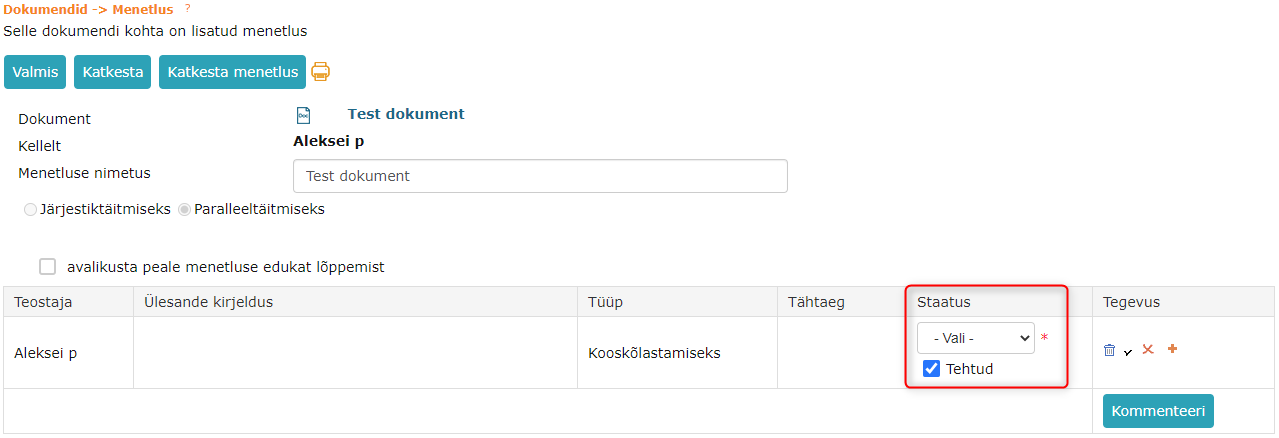
Coordination task can no longer be completed without selecting a decision
Previously, it was possible to complete a coordination task in process or delegation detail view so that the user added a checkmark before Done and then pressed the Done button. Yes/No/Dissenting opinion decision was not mandatory.
Now decision selection is mandatory for coordination tasks in process or delegation detail view.
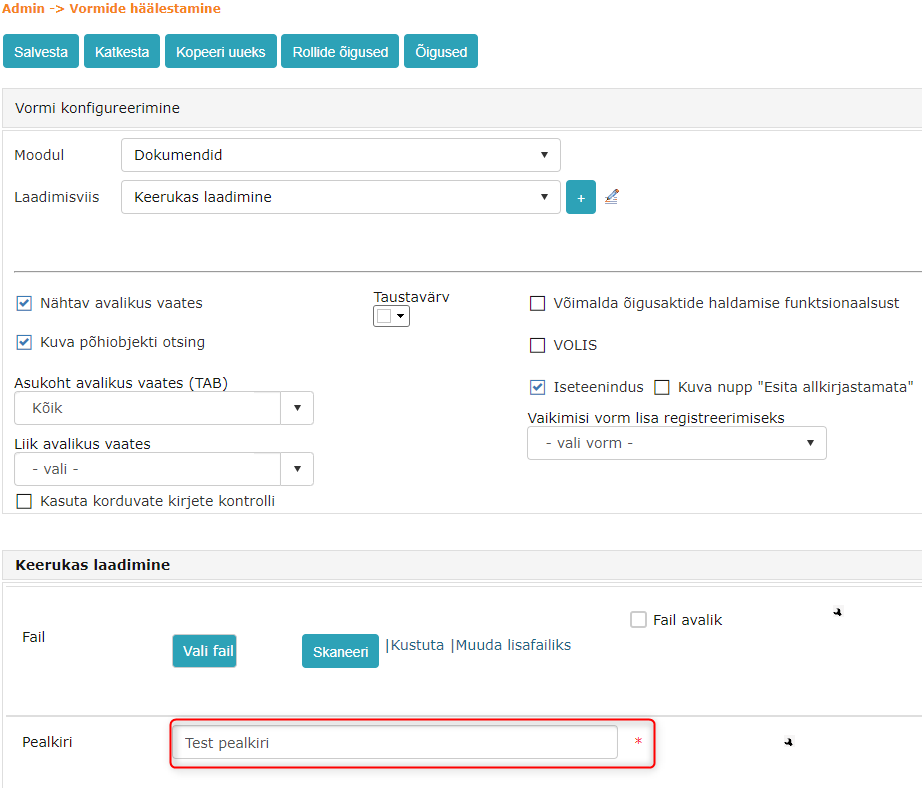
TextBox type field default values are now visible in form configuration
If TextBox type fields have default values configured, then now these default values are immediately visible in form configuration (Admin -> Form configuration). Previously, TextBox type field default values were not visible in form configuration view.
Number type field default value has been fixed
It was previously possible to add default values to Number type fields, but these default values did not appear anywhere. Now default values are visible both in form configuration view and when using the form.
Directory security classes and security level classifier fixes
Previously (Wrong):
- Availability – S0, S1, S2, S3
- Confidentiality – K0, K1, K2, K3
Now (Correct):
- Availability – K0, K1, K2, K3
- Confidentiality – S0, S1, S2, S3
Fixed "Response deadline in days" functionality in SPOKU registration profiles*
Response deadline in days functionality works so that the user adds the number of days to this field and when registering a document with this profile, Amphora adds a date (today's date + entered number of days) to the answer_date amphora field name field (Document completion deadline). This functionality did not work with SPOKU registration profile before, but in version 13.1.4 we fixed it.
Important
This functionality currently only works together with a responsible person.

Updated process and delegation icons in document and case modules
We updated the display of process and delegation icons - now icon values are taken from cache and therefore performance should improve. Additionally, icons have been made slightly larger.

After sending document via email icon (@), user is correctly redirected back to sent document view
Previously, there was a problem where when sending a document opened via relation or case object by email, the user was redirected back not to the sent document view, but to the document/letter/case view through which the sent document was opened. In this version, the bug has been fixed and after sending a document opened via relation or case object, the user is redirected back to the sent document view.
Document delivery status info is displayed in document registry view*
From now on, icons are displayed in the Documents module registry view for documents with delivery(ies) that inform about the delivery(ies) status.
 * Blue exclamation mark icon: Document has deliveries where delivery status is Not sent - delivery not sent.
* Green checkmark icon: Document has deliveries where delivery status is Sent - delivery sent.
* Red cross icon: Document has deliveries where delivery status is Sending failed - sending failed (e.g., due to incorrect email address).
* Blue exclamation mark icon: Document has deliveries where delivery status is Not sent - delivery not sent.
* Green checkmark icon: Document has deliveries where delivery status is Sent - delivery sent.
* Red cross icon: Document has deliveries where delivery status is Sending failed - sending failed (e.g., due to incorrect email address).
You can also filter documents with deliveries by unsent deliveries, sent deliveries, and failed deliveries. Checkmark in the respective box ensures that only such documents with deliveries are displayed that contain deliveries with the respective status.

Translation changes
In Documents and Case view modules, the following translations have been changed in directory tree view:
Show recent documents (old) – Show last 30d documents (new)
Show recent drafts (old) – Show last 30d drafts (new)
Version 13.1.5
Outgoing email delivery status update fix*
After the previous fix, there were situations where email delivery status was not updated correctly according to the log. Therefore, in certain situations, failed sendings kept the Sent status and in list view, the failed delivery was displayed in green.
With this version, email delivery status updating has been fixed.
Also, pink background is now shown in the delivery panel for all failed email deliveries.
Completing rejected tasks in case and correspondence modules has been fixed
If someone selects a negative decision for a signing or coordination task, the process/delegation initiator gets a corresponding task for information.
Previously, such information tasks could only be completed for cases and letters (Correspondence module letters) through the forwards panel, which meant no comment could be added.
Now tasks notifying about task rejection can also be completed in task view, where a comment can also be added.
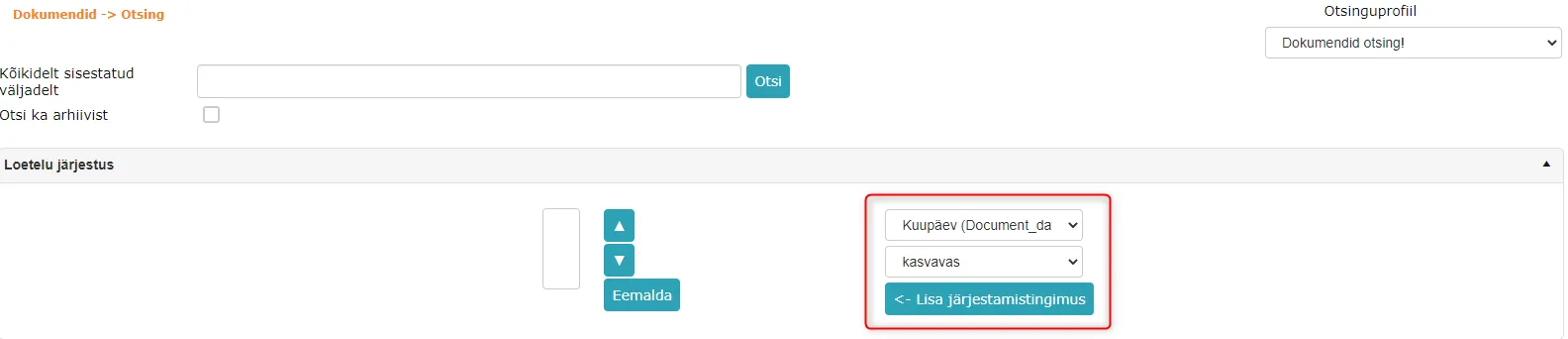
Document module search (Documents -> Search) sorting and direction selection fixes
In document module search, direction search has been fixed. Previously, direction (In/Out) search did not work together with other search criteria (e.g., direction selection + directory selection).
Additionally, search sorting has been fixed. Default search profile sorting worked before as well, but when adding a new sorting condition on search profile form, sorting did not work correctly.
 ***
***
Version 13.1.6
Registration profile conditional rules have been fixed
Conditional rule did not work if localizedlabel in XML file and amp. field name in Amphora contained capital letters. Amphora simply did not send automatic process/task to the responsible person, although the condition was true. In previous versions, conditional rules worked correctly only when all letters were lowercase.
In version 13.1.6, this bug has been fixed and now conditional rules work in every situation.
Purchase invoices fix
When saving some incoming purchase invoices, the Cost became incorrect. Namely, one VAT amount was added to the cost. Problematic were those purchase invoices that had VAT but it was not in invoice lines.
In this version, this bug has been fixed.
Version 13.1.7
URL search has been fixed
It is now again possible to search for objects in Amphora by form fields via URL.
Example URLs
Document module search:
https://environmentaddress/index.aspx?type=12&pn=Caption&pv=ForTesting - searches for documents where title is "ForTesting". In document module "pn" value is Amphora field name (can be found in Admin -> Form configuration)
Correspondence module search:
https://environmentaddress/index.aspx?type=16&pn=title&pv=ForTesting - searches for letters where title is "ForTesting". In correspondence module "pn" value is a database-specific value that cannot be found in Amphora internal environment.
Last modified: 17 October 2026, 11:05:57