Amphora 15.1 Version Guide
- Version 15.1.0
- New search fields - "Are valid" and "Are not valid"
- Response document feedback template functionality enhanced
- Hiding application forms in Self-service Portal
- Amphora remembers "Show all units' users/user groups" selection
- Conditional sequential procedure/delegation fix
- Changes to sending tasks to external persons
- Volume restriction added when sending email
- When adding a new institution, there is now Business Registry search (previously was Credit Info search)
- Sending task email notification to responsible person fixed
- Procedure/delegation deletion log added
- In document reading view "Procedure" and "Delegate" buttons become inactive if user has reading rights
- Deleting catalogs where destroyed objects are located
- Three new fields displayed on documents with AK restriction in Public view
- Fixed sending Self-service Portal task email notifications
- Purchase and sales invoice saving enhanced
- Relationship creator name now persists
- PersonChooser field department selection
- Minor changes
Version 15.1.0
New search fields - "Are valid" and "Are not valid"
We added new search profile fields. These fields are Are valid (IsValid) and Are not valid (IsNotValid). These search fields can be added in search profile settings (Admin - Searches).
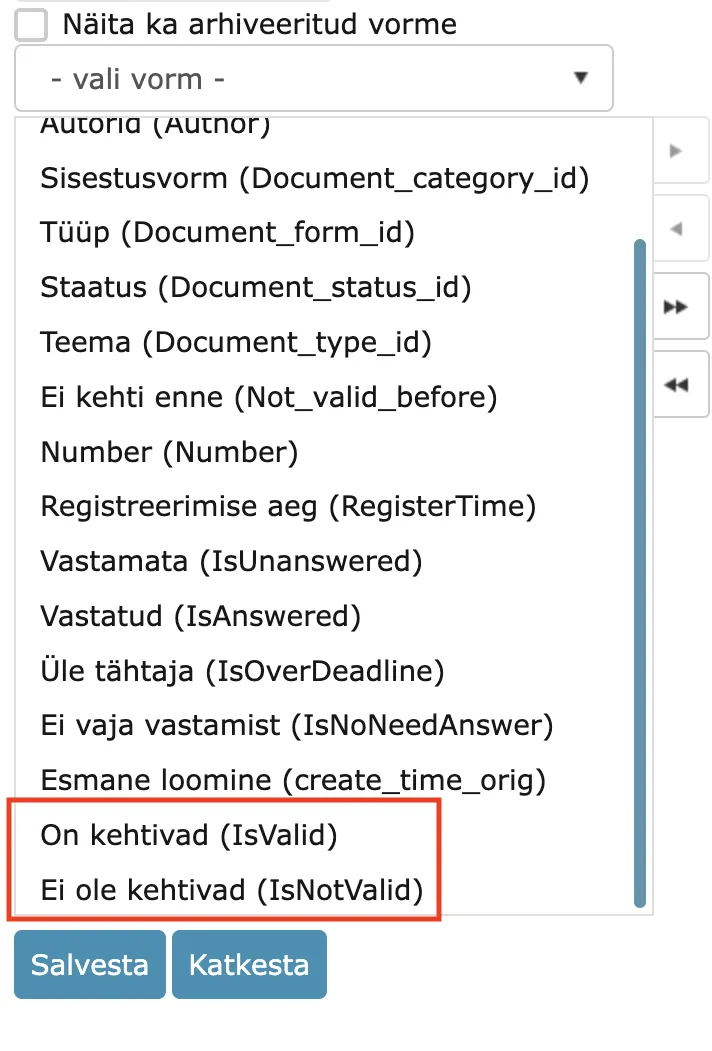 With these fields, you can search for valid and invalid documents (for example, contracts). Here Amphora considers the Valid until (Not_valid_after) form field value. If this field is missing from the document form, then this search does not consider these documents.
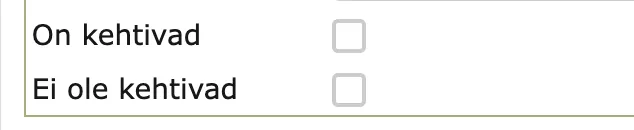 Valid documents are those documents where:
- Valid until date is in the future or is missing.
- Effective date is in the past or is missing altogether.
Valid documents are those documents where:
- Valid until date is in the future or is missing.
- Effective date is in the past or is missing altogether.
** This development was supported by Amphora client Viljandi City Government. ** ** Thank you! **
Response document feedback template functionality enhanced
In version 14.3, we added response document feedback functionality. You can familiarize yourself with this functionality HERE.
However, in previous versions, template elements were not supported in the feedback template. The template content could only consist of regular static text. In version 15.1, we added template element support to the feedback template. Since this is an HTML text editor template, HTML template elements are supported here, including response document template elements.
Template element examples: ::ID_MALLIL:: - response document (document we are working with) data. ::source.amp_field_name:: - original document (document from which we compose the response document) data.
NB!
Static template elements work, but we do not recommend using them. They are all related to the creator person, but feedback is created by the Amphora System user, so these template elements would bring this user's data to the template.
** This development was supported by Amphora client Harku Municipality Government. ** ** Thank you! **
Hiding application forms in Self-service Portal
Starting from version 15.1, it is possible to hide application forms in the Self-service Portal from certain persons. You can read more about submitting applications in the Self-service Portal HERE.
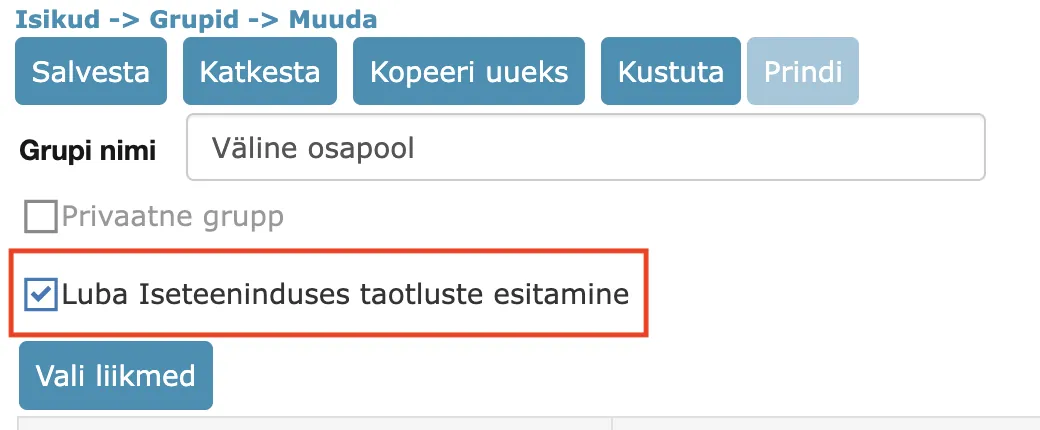
Self-service Portal forms can be hidden through person groups. Person groups now have an "Allow application submission in Self-service" checkbox.
The logic here is as follows: - If a person belongs to a group where this checkbox is added, then application forms are visible to this person. Even if this person simultaneously belongs to a group where this checkbox is not added. - If a person does not belong to a group, then application forms are visible to them in the Self-service Portal. - If a person belongs only to a group where this checkbox is not added, then application forms are not visible to them in the Self-service Portal
 ** This development was supported by Amphora client Ahhaa. **
** Thank you! **
** This development was supported by Amphora client Ahhaa. **
** Thank you! **
Amphora remembers "Show all units' users/user groups" selection
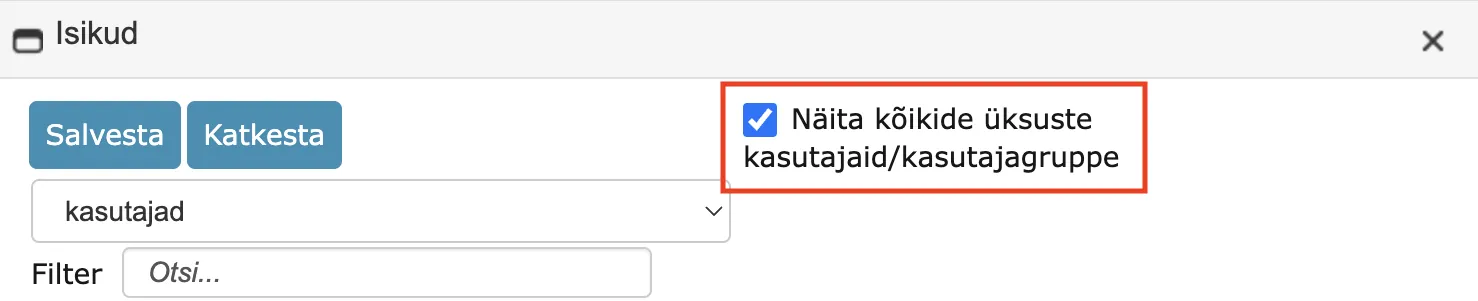
When creating a procedure or delegation, the user must select parties (users or persons). In the party selection window, there is a Show all units' users/user groups checkbox, which allows making users from other institutions visible as well. Starting from version 15.1, Amphora remembers this selection. For example, if a user had this option activated, then when creating the next procedure/delegation, this option is activated again (no need to add the checkbox every time).
Conditional sequential procedure/delegation fix
This functionality was added in version 14.7. You can read more about this HERE.
We recently discovered one bug that was related to sequential execution procedures. Namely, when the first procedure/delegation was completed, the next sequential execution procedure became a parallel execution procedure, meaning all tasks were immediately active. This bug has been fixed in this version.
Changes to sending tasks to external persons
- When creating a procedure, it is now immediately visible when a person is selected and the task is sent to the Self-service Portal. "Self-service: " text is now displayed in front of the selected person.
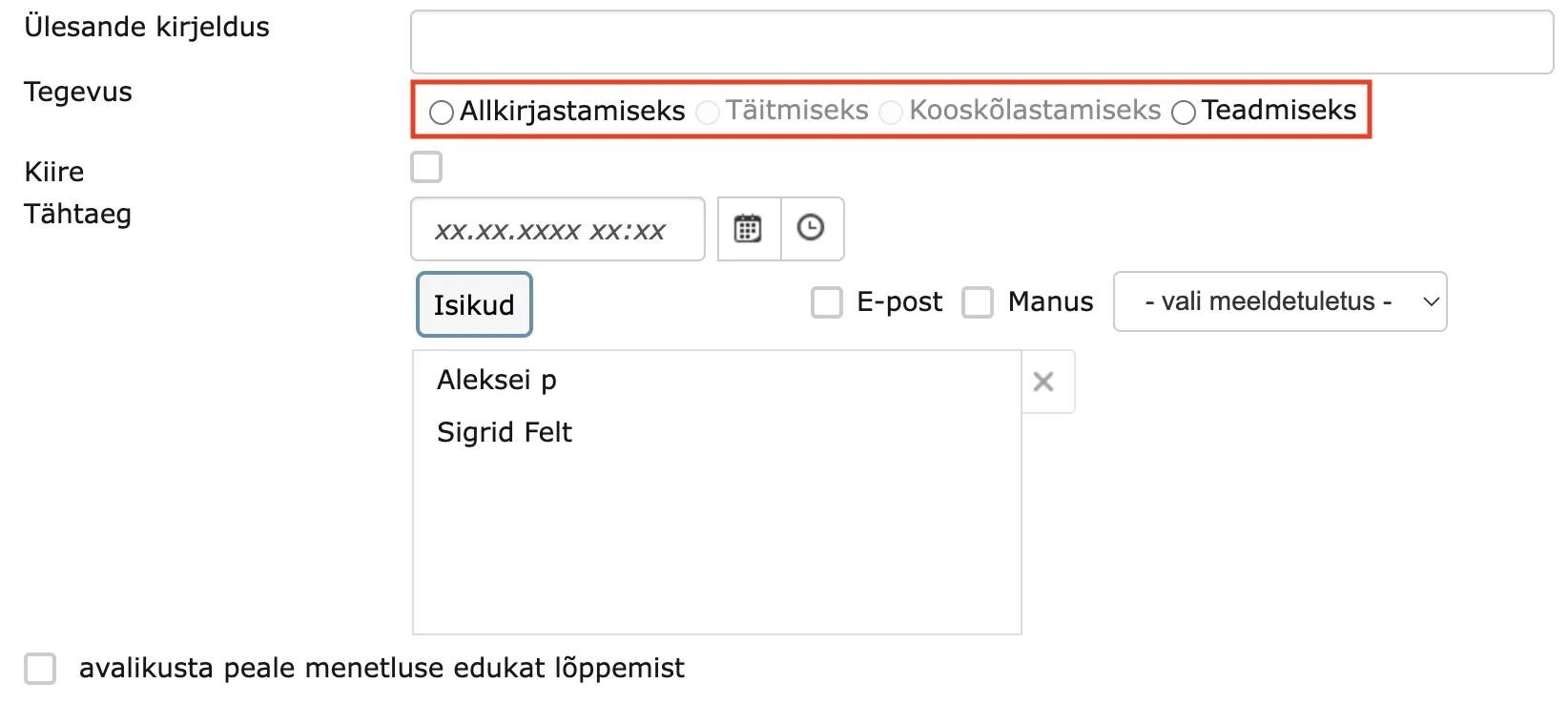
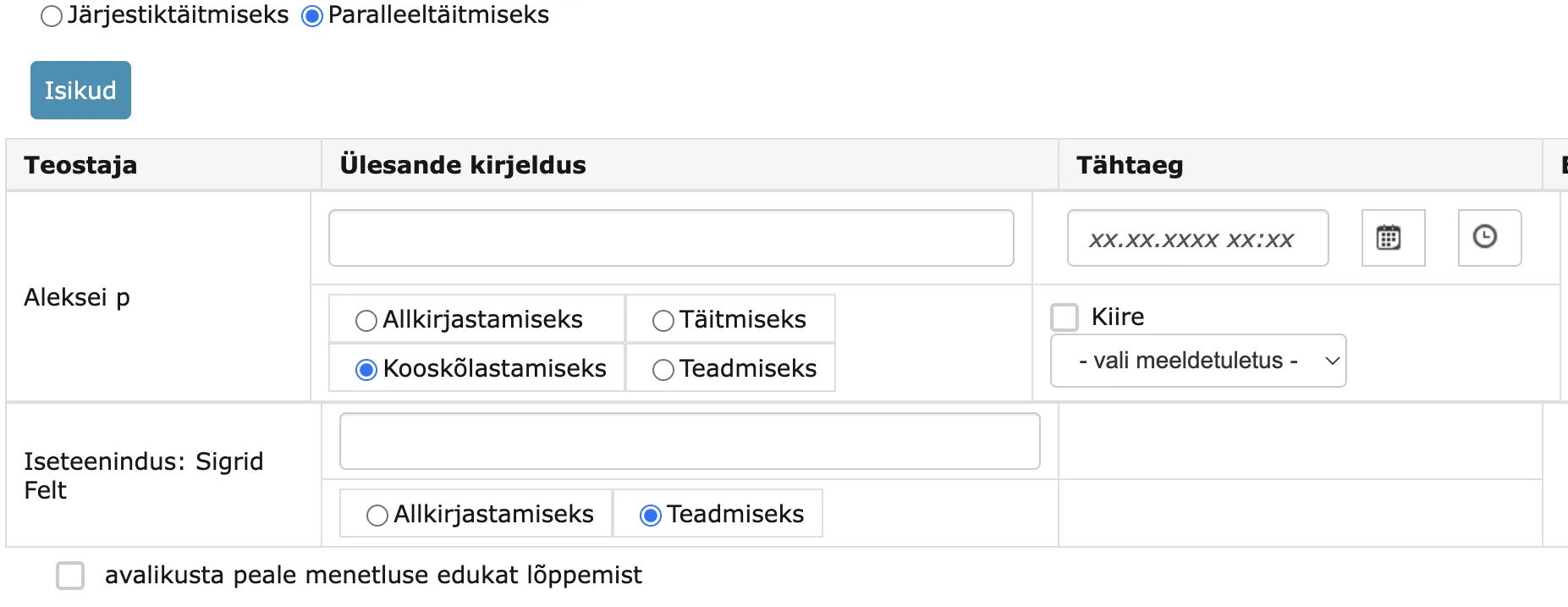 2. When creating a delegation, For coordination and For completion actions are no longer selectable if at least one person is selected. Since coordination and completion tasks are currently not visible in the Self-service Portal, it is not reasonable to send these tasks to the Self-service Portal.
 3. In the created procedure or delegation, it is now visible when a person is selected as a party and the task is sent to the Self-service Portal. "Self-service: " text in front of the person's name is now displayed in the document modification and reading views as well as in the procedure/delegation detail view.
 4. If a person associated with a user is selected when creating a procedure or delegation, then the task is visible both in the Self-service Portal and in the Amphora internal environment. However, in the Amphora internal environment, such a task now has **Self-service: ** text in front of the task name in the Routing panel on the home page.

Volume restriction added when sending email
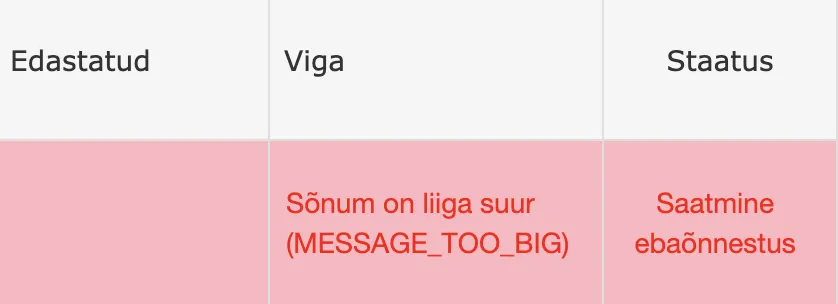
It is possible to send emails whose total volume (attachment + content) is under 25mb. Therefore, it is not reasonable to send out emails whose total volume is larger than this, as they do not arrive and later a corresponding notification appears in the email log. Now we added a control before sending email, which checks and does not allow sending emails where the total volume is larger than 25mb.
NB!
This restriction applies only when sending with Mailgun. So this restriction applies in environments where Mailgun has been taken into use instead of Sendgrid.
When adding a new institution, there is now Business Registry search (previously was Credit Info search)
Nothing changes directly for Amphora users, it is still possible to automatically search for institutions by institution name or registry code.
Minor changes: - Institution name is now added in correct format. Previously, the institution name was added in capital letters. - All email addresses/phone numbers are added. Previously, only one was added.
Sending task email notification to responsible person fixed
When adding a responsible person with the Create work task checkbox, Amphora immediately sends a completion task to the responsible person. Previously, when creating a responsible person's task, Amphora did not check the user's notification settings and always sent an email notification as well. Starting from version 15.1, user notification settings are checked and if the "System notifications about tasks" checkbox is missing, then Amphora does not send an email notification when creating a responsible person's task either.
Procedure/delegation deletion log added
Amphora now logs procedure and delegation deletion. When deleting an entire procedure or delegation, a Procedure / delegation deletion log is created in the document's history panel.
 This creates a much better overview of who has deleted existing procedures/delegations.
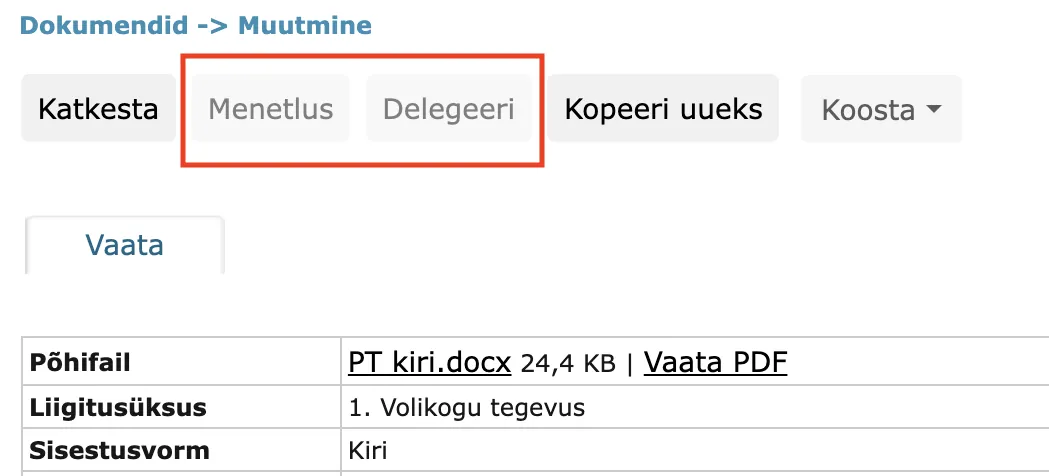
In document reading view "Procedure" and "Delegate" buttons become inactive if user has reading rights
If a user has either reading or restricted reading rights to a document, then the user should not be able to add procedures/delegations to this document. Adding procedures/delegations is essentially document modification and can also add additional rights (for example, signing or completion tasks give the user modification rights), so users with reading rights should not be able to add procedures/delegations.
In the document reading view, the Procedure and Delegate buttons are now inactive in this situation.
 !!! warning "NB!"
Currently, it is still possible for a user with reading rights to add procedures/delegations to a document from the list view. We will fix this problem in future versions.
!!! warning "NB!"
Currently, it is still possible for a user with reading rights to add procedures/delegations to a document from the list view. We will fix this problem in future versions.
Deleting catalogs where destroyed objects are located
Amphora has long had a control that does not allow deleting catalogs where objects are associated with that catalog. This control remains, but in this version we make a small change - if the catalog contains only destroyed objects, then such catalogs can be deleted.
NB!
If the catalog contains archived objects, then such catalogs still cannot be deleted.
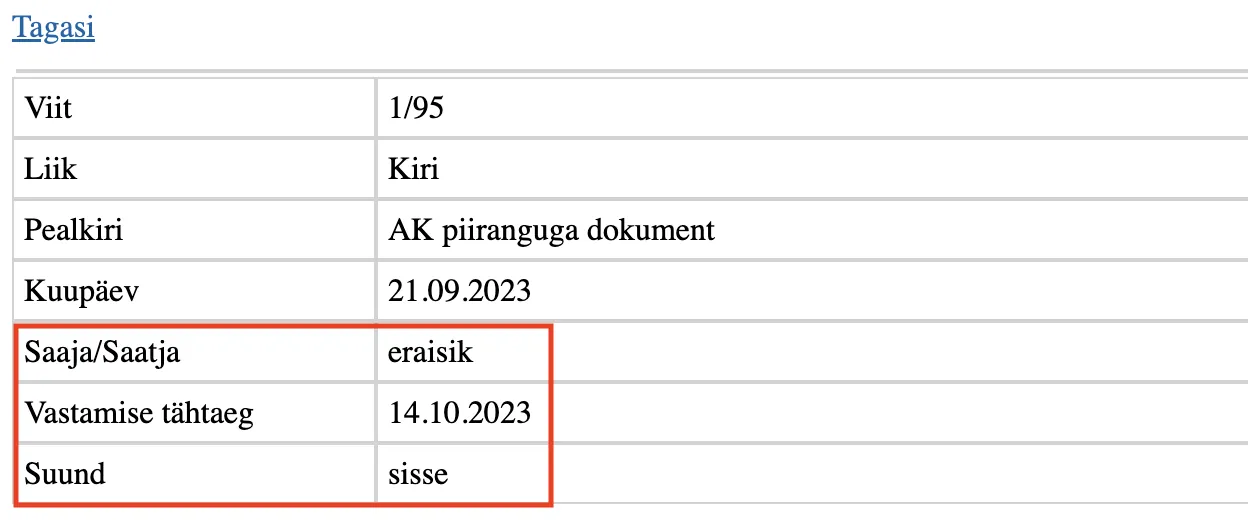
Three new fields displayed on documents with AK restriction in Public view
Previously, Amphora displayed the following data in the public view on documents where AK restriction was added - title, number, type, date, and AK restriction information.
Starting from version 15.1, (if the document has at least one transmission) Recipient/Sender and Direction are now also displayed. In addition, Response deadline is also displayed.
Recipient/Sender - displays the institution name. In case of a person/citizen, private person is displayed. Direction - there can only be two directions - out and in. If the document has both in and out direction transmissions, then in direction is displayed.
Fixed sending Self-service Portal task email notifications
When sending a task to a person associated with a user to the Self-service Portal, email notification sending has now been fixed. Previously, Amphora checked the user's notification settings (although a person was selected) and if the "System notifications about tasks" checkbox was missing, then the Self-service Portal notification was not sent out. This in turn caused a problem because some employees do not know the Self-service Portal link (the link is in the email notification).
Now, however, for all Self-service Portal (Person is selected) sent tasks, Amphora triggers email notification sending.
Purchase and sales invoice saving enhanced
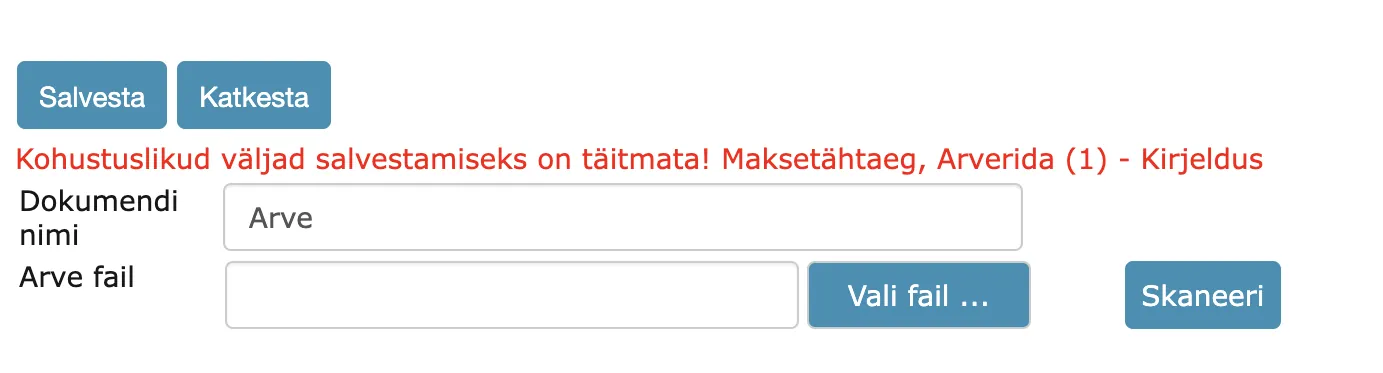
In this version, we added a control when saving purchase and sales invoices that does not allow saving invoices where the invoice line description is missing. Each invoice line must definitely have a description.
 The error message looks like this:
Relationship creator name now persists
In the Relationships panel, there is a relationship creator column that displays the relationship creator's name. In previous versions, the relationship creator's name could change if, for example, another user modified this document. In this version, we added a fix - in the future, the relationship creator's name can no longer be changed in any way.

PersonChooser field department selection
The PersonChooser field allows selecting persons from a specific institution. PersonChooser in turn consists of three different selection fields - Institution, Department, and Person name. Previously, Amphora displayed all three selection fields even when the department was missing. In version 15.1, we enhanced the department selection - if the institution lacks departments, then the department selection field is not visible.
Department exists at the institution:
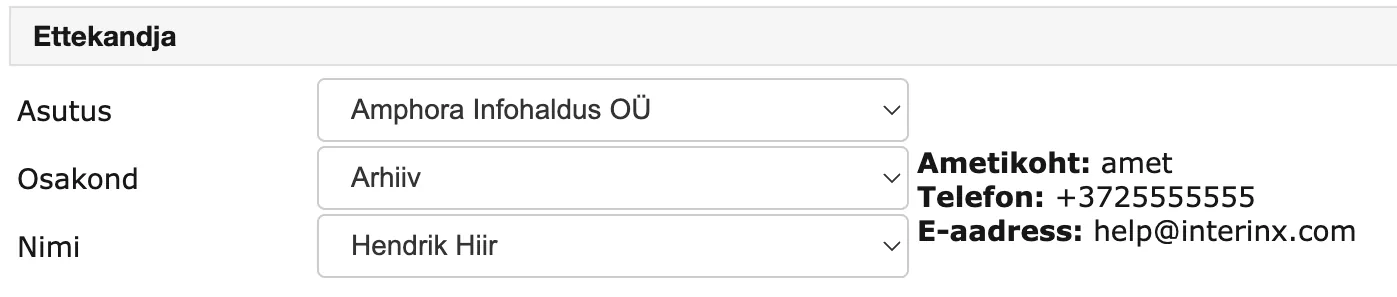 Department is missing at the institution:

Minor changes
- On the home page Out of office panel, there is now sorting by person's first name. Previously, sorting was by Until date.
- Deleting procedure statuses (yes, no, dissenting opinion) is no longer allowed. Previously, procedure statuses could be deleted in Admin - Institution settings - Selection field content.
- On the AK restriction expires report, date selection when running the report has been fixed. In previous versions, this did not work.
- In the System-created procedures for responsible persons report results, only procedures created in the last three months are now displayed.
Last modified: 09 October 2026, 10:25:03