Additional Services
Additional Services
In the Amphora environment, it's possible to order (also pre-order) various additional services. There's no need to contact Amphora customer support separately for this. Main users can periodically check which services are currently available and decide whether they need that service or not. This can be done through Admin – Additional Services.
To order additional services, the main user must have superuser mode activated. You can read more about superuser mode HERE.
The Additional Services view will display all services that can be ordered immediately. You can order a service by clicking the "Order" button. After ordering an additional service, Amphora automatically creates an invoice and the service activates immediately (unless there's a note that it's a pre-order). Once a service is ordered, the "Order" button disappears.
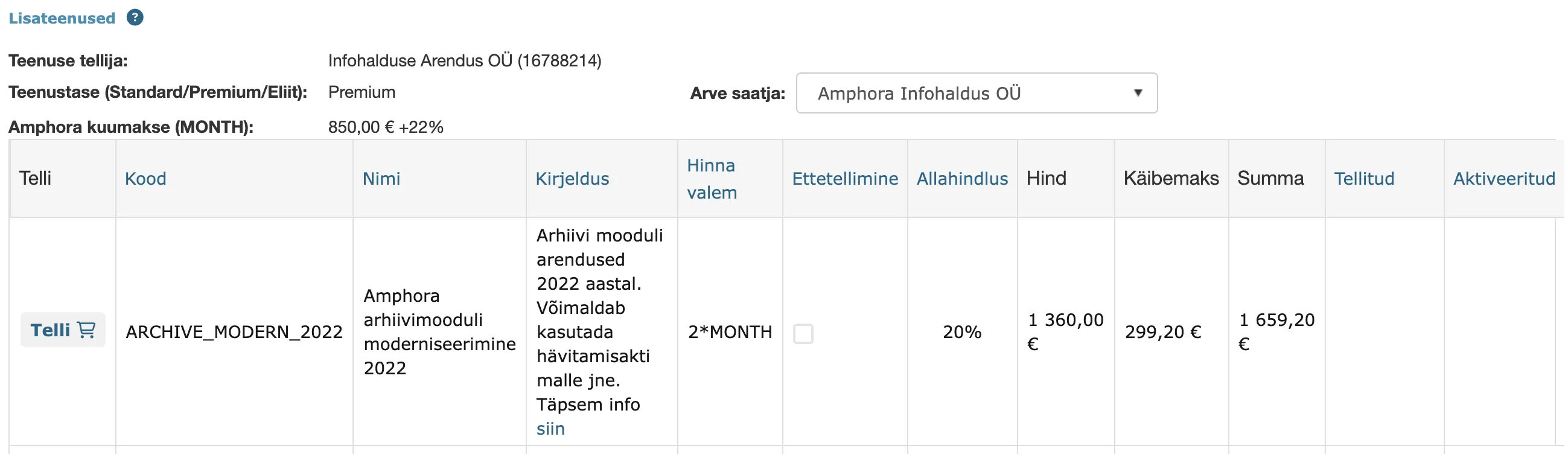
The services table contains all information about the service – name, description (including guide link if necessary), price (and related discounts and VAT). When a service is ordered, Amphora also fills in the order date (Ordered) and activation date (Activated).
Some examples of additional services that can be ordered today or in the near future - SPOKU interface activation, mass-signing activation, new Archive module functionality activation, Email attachment encryption and many others.
NB!
The service activation fee is ONE-TIME! No monthly fee is added unless specifically mentioned in the service description.
Last modified: 07 October 2026, 15:42:46