Amphora 13.2 Version Guide
Important
The purpose of this guide is to describe the changed functionality of Amphora that comes with the new version 13.2 of Amphora Professional. We continuously update the version guide.
** * Change is relevant for environments where the correspondence module is no longer used.**
Version 13.2.0
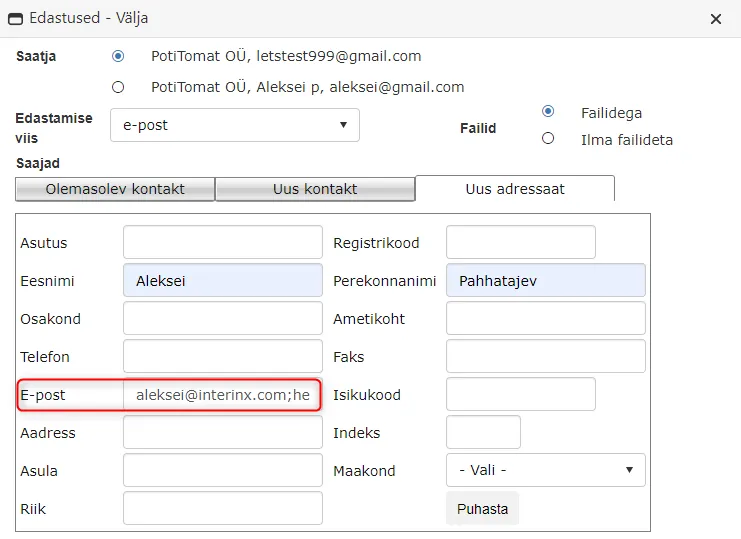
Adding multiple email addresses to new addressee generates separate deliveries*
When creating a delivery through new addressee, you can now enter multiple email addresses separated by semicolons for the addressee and a separate delivery is created for each email address.
Previously, with this delivery creation method, separate deliveries were not generated, but all entered email addresses remained on one delivery. Since one delivery had multiple email addresses, it was not possible to correctly track email sending logs.

Amp. field uniqueness control
Previously, in form configuration, it was possible to create multiple identical Amp. field names with different letter cases, for example FirstName and firstname. This could cause problems when sending SPOKU forms. Now Amp. field names used on forms must be unique and existing Amp. field names cannot be added regardless of letter case.
Registration profile fixes*
This version fixes several bugs related to registration profile changes:
-
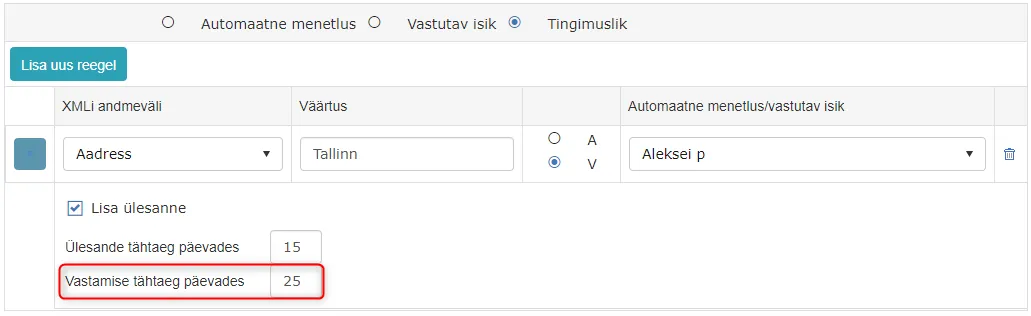
If you create a conditional rule for adding a responsible person also using response deadline, then now the response deadline is displayed correctly when registering the document.
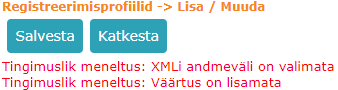
 2. Previously, if XML data field was not selected in conditional rules and you tried to save, an ambiguous server error message appeared on the page. Now, if XML data field is not filled in conditional rule, a correct error message describing the problem appears.
 3. Using the "Title from multiple data fields" functionality, it is now possible to add multiple values of the same form element to the title.
 4. If Responsible person condition is changed to Automatic process condition, then Responsible person selection settings (Add task, Task deadline in days, Response deadline in days) are correctly removed.
5. If you delete a form from Admin -> Form configuration, then now the registration profile associated with the form is automatically deleted, provided that no documents associated with the form exist in Amphora.
6. If "Add form to case composition" was not selected for SPOKU or KOVMEN registration profile and "Use only case counter" was selected in directory settings, the document sent via SPOKU or KOVMEN still got a number according to the counter (provided that the directory had an active document counter). No longer does the document get a number under such conditions.
4. If Responsible person condition is changed to Automatic process condition, then Responsible person selection settings (Add task, Task deadline in days, Response deadline in days) are correctly removed.
5. If you delete a form from Admin -> Form configuration, then now the registration profile associated with the form is automatically deleted, provided that no documents associated with the form exist in Amphora.
6. If "Add form to case composition" was not selected for SPOKU or KOVMEN registration profile and "Use only case counter" was selected in directory settings, the document sent via SPOKU or KOVMEN still got a number according to the counter (provided that the directory had an active document counter). No longer does the document get a number under such conditions.
Spoku fixes*
This version includes the following SPOKU fixes:
- Relations no longer disappear from the document when it is updated via SPOKU or when new files are sent to it via SPOKU.
- Empty (type = group) elements in SPOKU form XML files are no longer read as textbox elements when a new form or form version is sent via SPOKU.
- Now, when a document is updated via SPOKU with an empty date value, an empty value remains in the date field on the document in Amphora. Previously, the old date value remained on the document if an update with an empty date value came via SPOKU in the meantime.
KOVMEN fixes
This version includes the following KOVMEN fixes:
- Object ID is automatically added to the database when registering a KOVMEN document.
- Now the report "Kovtp registered DVK documents" (Get_ReportKovmenRegistrations) correctly displays registered KOVMEN documents.
Rights optimization
In this version, we have optimized rights synchronization, which should reduce previously occurring Deadlock errors. Such errors occurred when multiple users performed the same action at the same time.
SAF and Amphora integration
SAF is financial and business software that some environments have expressed interest in integrating. This version adds integration between Amphora and SAF. Now it is possible to send invoices both from Amphora to SAF and from SAF to Amphora.
Version 13.2.1
Rights optimization
Due to high rights calculation load, Timeout errors could occur in the previous version as a result of various actions. In version 13.2.1, rights optimization fixes these problems and Timeout errors should no longer appear in connection with rights calculation.
Version 13.2.2
Rights optimization
This version optimizes the calculation of rights obtained through processes. These problems were not visible to users, but now process rights calculation should work even faster.
Delivery status optimization*
In individual situations, when changing delivery status, a Timeout error could occur, which was not visible to the user and therefore the delivery status did not update immediately. This error has been fixed in this version.
In Amphora, delivery status update is run once per hour, where incorrect statuses are checked and updated if necessary, so ultimately the delivery statuses on letters are correct.
Version 13.2.3
Case copying fixed
The functionality that can appear in the dropdown menu of cases has been fixed. Previously, it was only possible to copy cases from the same folder where the user was currently located. Now it is possible to copy cases from the entire case view module, including subfolders.
Incoming email registration fix in Emails module
In some cases, when registering incoming emails, the text content of the email was displayed incorrectly in the registered document. This was especially noticeable with HTML format emails. This error has been fixed and now email content is displayed correctly when registering emails.
Text editor removal from process detail view
The text editor in process and delegation detail view has been removed as it was not being used and could cause confusion. The comment field is now a regular text field where you can enter plain text.
Last modified: 09 October 2026, 10:25:03