Translations
Translations are used everywhere in the Amphora environment and administrators can modify them. Important translations that administrators can modify are email notification texts (process and delegation task email notifications) or Self-service portal login page greeting text. The maximum character limit for such translations is 3000 characters.
It is possible to change the names of default translation words, as well as button meanings/names and system classifiers.
Important
Translations should generally only be changed for very compelling reasons. It may happen that when later contacting client support, confusion arises with changed translations if, for example, the Save button has been changed to an OK button.
Searching and modifying translation words
Open the module Admin -> Translations. You can filter the translations displayed in the table using radio buttons.
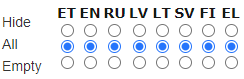 Don't show - check if you don't want to see translations of this language.
All - all translations of this language appear in the table.
Empty - shows expressions that don't have translations added yet.
Don't show - check if you don't want to see translations of this language.
All - all translations of this language appear in the table.
Empty - shows expressions that don't have translations added yet.
ET - Estonian EN - English RU - Russian LV - Latvian LT - Lithuanian SV - Swedish FI - Finnish
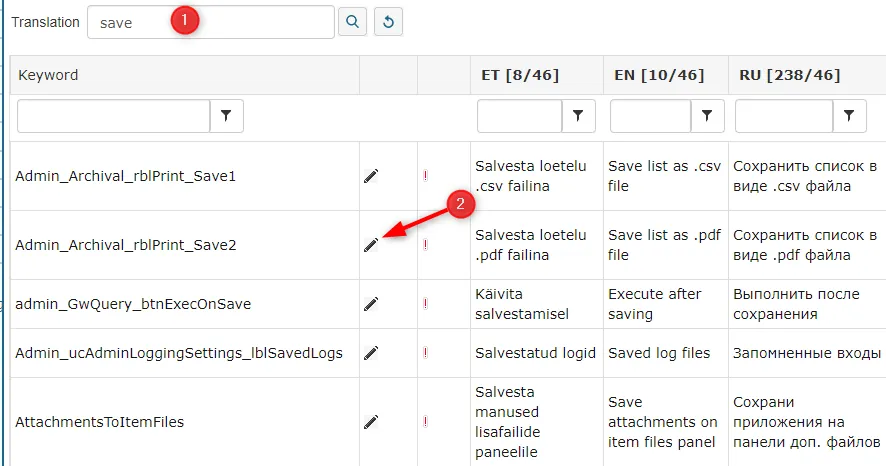
Search translation allows you to search for translations with a specific word/expression. Type the word and press the Search (magnifying glass) button (1).
If you find the desired keyword from the search results, click the pencil-shaped button in front of it (2), add a new word instead of the old one, and then press the Save button.
 ***
***
Changing the notification email address
Amphora sends system notifications (about tasks, processes, etc.) by default from the email address noreply@amphora.ee. The notification sender email address can be changed in the Admin -- Translations view. Search for the keyword Informer_NotificationFrom and change the ET name.
FileShareFooter translation keyword
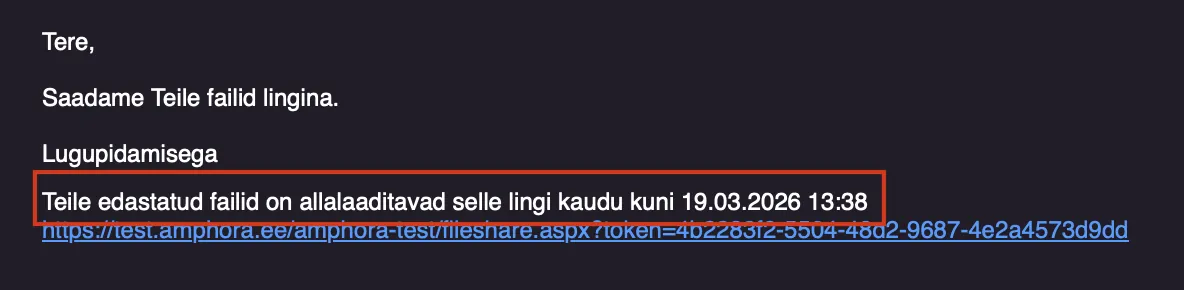
In Amphora, files can be sent via email with a temporary link. Static text can be added to the email body before the file link. The text can be added or changed in the menu Admin -- Translations under the keyword FileShareFooter.
If the corresponding translation is empty, no text is added before the file link. By default, the translation is empty.
Informative content can be added to the text so that the recipient understands where the files are located. Since these are temporary file links, an expiration date with time can also be added -- for this, use #1.
Example of the FileShareFooter keyword translation text:

Example in email:
Google Translate support
Amphora supports Google Translate automatic translation. The automatic translation translates:
- Form field names and DropDownList, CheckBoxList, RadioButtonList choices.
- Report names and report table columns.
- All missing translation words in all Amphora languages.
Google Translate support has been added so that users do not have to manually enter translation equivalents in all languages in a multilingual environment.
Changing public view tab names
Public view tab names can be changed under Admin -> Translations. By default, the tab names are: All, Legal Acts, Contracts, Correspondence, and Drafts and Agendas.
Keywords that can be changed:
- PublicTabAll -- All tab
- PublicTabAct -- Legal Acts tab
- PublicTabCtr -- Contracts tab
- PublicTabMsg -- Correspondence tab
- PublicTabCas -- Drafts and Agendas tab
To change a keyword translation, click the pencil icon on the same row as the keyword and change the ET translation. After changing translations, click the Save button. Amphora applies changes within 12 hours.
Auto-reply translations
Translations related to the auto-reply functionality:
- Email_Autoreply_Subject -- auto-reply subject. Default is "Auto-reply".
- DeliveryAutoreplyLink -- sent auto-reply link name. Default is "(a.r.)".
- DeliveryAutoreplyTooltip -- auto-reply link tooltip text.
- HISTORY_SEND_AUTOREPLY -- history panel event name. Default is "Sending auto-reply".
Last modified: 07 October 2026, 15:42:46