Amphora 14.7 Version Guide
- Version 14.7.0
- Archive module developments
a. Archive file objects addition view enhancements
b. Cases/Files archiving
c. Invoices archiving
d. "Files exceeding retention deadline" report enhanced – institution column added - Document locking changes
- Conditional sequence processes/delegations
- New "Add document automatically to archive file" setting
- Additional files signing enhanced
- Rights calculation optimized when adding new catalogs
- (organization) field default value change
- Date fields check enhanced
- Old DDOC signature containers – fixes (optimization)
- File order inside signature container no longer changes
- Added two new agenda protocol template elements
- Main file name change enhanced – spaces instead of underscores
- Minor changes
- Archive module developments
Version 14.7.0
Archive module developments
In this version, we continue with planned Archive module developments. The developments primarily concern adding objects to archive file composition, including adding invoices and cases/files.
Archive file objects addition view enhancements
Archive file objects addition view:
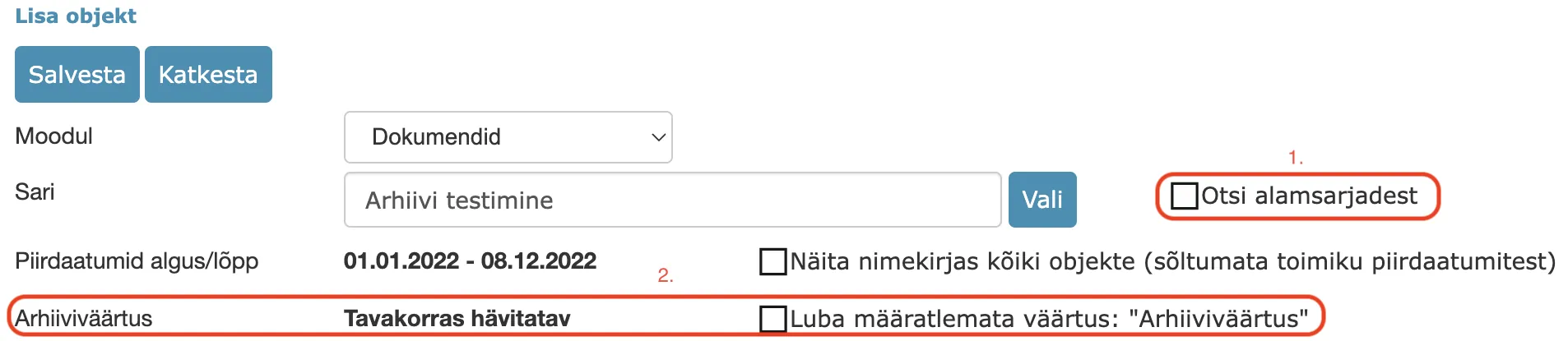 1. Search from subseries support. If the checkbox is added, objects located in selected series subseries are also displayed. Objects are displayed from all subseries, including subseries of subseries.Example – "4-2 Personnel work" series is selected. This series subseries "4-2.3 Employment contracts" has in turn a subseries "4-2.3-2 Employment contracts of managed institutions heads". If the "Search from subseries" checkbox is enabled, then objects are displayed from both subseries and sub-subseries.
2. By default, it is now possible to select only objects with the same archive value to the archive file composition. For example, if the archive file archive value is "Destroyable in regular procedure", then by default Amphora allows selecting only those objects that are located in a catalog with the same archive value – "Destroyable in regular procedure". However, it may happen that no archive value is selected in catalog settings at all, so we added a separate Allow undefined "Archive value" value checkbox so that such objects could also be added to the archive file composition.
1. Search from subseries support. If the checkbox is added, objects located in selected series subseries are also displayed. Objects are displayed from all subseries, including subseries of subseries.Example – "4-2 Personnel work" series is selected. This series subseries "4-2.3 Employment contracts" has in turn a subseries "4-2.3-2 Employment contracts of managed institutions heads". If the "Search from subseries" checkbox is enabled, then objects are displayed from both subseries and sub-subseries.
2. By default, it is now possible to select only objects with the same archive value to the archive file composition. For example, if the archive file archive value is "Destroyable in regular procedure", then by default Amphora allows selecting only those objects that are located in a catalog with the same archive value – "Destroyable in regular procedure". However, it may happen that no archive value is selected in catalog settings at all, so we added a separate Allow undefined "Archive value" value checkbox so that such objects could also be added to the archive file composition.
We also enhanced displaying objects in the archive file objects addition view. Previously, the objects table lacked sorting and filtering capability – now it has been added.
Additionally, we enhanced the procedure that outputs objects that can be added to the archive file composition. It is no longer possible to select objects that are already located in another archive file.
Cases/Files archiving
Cases/Files archiving support was added in this version. Until now, it was not possible to archive cases/files.
In the archive file objects selection view, the "Case view" module is now available in the module dropdown selection.
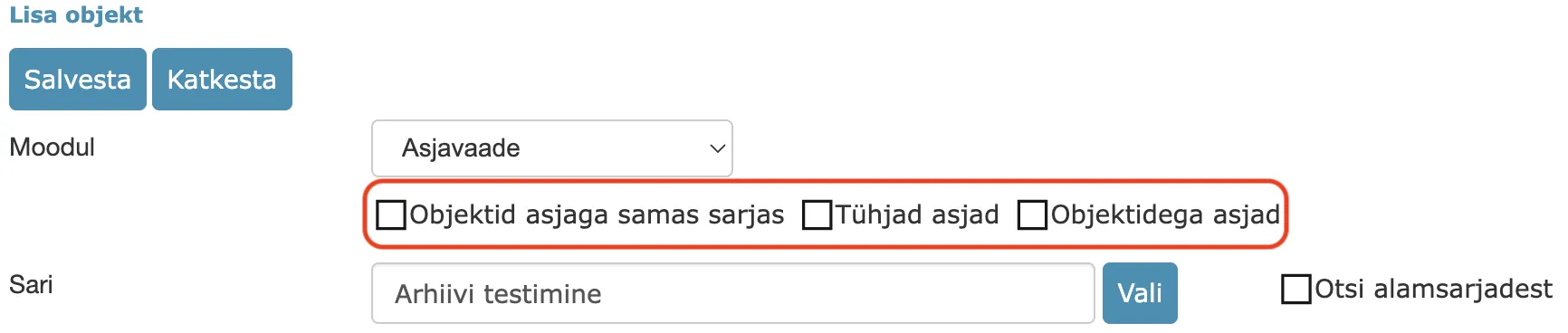
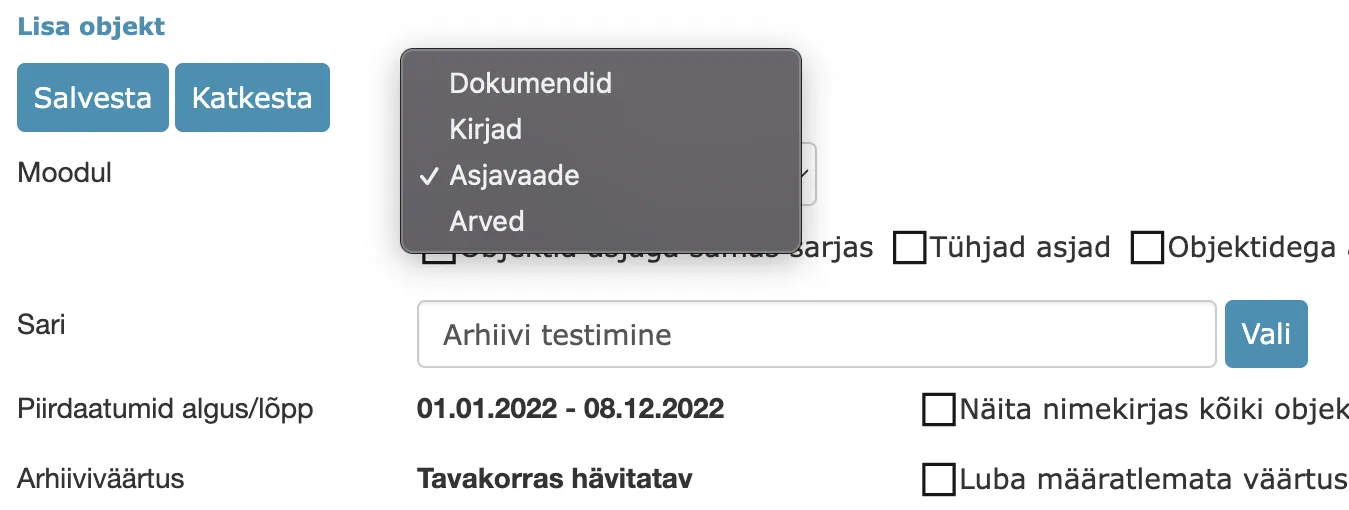 Additional filters have been added for the Case view module – Objects with case in same series, Empty cases and Cases with objects.
Objects with case in same series – displays cases where all case objects are located in the same series as the case.Empty cases – displays cases where the number of case objects is zero.Cases with objects – displays cases where there is at least one case object.
 When displaying cases within a specific temporal coverage, both the case's own date and the case objects' dates are taken into account – both case and case objects' dates must be within the temporal coverage period. For cases, Amphora checks all date fields on the case form and selects the largest date – a separate Date (MAX) column has been added to the table to display this date.
In the table, each case file has a  button in front. This button makes all objects of this case visible. This gives the user the ability to check which case objects are located in the case composition.
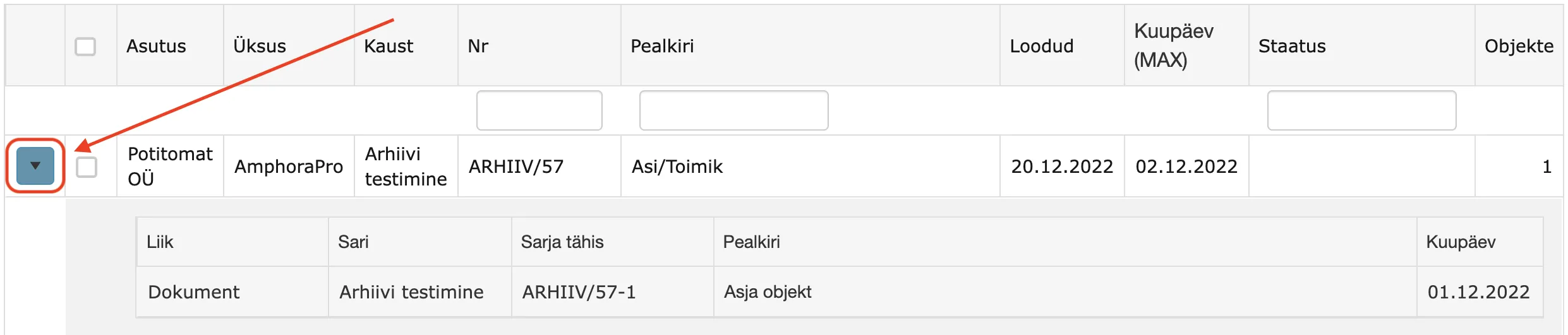 If a case is already selected for archive file composition, then before archiving it is similarly possible to double-check which case objects are located in the case composition.
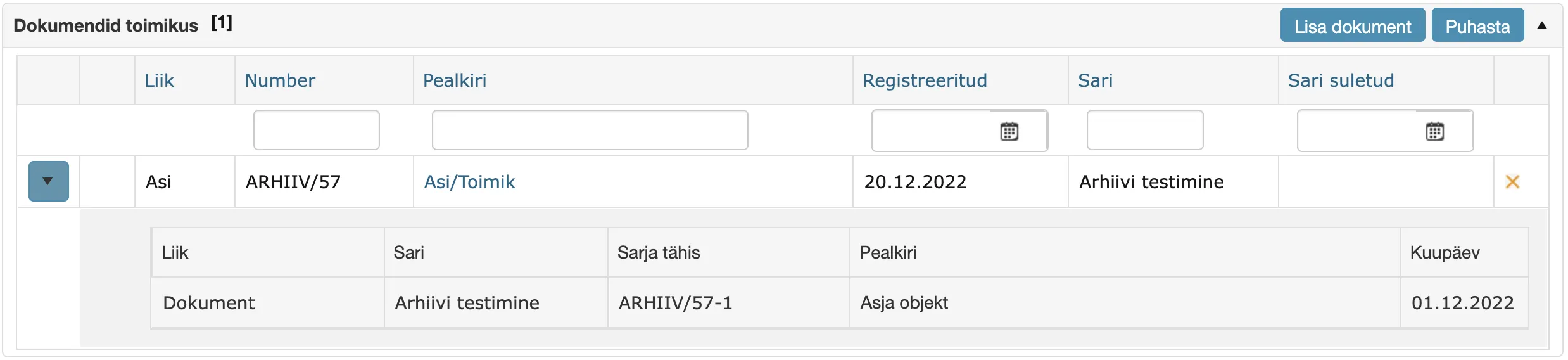 The archiving logic for cases and their case objects is the same as for documents. Archived cases and their case objects are not visible in Case view and other modules, but can be found with global search (the "Search also from archive" checkbox must be enabled). Destroyed cases and their case objects can no longer be found even with search.
NB! Amphora archives together with the case also all case objects.
Archive file cases/files selection view (table columns):
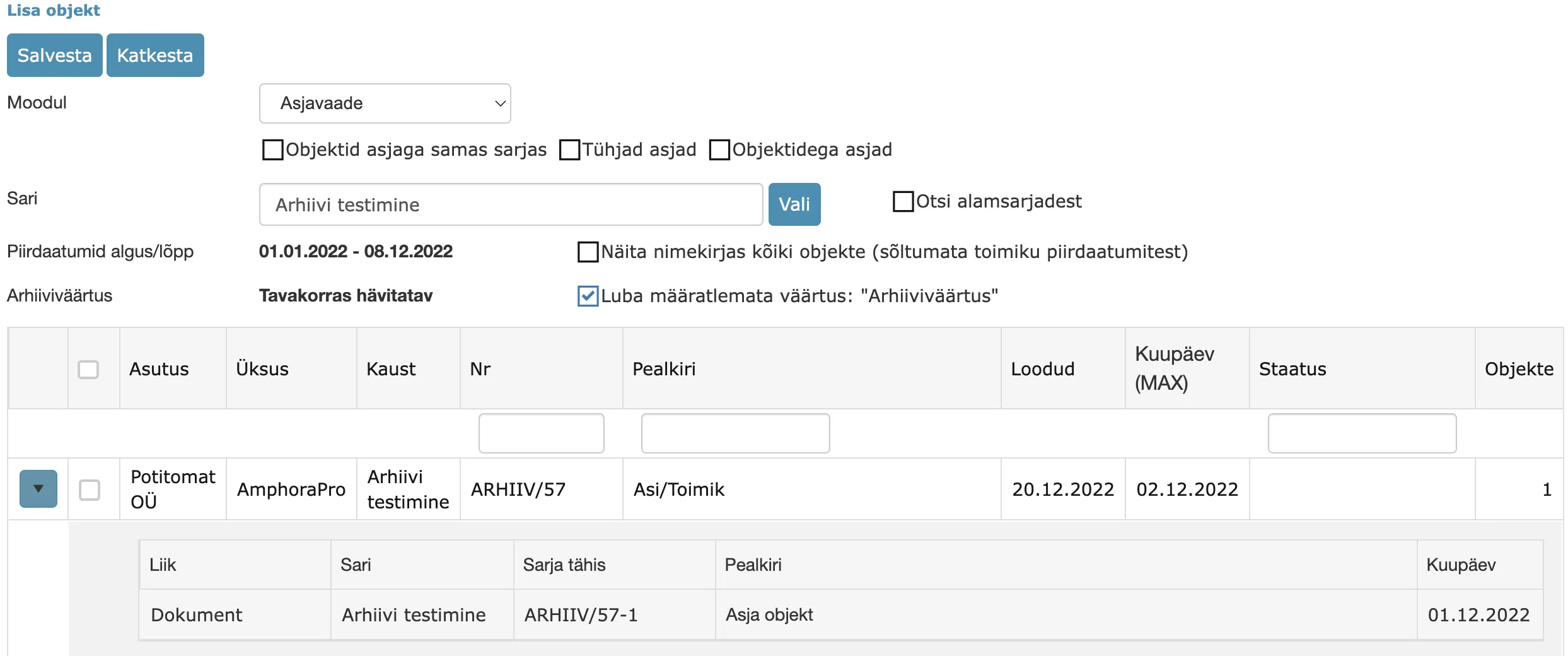 It is possible to sort by each column and there are NO, Title and Status column filters (search).
Invoices archiving
Invoices/Finance module objects (purchase and sales invoices) archiving support was added in this version. Until now, it was not possible to archive invoices.
In the archive file objects selection view, the "Invoices" module is now available in the module dropdown selection.
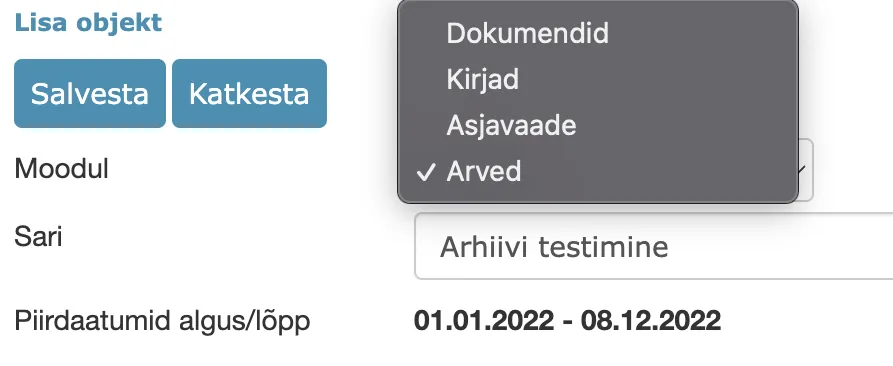 Both purchase and sales invoices can be added to the archive file. When the "Invoices" module is selected, purchase and sales invoice selection appears in turn.
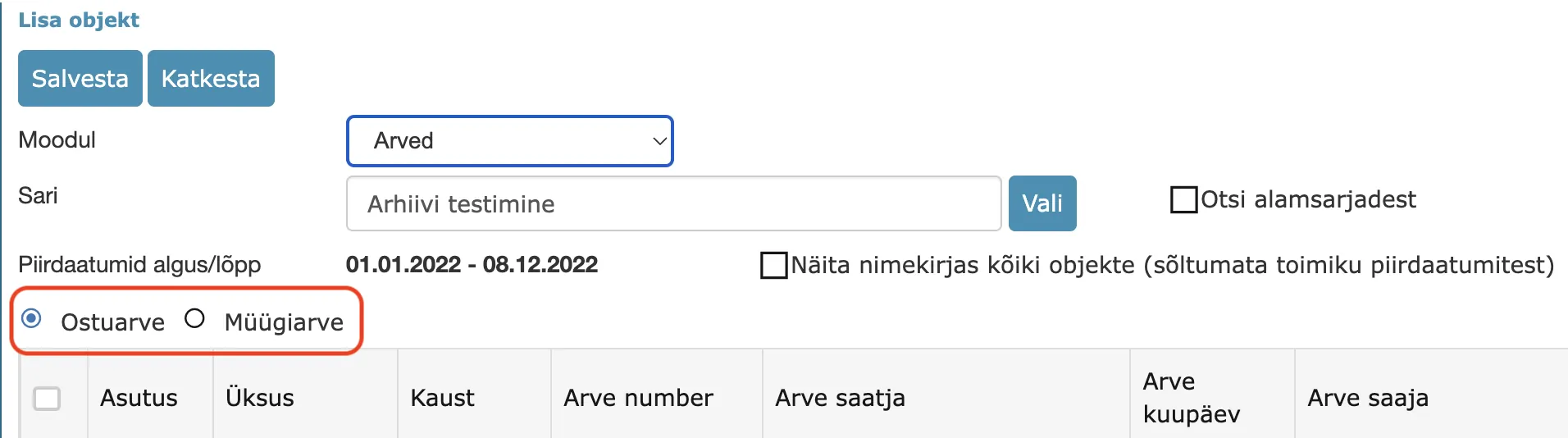 When displaying invoices within a specific temporal coverage, the invoice Payment deadline is taken into account and if it is missing, then the invoice Date.
The invoice archiving logic is the same as for documents. Archived invoices are not visible in the Invoices/Finance module, but can be found with global search (the "Search also from archive" checkbox must be enabled). Destroyed invoices can no longer be found even with search.
Archive file invoices selection view (table columns):
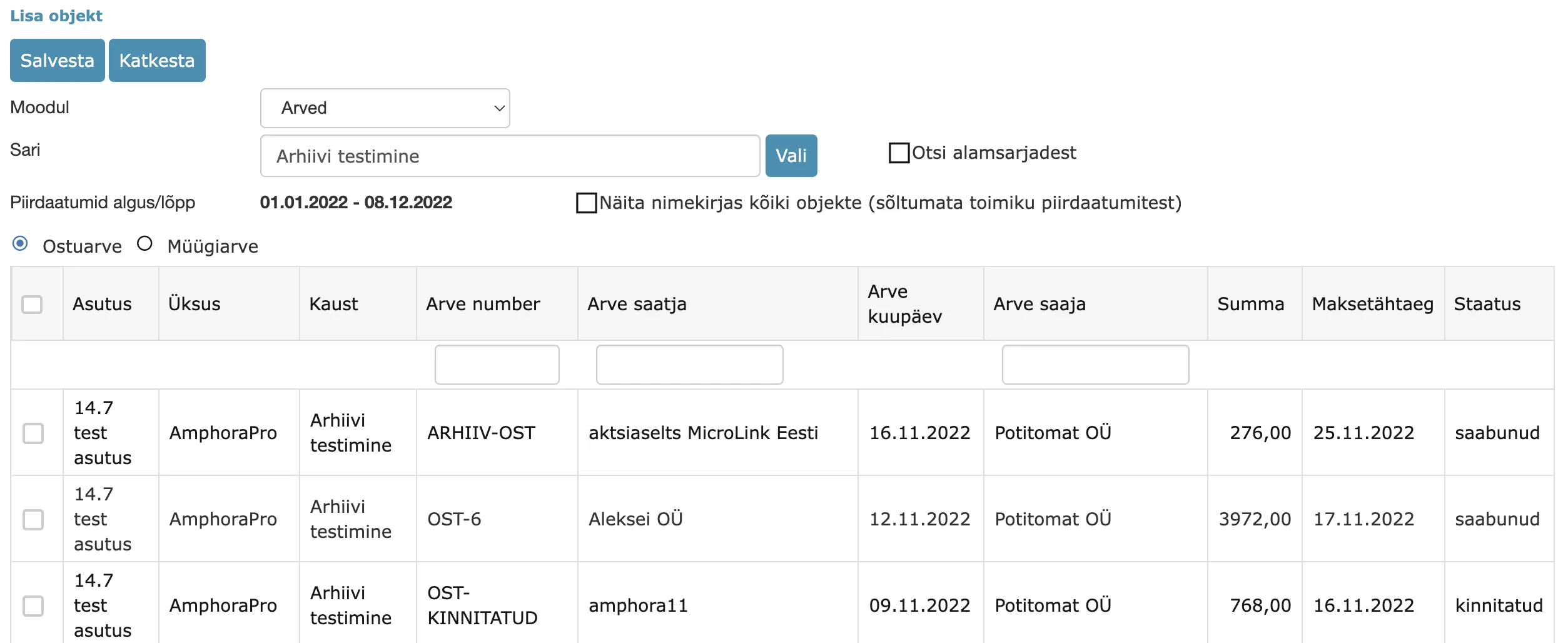 It is possible to sort by each column and there are Invoice number, Invoice sender and Invoice recipient column filters (search).
"Files exceeding retention deadline" report enhanced – institution column added
The Files exceeding retention deadline report returns archive files where the retention deadline has passed. We added a new Institution column to this report so that users would have a better overview.
Document locking changes
When editing main file or additional file, Amphora automatically locks the document so that another user cannot change this document in the meantime. In this version, we enhanced the display of the locking checkbox and related history events.
Amphora has a "Document locking" policy. When this policy is enabled, the user sees the "Locked" checkbox in the document edit view and can manually lock/unlock the document. However, a problem occurred in situations where the user had the "Document locking" policy disabled and this user opened a main file/additional file for editing and did not complete the file editing process. A lock remained on the document and the user who had locked this document could not remove the lock themselves because the "Locked" checkbox was not visible to them. We made an enhancement so that if a user has the "Document locking" policy disabled and the user themselves locked the document, then in the document edit view the "Locked" checkbox is visible to this user and they can manually remove the lock. Previously, in this situation, only a user with administrator rights could remove the lock.
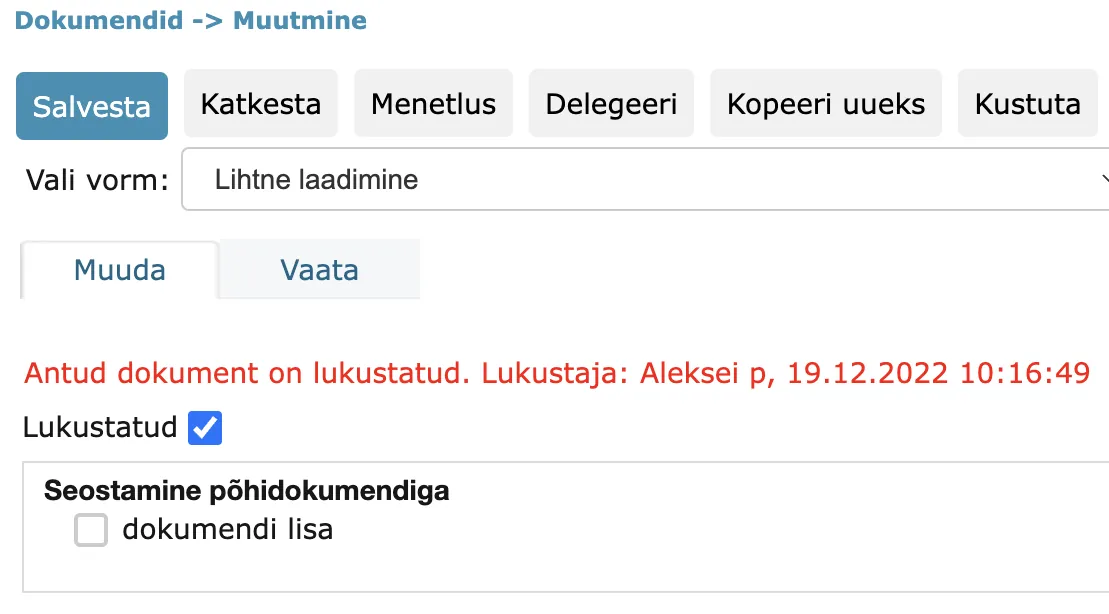 We also removed duplicate document locking history events that could occur in certain situations.
Conditional sequence processes/delegations
New functionality was added in this version – conditional sequence processes and delegations. The added process/delegation depends on the result of the original process/delegation and is made active when the originally selected process/delegation is successfully completed (similar functionality already exists when creating automatic processes). In connection with this, a new Process sequence creation policy was added. This policy is disabled by default for all user groups. If the policy is disabled, then the new functionality is not available to the user.
To add a sequence process/delegation, the document must have at least one process/delegation with incomplete status. When adding a new process/delegation, a dropdown appears where it is possible to select the original process/delegation.
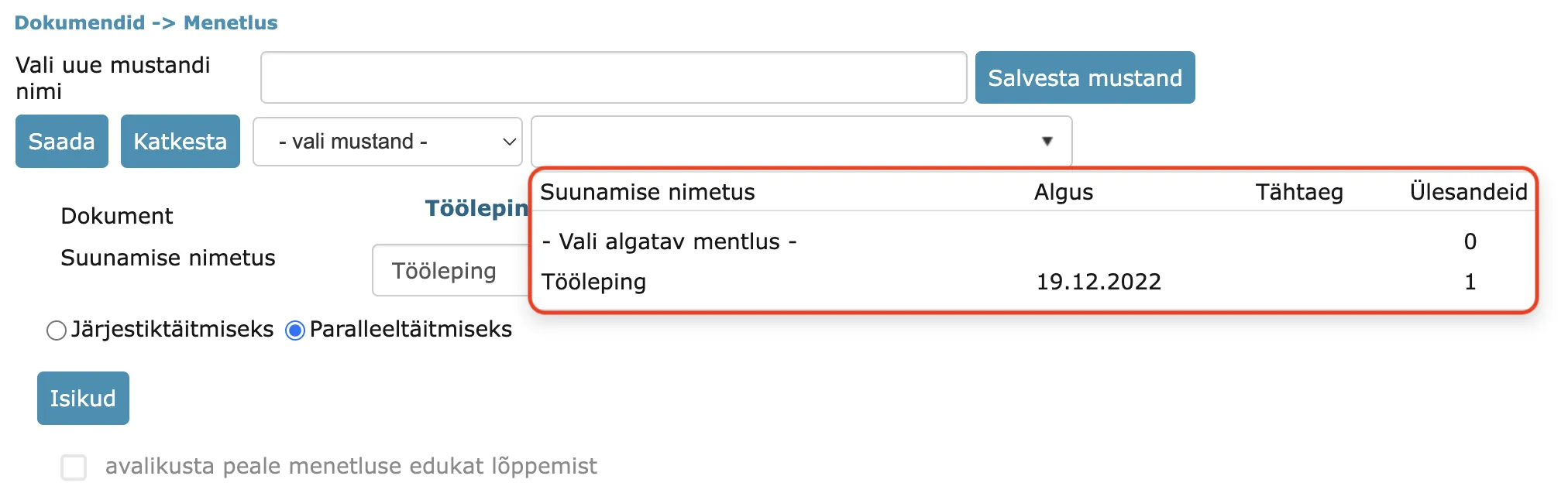 The added sequence process/delegation is immediately visible at the document, but the "Start" date is Pending and the process/delegation is not immediately active. It becomes active when the original process/delegation status changes to completed.
 This functionality has been added with the purpose of being able to create so-called task stages. Each stage is a separate process/delegation, which in the case of a process can be either sequential or parallel execution.
New "Add document automatically to archive file" setting
We added a new setting under Admin -> Institution settings -> General settings – "Add document automatically to archive file" checkbox. When this setting is enabled (checkbox added), then Amphora adds the document to the archive file composition automatically when registering a document/changing an existing document if it finds a suitable archive file (archive file is located in the same catalog and the registered/changed document fits within the archive file temporal coverage).
By default, this checkbox is disabled in all environments.
Additional files signing enhanced
We detected one bug when signing additional files. The bug occurred in situations where the document already had a signature container in deconstructed form, additional files also had a signature container, and the user tried to sign the signature container in additional files separately. In such situations, after signing, a separate signature container should be created, but in the previous version Amphora added the signature to the existing signature container composition. In version 14.7, this bug has been fixed.
Rights calculation optimized when adding new catalogs
When adding a new catalog to the catalog tree, Amphora runs a database procedure that adds necessary rights to the new catalog. In previous versions, this procedure was relatively slow, especially for >3 level catalogs (for example, catalog with number 10-1.3-2). We optimized the procedure responsible for rights calculation and addition, in the future rights calculation and addition should be several times faster.
(organization) field default value change
The (organization) field default value adds the logged-in user's institution name to the text field (TextBox). Previously, Amphora added the institution name that was related to the user's person. Now, however, Amphora starts adding the institution name that is related to the unit to which the logged-in user belongs. This change makes this default value more reliable because the institution related to the user's person may not always be this employee's correct institution.
Date fields check enhanced
Date, Datetime and Deadline type fields (Date fields) may have dates entered in the range 01.01.1753-31.12.9999 (these are SQL Server limitations). In previous versions, if a user entered a date value like 20.12.1022, then when saving the object, Amphora displayed an error message to the entire screen. Displaying an error message in this form is not correct because there is too much text on the screen and a regular user cannot understand exactly what the problem is.
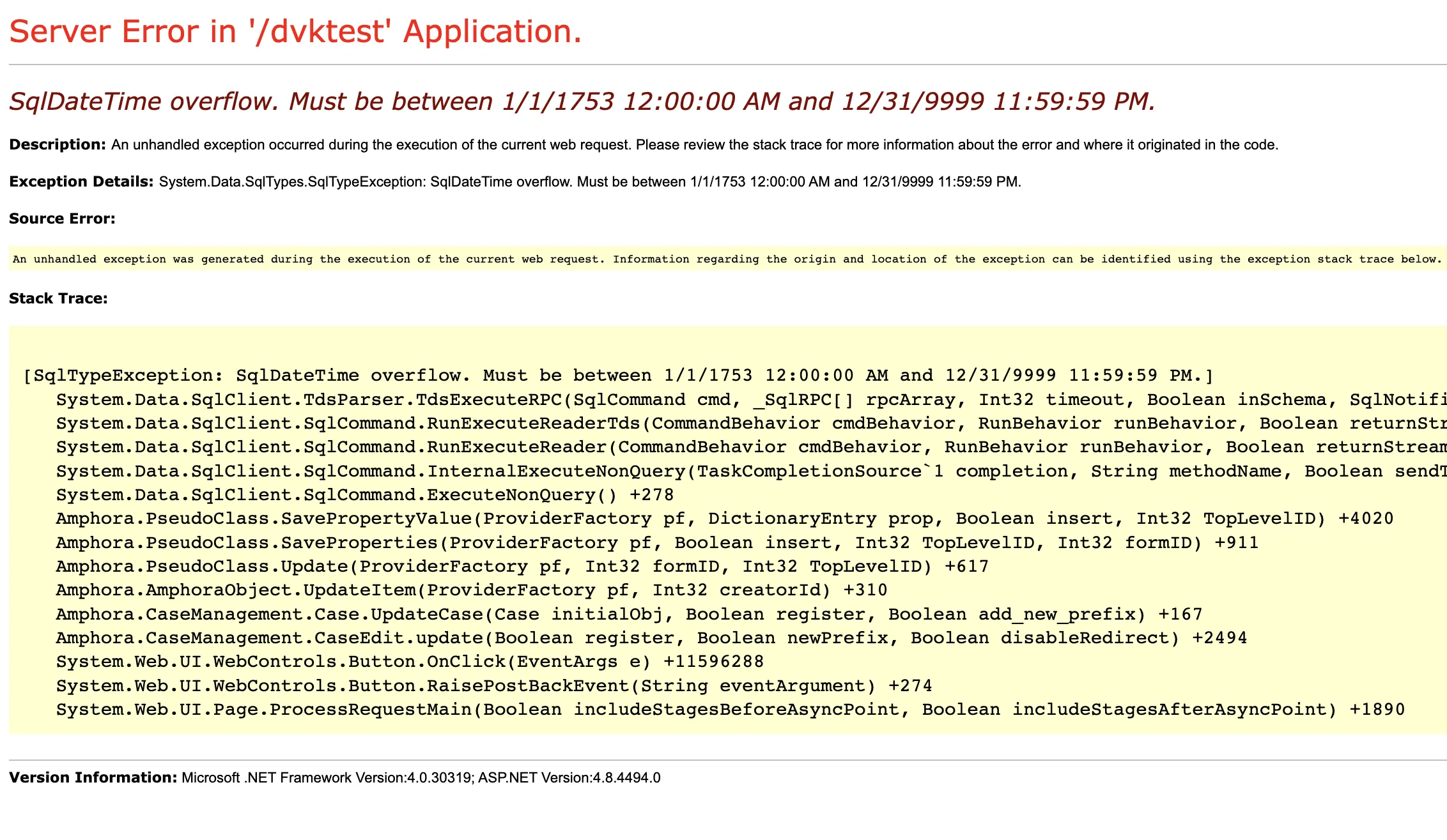 In version 14.7, we enhanced date checking – from now on, an error message is no longer displayed to the entire screen.
Old DDOC signature containers – fixes (optimization)
- Opening objects that had a signature container with DDOC extension has been made faster in version 14.7. Previously, opening such objects took over 10 seconds.
- We fixed saving objects with DDOC signature containers. Previously, the DDOC signature container disappeared when saving the object over.
File order inside signature container no longer changes
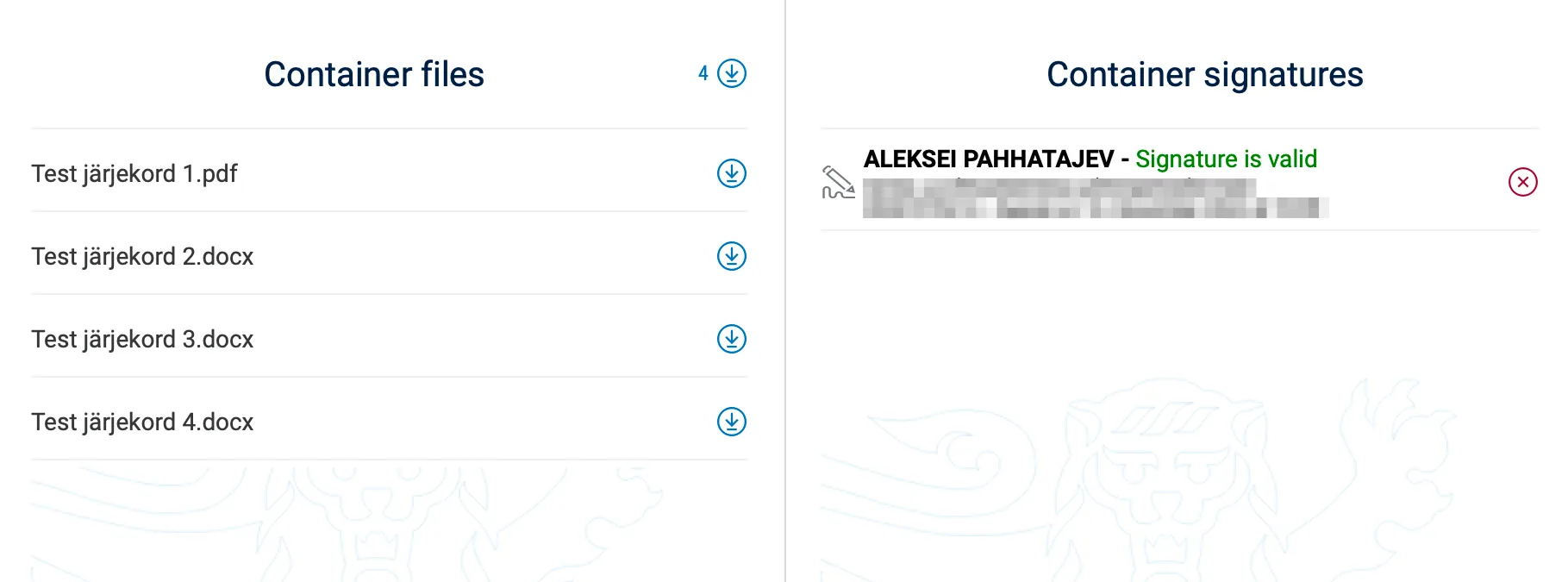
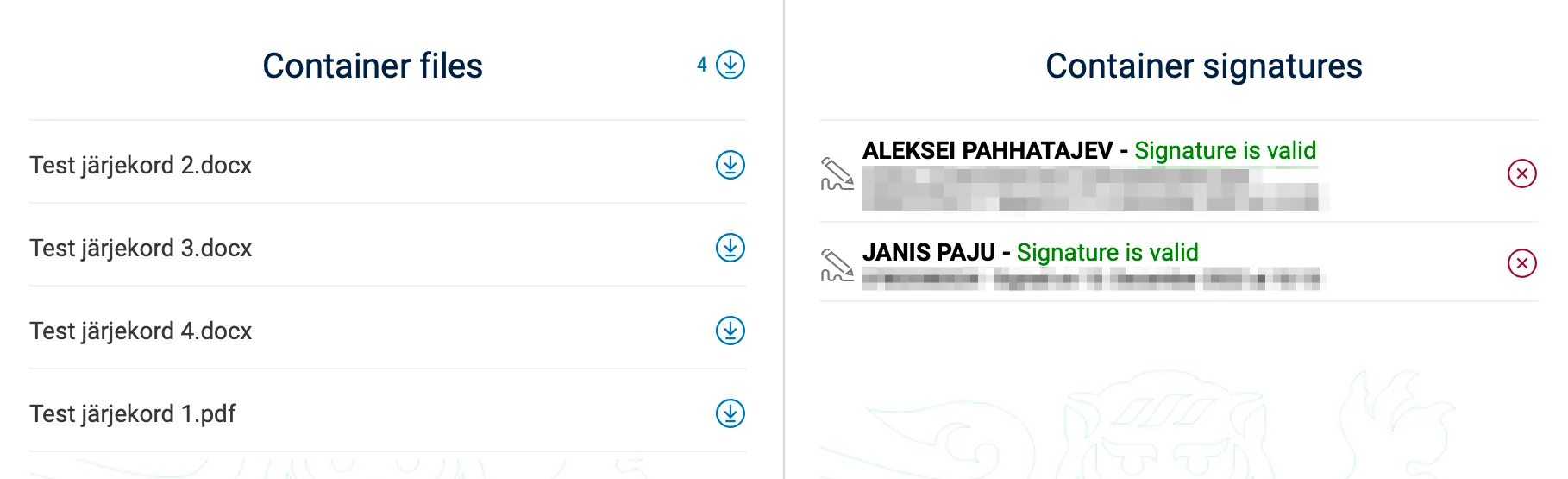
For a signature container that had two or more files in additional files, the file order could change when adding a new signature. This happened in situations where the signature container already had one signature and a second signature was added in the Amphora environment. In version 14.7, the bug has been fixed and the file order in the signature container composition will no longer change.
Example signature container with one signature:
 Example (before fix) signature container after adding second signature:
Added two new agenda protocol template elements
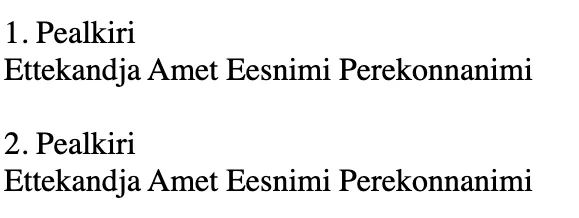
Added two new HTML template elements that can be used in agenda protocol templates. New template elements - ::PAEVAKORRAD_B:: and ::PAEVAKORRAD5::.
::PAEVAKORRAD_B:: template element is a table of contents template element:
 ::PAEVAKORRAD5:: template element is an agenda items template element:
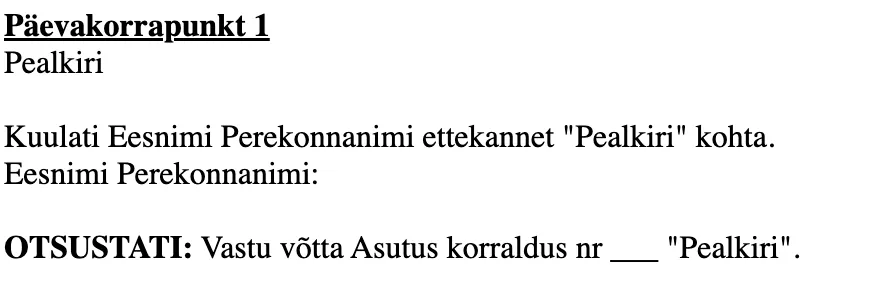 Where Title is the Draft/Agenda item title, First name and Last name is the presenter's first and last name, Position is the presenter user's job title.
** The implementation of this development was supported by Amphora client Võru Municipality. ** ** Thank you! **
Main file name change enhanced – spaces instead of underscores
Until version 14.7, when changing the main file directly in the Amphora environment, underscores were added instead of spaces. For example, instead of "Test file" the name "Test_file" was added. In this version, we enhanced main file name changing – spaces are now added instead of underscores.

Minor changes
- In the Persons module, person group display rights have been enhanced – superuser rights users now see all groups (including groups added by another institution's user).
- In document reading view, External system delivery method display has been fixed – in previous versions the translation [ExternalSystem_ExternalSystem] was missing.
- Updated Telerik components (2022.3.913->2022.3.1109) - HERE.
Last modified: 09 October 2026, 10:25:03