Reports
- Making reports visible
- Running reports in Admin view
- Configuring reports
- Report field filtering
- List of reports
The Reports module is designed for managing and creating reports, it allows creating SQL queries based on which parameters can be provided to perform desired extracts.
Reports are visible on the homepage immediately after logging in, and you can configure exactly those types of reports (reports) that the user needs to deal with in their daily work according to requirements and needs.
Making reports visible
Open the Admin -> User groups module. Click on the user group name, then click the Policies button.
In the opened view, enable the Documents and Correspondence module policies Running reports – check the checkbox in front of the corresponding option.
The policy allows the selected group to see and use reports. If necessary, enable (according to user group permissions) the Admin module policy Report management then Save.
Running reports in Admin view
Reports can be run directly in the Admin -- Reports view. The user does not need to have the report running permission -- the user group policy Report management is sufficient.
Configuring reports
To configure reports, the following prerequisites must be met (see Making reports visible):
- The user's user group must have Admin module activated.
- The user group policy "Report management" must be activated.
From the modules on the left, select Admin -> Reports. From the list of reports that appears, click on the name of the desired report.
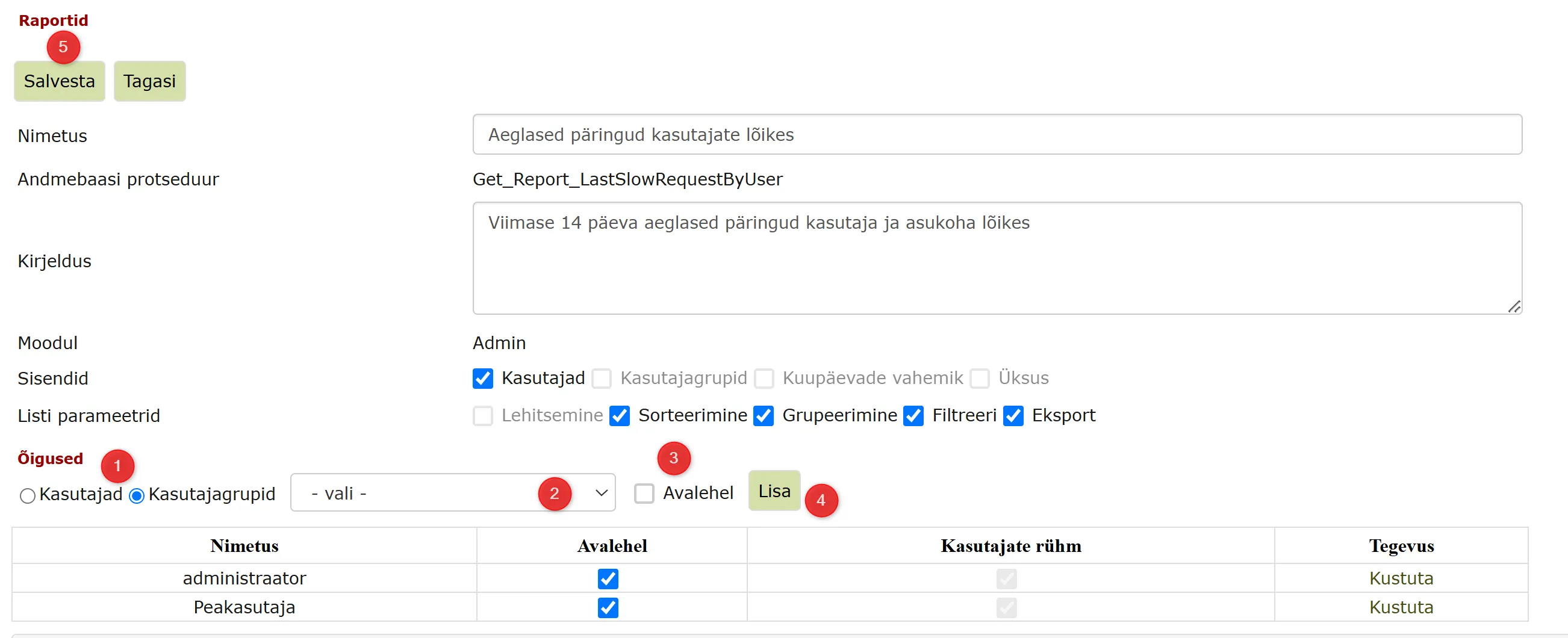 Here you can add users/user groups who can run this report:
- Choose whether you want to add the report to a user or user group.
- From the dropdown menu, select the user/user group to whom you want to add the report.
- Check the "On homepage" option if you want the user/user group to be able to run the report on the homepage.
- Click the Add button. When the user/user group is added, the corresponding info appears in the table.
- Save changes.
Reports configured for the homepage appear in the homepage Reports panel.
 ***
***
Report field filtering
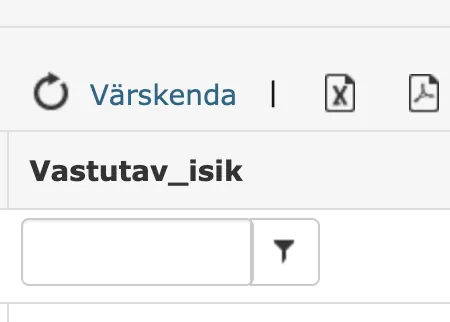
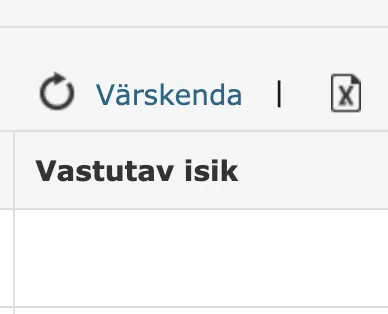
Reports can have field filtering support enabled. This can be done in Admin -> Reports in the report view (List parameters -> Filter checkbox).
Filter is activated:
Filter is not activated:
NB!
If filtering is activated in a report and the column name contains spaces or special characters, they are automatically replaced with underscores (_). This ensures correct filter operation.
List of reports
Below are listed all reports in the Amphora environment with descriptions.
Slow queries (statistics) - Last 14 days slow queries by user and location
Slow queries by users - Last 14 days slow queries by user and location
Invoices sent by AIP - All invoices that have reached the AIP environment and have been sent to the destination
Invoices not sent by AIP - All invoices that have reached the AIP environment but have not been sent further
AIP faulty invoices - All invoices that have reached the AIP environment but received an error message during transmission
Access restriction expires - Access restriction expires in 30 days
Access restriction expires (letters) - Letter access restriction expires in 30 days
Signing statistics - Signing statistics for the year - by sub-institutions, months and signing method
Amphora price list 01.01.2023 - Calculates price list based on number of active users and ordered services
Amphora price list 2025 (+VAT 24%) - Calculates price list based on number of active users and ordered services
Amphora price list 2025 LG - Calculates price list based on number of active users and ordered services. For institutions that are not VAT liable
Amphora price list 2027 - Calculates the annual fee in three packages (Standard, Premium, Elite) from the number of active users of the organization and its sub-organizations, together with the volume discount, server administration fee and mass-signing licenses. Every run is also saved to the price list history
Unarchived documents - Unarchived documents
ATP Case - Published cases and whether the public view displays them
ATP Document - Published documents with the title shown on the web and the internal title, date, organization, folder, registrar and a link to the public view
ATP Folder - How many documents, letters and cases are published in each folder
ATP Letter - Published letters with the title shown on the web and the internal title, date, organization, folder, registrar and a link to the public view
Authentication statistics - Authentication statistics for the year - by sub-institutions, months and method
Unopened emails - Sent but unopened emails by recipient
Document statistics - Number of registered documents by users
Document statistics for previous working day - Answered and unanswered documents by users
Document statistics for previous working day (by series) - Answered and unanswered by series
General document query - Outputs all documents in Amphora environment considering user rights
Delivery statistics - Delivery statistics for documents - by units, years and forms
Email sending domains (3 months) - List of domains used for email sending in the last 3 months
Indexing statistics - Shows number of indexed and pending indexing records
User valid rights - Outputs all valid rights of selected user
User valid policies - Outputs all valid policies of selected user
User series rights (all) - Effective series rights of all active users in one extract, one row per user and series, including denying rights. Only the series the runner is allowed to see are shown
Valid duplicate counters - Shows valid duplicate counters. Ideally, this query response is empty.
Valid contracts - Currently valid contracts in the sub-institution
Valid procedures - Shows all procedures that have not been invalidated. Report client PRIA
Letter registration statistics - Number of unit letter registrations by users
Letter statistics - Number of letters registered by users in given period
Correspondence by sending methods - Correspondence statistics by sending methods
General correspondence query - Outputs all letters in Amphora environment (letters in Correspondence module) considering user rights
All unfinished processes - All unfinished processes
All my department's unfinished tasks - All my department's unfinished tasks
All my department's unanswered documents - Outputs all documents where responsible person belongs to same department as me.
All my unit's unfinished tasks - Outputs all user unit's unfinished tasks
All unsent documents - Outputs all unsent documents
All tasks unfinished by external party - Outputs all processes unfinished by external party (in Self-service portal)
All unanswered documents - Outputs all unanswered documents within the unit
Kovtp registered DVK documents - Kovtp registered DVK documents
Unanswered documents with approaching deadline (5 days) - Unanswered documents with response deadline in next 5 days
Unanswered letters with approaching deadline (5 days) - Unanswered letters with response deadline in next 5 days
Page loading time 365 - Shows last year's page loading times
Expired contracts - Sub-institution's expired contracts
Expiring contracts - Contracts expiring in 3 months
Expiring procedures - Procedures whose review deadline arrives in 30 days
Expiring procedures (ITO) - Procedures expiring in 30 days (ITO)
Expiring procedures (OTHER) - Procedures expiring in 30 days (OTHER)
Expiring procedures (STO) - Procedures expiring in 30 days (STO)
My signed objects - My signed objects
My forwarded unfinished tasks - Returns user's forwarded unfinished tasks
My forwarded completed tasks - Returns user's forwarded completed tasks
My valid contracts - Outputs all valid contracts where user running the report is assigned as responsible.
My approved invoices - My approved invoices
My unanswered documents with approaching deadline (X days) - My unanswered documents with response deadline in next X days
My unfinished processes - My unfinished processes
My completed processes - My completed process tasks
My sent and completed processes - Processes and delegations the user started themselves and that have been completed, within a date range - document, process type, assignees, start and completion time, deadline and who completed it
My unsent documents - Outputs my created unsent documents
My unanswered documents - Outputs my unanswered documents
Pending email notifications - Pending email notifications. The report includes an Error column that displays the reason for email notification sending failure.
Pending processes for responsible persons - Shows process tasks for responsible persons that the system hasn't yet managed to create but whose creation deadline has arrived.
Unanswered documents with missing data - Unanswered documents (in last year) with missing response deadline or responsible person
Unanswered documents with missing data - list - Unanswered documents (in last year) with missing response deadline or responsible person
Unanswered letters with missing data - Unanswered letters with missing response deadline or responsible person
Unanswered letters with missing data - list - Unanswered letters with missing response deadline or responsible person as list
Missing counters based on previous year - Shows those counters from previous year that have not been configured this year.
Registered documents by units - Number of registered documents by users and units
Unaccepted processes by roles - Outputs all processes pending acceptance
Received documents with missing or overdue response date - All user unit's incoming documents (including those received via SPOKU) that have assigned response deadline but it's overdue or deadline missing. Additionally, it's checked whether document has response date later than deadline or this date is missing.
Received document statistics by forms and channels - Outputs all received documents by channels and forms
Number of received emails - Number of received emails by user groups
Files exceeding retention period AV - Files exceeding retention period that are in series where archival value selection has "Archival value" mark
Files exceeding retention period D - Files exceeding retention period that are in series where archival value selection has "Simplified or standard order destructible" mark
Files exceeding retention period - Files exceeding retention period
Statistics - registered documents and letters - Shows total number of registered documents and letters by months. Report client PRIA
Statistics - registered documents and letters files - Shows total number of registered documents and letters files by months. Report client PRIA
System-created processes for responsible persons - Shows processes created by the system.
Free user accounts - Outputs all active free accounts where user belongs only to groups containing words "council", "board", "auditor" or "commission"
Documents without files - Documents and letters that are not in any file
Single-signature contracts - Contracts with only one signature
Number of studies by years - Number of studies by years
Number of studies by institutions - Number of studies by institutions
New cases and documents statistics - Counts new cases and documents added each month.
Unanswered letters by series - Outputs total number of unanswered documents by directories
Documents with faulty deliveries - Outputs all documents within the unit that have at least one faulty outgoing delivery
Last modified: 07 October 2026, 15:42:46